Bader tec unisoc spreadtrum tool used for pac firmware flashing frp unlocking and software repair on unisoc phones.
If Your Unisoc Phone Is Stuck After A Reset Won’t Flash Or Keeps Showing Connection Errors You’re Not Alone. Many People Feel Confused When Drivers Don’t Install Download Mode Doesn’t Work Or The Phone Won’t Respond At All. After Trying Random Fixes It’s Normal To Start Searching For A Tool That Can Actually Handle These Problems. That’s Usually When Users Come Across The Bader Tec Unisoc Spreadtrum Tool.
In This Post You’ll Learn How This Tool Helps With Flashing Pac Firmware Installing Drivers Using Diag Mode And Handling Frp Or Boot Issues Step By Step. We’ll Also Explain Features Like Device Identification Exploit Support For New Security And How To Use The Flash And Partition Options Safely. Everything Is Explained In Simple Words So You Can Follow Along Without Stress. By The End You’ll Know Exactly How To Fix Common Unisoc Phone Problems With Confidence.
Contents
- 1 What Is The Bader Tec Unisoc Spreadtrum Tool
- 2 Bader Tec Unisoc Spreadtrum Tool Flash Unlock And Diagnose Unisoc Phones
- 3 Bader Tec Unisoc Spreadtrum Tool Latest Verosin Free Download
- 4 Features Bader Tec Unisoc Spreadtrum Tool:
- 5 How to Use?
- 6 Frequently Asked Questions (FAQs)
- 7 Final Words
- 8 How To Download
What Is The Bader Tec Unisoc Spreadtrum Tool
If You’ve Ever Tried Fixing A Unisoc Phone You Know It’s Not Always Easy. Phones Can Get Stuck On The Logo Fail During Updates Or Lock After A Reset. That’s Where Bader Tec Unisoc Spreadtrum Tool Becomes Helpful For Both Technicians And Advanced Users. It Works With Download Mode And Diag Channel To Communicate Directly With The Device.
The Tool Also Helps Install Drivers So Your Pc Can Properly Detect The Phone. This Makes Flashing And Repair Much Smoother Than Guessing With Random Software. What Really Helps Is That It Combines Flash Unlock And Diag Tools In One Place. You Can Load Fdl1 And Fdl2 Files Then Add The Pac Firmware Without Switching Programs. It Also Lets You Manage Partitions Read Memory Or Erase Frp Accounts When Needed.
If Flashing Doesn’t Fix The Problem You Can Enter Calibration Mode Or Factory Test Mode Using The Diag Tool. There’s Also An At Command Box For Advanced Network And Modem Testing. All These Options Give You More Control When Normal Fixes Don’t Work.
Also Read
Bader Tec Unisoc Spreadtrum Tool Flash Unlock And Diagnose Unisoc Phones
Unisoc (Spreadtrum) Chipset Phones Are Very Common In The Budget Smartphone Market But Fixing Their Software Issues Is Not Always Easy. Problems Like Bootloop Frp Lock Dead Boot And Failed Updates Can Be Very Frustrating. In Such Cases A Normal Factory Reset Does Not Work And You Need A Professional Repair Tool. That Is Why Many Technicians Use Bader Tec Unisoc Spreadtrum Tool For System-level Phone Repair.
This Tool Combines Flashing Diagnostic And Unlocking Features In One Simple Interface. You Can Flash Pac Firmware Read Device Information And Fix Security-related Problems Without Using Multiple Programs. When Used Correctly It Can Solve Many Serious Software Problems Quickly And Safely.
Bader Tec Unisoc Spreadtrum Tool Latest Verosin Free Download
Using The Latest Version Of The Tool Is Important Because Phone Security Keeps Getting Stronger. New Android Updates Block Old Exploits So Older Tools May Fail To Connect Or Unlock Devices. The Latest Version Supports New Security Patches And Offers Better Exploit Support For Locked Phones.
It Also Improves Download Mode Stability And Reduces Connection Drops During Flashing. With Better Driver Handling And Usb Port Selection The Risk Of Flash Failure Becomes Lower. This Saves Time And Protects The Device From Damage. Another Big Benefit Is The Built-in Device Database That Shows Model Number And Unisoc Chipset Info.
You Can Search Using The Device Search Bar And Quickly Confirm If Your Phone Is Supported. The Device Info Panel Helps You Verify Details Before You Start Risky Actions Like Repartition Or Full Flashing. It Also Allows You To Identify The Device Even When The Phone Won’t Boot.
However You Should Only Use Unlock And Frp Features On Devices You Own Or Have Permission To Repair. When Used Correctly The Latest Version Makes Software Repair Faster Safer And More Reliable.
Features Bader Tec Unisoc Spreadtrum Tool:
Download / Flash Tool
Connection & Drivers
- Download Mode
- Diag Channel
- FDL Loaded
- Diag Connected
- Install Driver
- Device Manager Open Button
Settings
- Timeout I/O (5000 ms)
- Using RSA Exploit Bypass
- USB Port Select
- Auto Reboot Device
- Repartition Option
- Dark Theme Switch
Flash / Partition Options
- File IDs
- Partitions
- Sectors
- Lengths
- File Sizes
- Locations
Firmware Loading
- FDL1 File Load
- FDL2 File Load
- PAC Firmware Load
Actions / Buttons
- Erase FRP Account
- Erase Partition
- Read Partition
- Identify Device
- Flash Firmware
- STOP Process
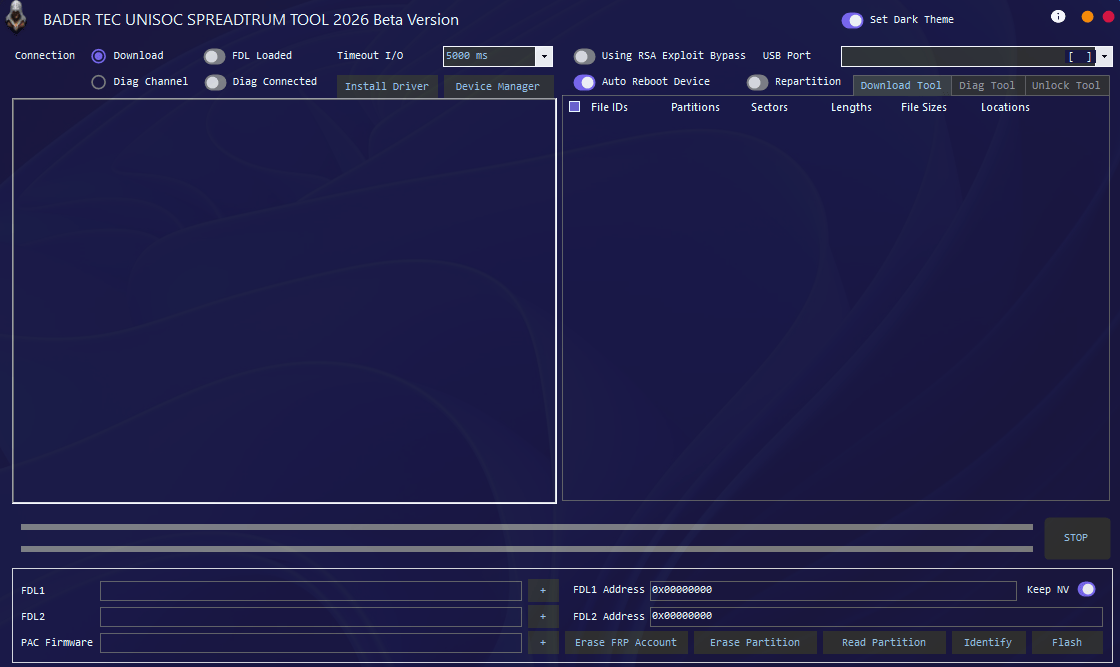
Bader tec unisoc spreadtrum tool showing flash diag and unlock options for unisoc chipset devices.
Diag Tool
Connection Mode
- Calibration Mode
- Factory Test Mode
Main Functions
- Enter Diag Mode
- Factory Reset
- Power Off
AT Command Section
- AT Command Input Box
- Send AT Command Button
IMEI Read / Write
- IMEI 1 Read
- IMEI 1 Write
- IMEI 2 Read
- IMEI 2 Write
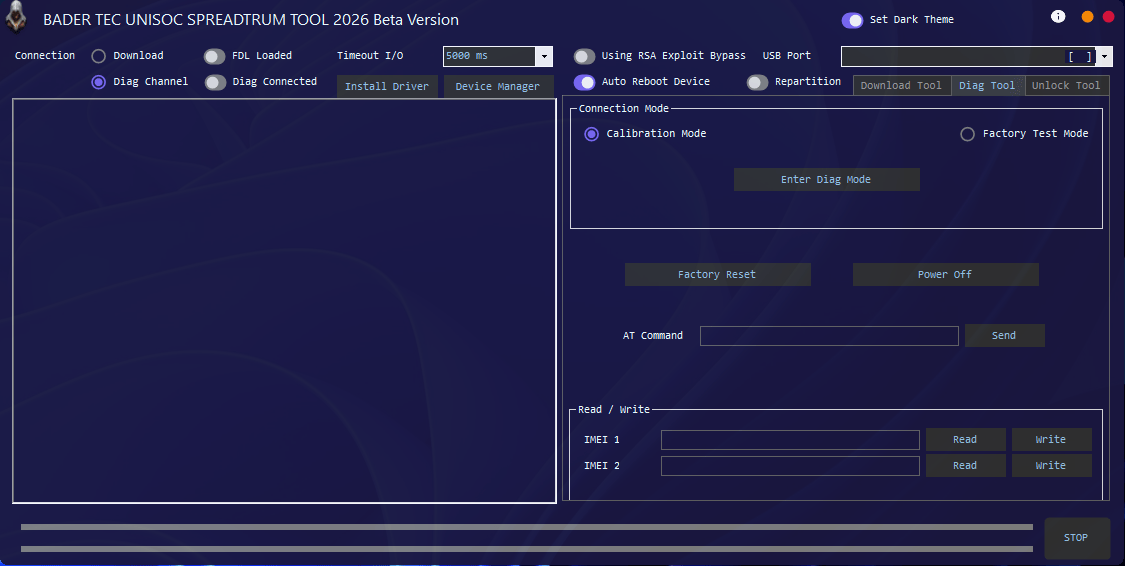
Download bader tec unisoc spreadtrum tool to flash pac firmware remove frp and repair unisoc devices.
Unlock Tool
Device Info Panel
- Device Name Show
- Model Number
- Platform (Unisoc)
Device Search & List
- Search Bar
- Total Devices Count (54 Devices)
- Brand + Model List
- Chipset Info (Unisoc)
Exploit & Security
- Download Mode Support
- Exploit Button
- New Security Support
Operations Panel
- Read Device Info (Identify)
- Flash MIUI Recovery Install
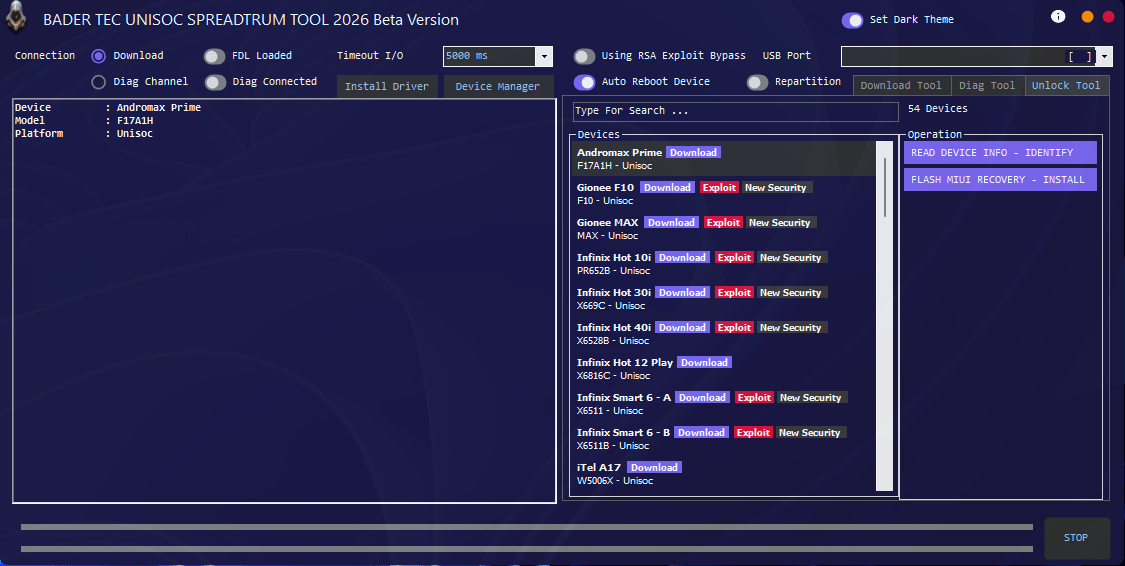
Bader tec unisoc spreadtrum tool used to flash pac firmware remove frp lock and diagnose unisoc chipset devices.
How to Use?
- You Will Need To First Download The Zip From The Below Link.
- Then, Unzip All The Files In The C Drive.
- Then, Install The Setup With The Basic Instructions.
- Run The Tool As Admin “Bader Tec Unisoc Spreadtrum Tool“
- If You Already Have Drivers Installed, Skip This Step.
- Enjoy !!!
Frequently Asked Questions (FAQs)
Does Bader Tec Unisoc Spreadtrum Tool Support All Unisoc Devices?
It Supports Many Unisoc Models But Not Every Device. Always Check The Model Number And Chipset Before Flashing.
Can I Remove Frp Lock Using This Tool?
Yes It Includes An Erase Frp Option But It Should Only Be Used On Devices You Own Or Are Legally Repairing.
What Firmware Format Does The Tool Support?
The Tool Mainly Supports .pac Firmware Files Along With Required Fdl1 And Fdl2 Loader Files.
Why Does My Phone Not Connect In Download Mode?
This Usually Happens Due To Missing Drivers Wrong Usb Cable Or Incorrect Key Combination While Connecting The Phone.
Can The Tool Fix Bootloop Or Dead Boot Issues?
Yes If The Problem Is Software-related Flashing Correct Firmware Can Fix Bootloop And Soft-bricked Phones.
Final Words
Unisoc Phone Repairs Require Specialized Tools And Bader Tec Unisoc Spreadtrum Tool Provides Powerful Flashing Diagnostic And Unlocking Features In One Software. It Helps Technicians Fix Serious Software Issues That Normal Tools Cannot Handle. When Used With Correct Firmware And Proper Steps It Can Save Time And Reduce Repair Failures. Always Repair Devices Responsibly And Within Legal Limits To Keep Both The Phone And Your Work Safe.
How To Download
To Download Mysterious-dev Tool Follow These Steps:
- Go To The A2zflashfile.com Website Of Bader Tec Unisoc Spreadtrum Tool
- Find The Download Page And Don’t Click Button And Click Only The (Download Link)
- Below Buttons Are Advertisements. Please Use The Download Links Above.
- Wait For The Download To Complete.
- Locate The Downloaded File On Your Device Once The Download
Bader Tec Unisoc Spreadtrum Tool
Download Link:: Usersdrive – Mediafire – 4shared – My.pcloud – Playbook – Limewire – Disk.Yandex – DropBox – Mega – Vexfile – Drive Proton