If You Work On Android Phones Every Day You’ve Probably Been Stuck Staring At Fastboot Mode Edl Mode Or A Dead Boot Screen Wondering Which Tool Can Actually Fix It. Jumping Between Different Apps Just To Reboot Erase Frp Switch Slots Or Flash A Single Partition Is Tiring And Risky. That’s Why So Many Technicians Start Looking For A Reliable Multiflash Tool That Can Handle Qualcomm Mediatek And Spreadtrum In One Place Without Wasting Time.
In This Blog We’ll Walk Through How A Good Multiflash Tool Can Manage Quick Actions Like Reboot System Mi Kick To Edl Erase Frp Switch Slot Merge Super And Extract Payload As Well As Deeper Edl Operations Partition Table Work And Flash/repair Functions Across Qualcomm Mediatek And Spreadtrum Platforms.
You’ll See How Features Like Read Gpt Partition Flash Operations Imei/nv Management And Driver Support Come Together To Give You A Complete Repair Solution. By The End You’ll Know Exactly How This Multiflash Tool Can Simplify Your Daily Workflow And Help You Bring More Devices Back To Life Safely.
Contents
- 1 What Is The Multiflash Tool
- 2 Download The Multiflash Tool Latest Versoin
- 3 Features:
- 3.1 Quick Action:
- 3.2 Quick Action Functions In Multiflash Tool
- 3.3 Edl Operation:
- 3.4 Edl Operations Deep‑level Control For Stuck Devices
- 3.5 Other:
- 3.6 System Tools: Drivers Cmd And Device Management
- 3.7 Fastboot mode
- 3.8 Understanding The Partition Table In Multiflash Tool
- 3.9 Flash And Repair Functions: From Simple Reboot To Deep Fix
- 3.10 Qualcomm Platform
- 3.11 Qualcomm Platform Support And Cloud Auto Match
- 3.12 Mediatek platform
- 3.13 Mediatek Platform Exploits Userdata Skips And Partition Work
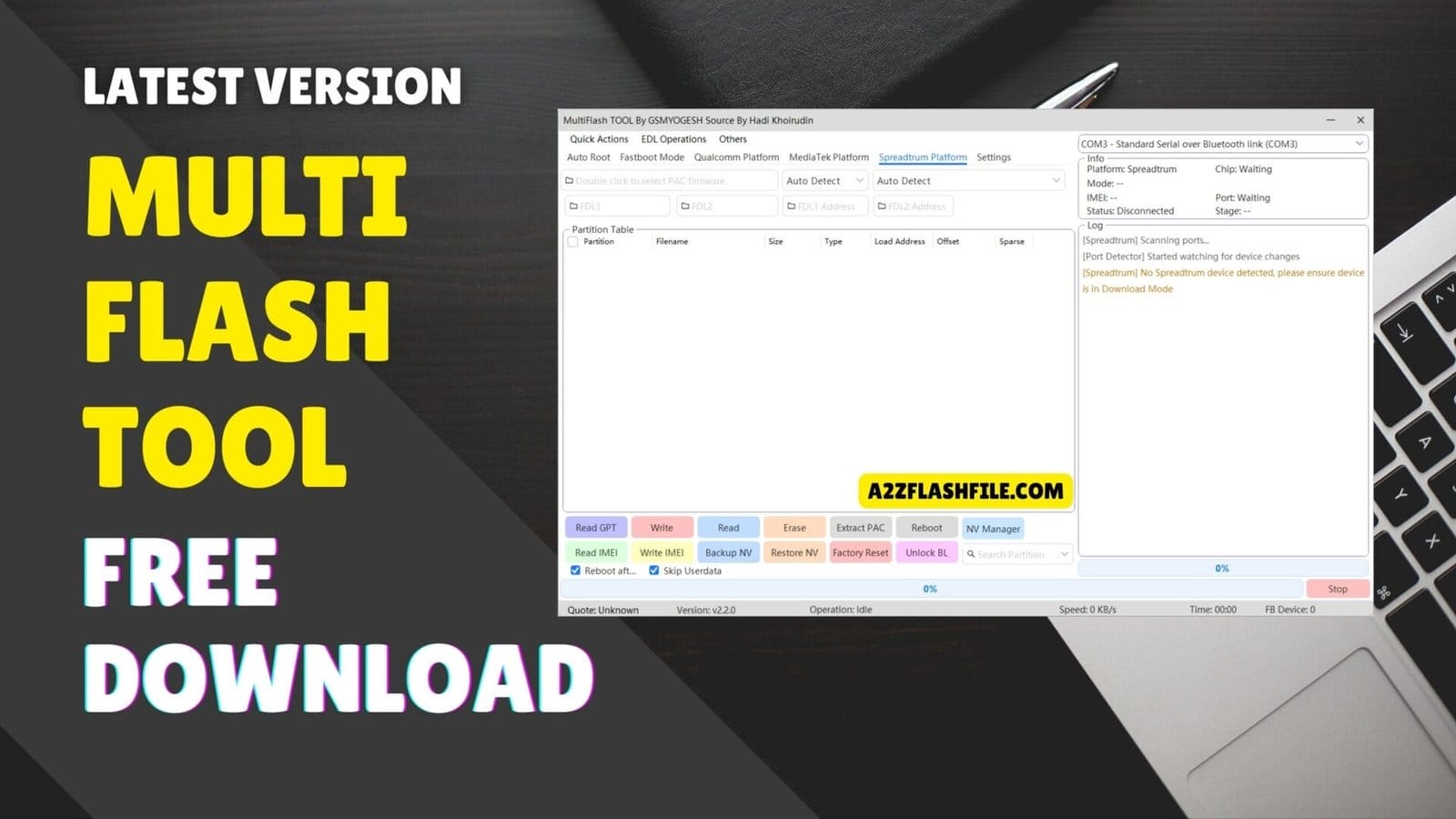
- 3.14 Spreadtrum
- 3.15 Spreadtrum Platform: Auto Detect And Nv Management
- 4 Why Multiflash Tool Matters For Daily Phone Repair
- 5 Frequently Asked Questions (FAQ)
- 6 Conclusion
- 7 How To Download
What Is The Multiflash Tool
At Its Core The Multiflash Tool Is A Unified Flashing And Repair Utility That Lets You Handle Many Different Android Devices From One Place. Instead Of Installing A Separate App Every Time You Meet A New Chipset It Gathers Support For Qualcomm Mediatek And Spreadtrum Into One Interface.
You Can Move Between Fastboot Mode Edl And Normal System Boots Without Changing Tools Or Guessing Commands. The Interface Is Built Around Clear Sections: Quick Action Edl Operation Partition Table Flash And Repair Function And Platform‑specific Panels For Qualcomm Mediatek And Spreadtrum.
Each Section Is Designed To Solve A Different Stage Of The Repair Story From Basic Reboots To Deep Partition Flashing. If You’ve Ever Wished That Device Manager Cmd Drivers And Flashing Tools Could Talk To Each Other This Is The Kind Of Control Panel That Finally Makes That Possible.
Download The Multiflash Tool Latest Versoin
Most People Look For The Latest Version Of The Multiflash Tool Because Every Update Fixes Bugs And Adds Support For New Chipsets And Security Patches. A Current Build Usually Handles More Storage Types Like Ufs And Emmc And It Tends To Be More Stable When Doing Tricky Jobs Like Merge Super Or Extract Payload.
Newer Versions Also Improve Things Like Automatic Platform Detection And Partition Parsing Which Can Save You From Flashing The Wrong File. When You Download The Latest Release You’re Not Just Getting New Buttons—you’re Getting Better Safety Nets. Updated Android Drivers Mtk Drivers And Qualcomm Drivers Help Your Pc Talk To More Devices Correctly.
Improved Logging Through View Log Also Makes It Easier To Understand What Went Wrong If Something Fails. That Combination Of Broader Support And Clearer Feedback Is What You Really Want When You’re Working On Valuable Customer Phones.
Features:
Quick Action:
- Reboot System
- Reboot Fastboot
- Reboot Fastbootd
- Reboot Recovery
- Mi Kick To Edl
- Lenovo / Android Kick To Edl
- Erase Frp
- Switch Slot
- Merge Super
- Extract Payload

Multiflash tool offering one-click shortcuts to reboot into edl mode and erase frp.
Quick Action Functions In Multiflash Tool
The Quick Action Area Is Where Most Stories With A Troubled Phone Begin. Imagine A Device That’s Frozen In Fastboot Or Fastbootd And The Customer Is Already Nervous. With A Couple Of Clicks You Can Reboot System Reboot Fastboot Reboot Fastbootd Or Reboot Recovery Guiding The Phone Out Of The Dead End And Back Into A Mode Where You Can Actually Help It.
For Stubborn Qualcomm Devices Or Certain Xiaomi And Lenovo Models Quick Action Goes Even Deeper. Options Like Mi Kick To Edl And Lenovo / Android Kick To Edl Push The Device Into Edl Mode So You Can Perform Serious Repairs. When Frp Or A Bad Update Blocks Normal Recovery Tools Such As Erase Frp Switch Slot Merge Super And Extract Payload Let You Reshape The System Layout And Get Another Chance To Bring It Back. Each Click Feels Like A Small Rescue Step In A Longer Recovery Journey.
Edl Operation:
- Edl To System
- Edl To Recovery
- Edl To Edl
- Edl To Fbd
- Edl Factory Reset
- Edl Erase Frp
- Edl Switch Slot
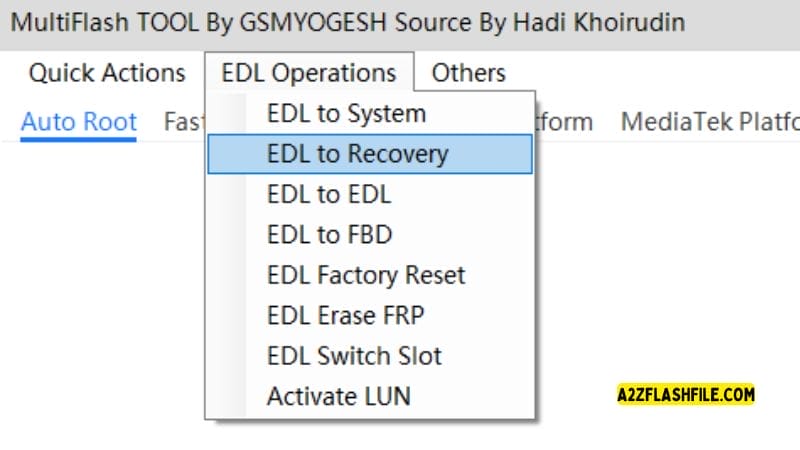
Edl operations menu in multiflash tool for advanced recovery and safe frp removal.
Edl Operations Deep‑level Control For Stuck Devices
When A Phone Is Badly Bricked It Often Lands In Edl And Won’t Boot Android Or Even Recovery. This Is Where The Multiflash Tool’s Edl Operation Panel Becomes The Main Character. You Can Navigate Between Modes Using Options Like Edl To System Edl To Recovery Edl To Edl And Edl To Fbd Effectively Steering The Device Back Toward Life. It’s Like Having A Hidden Service Entrance Into The Phone When The Front Doors Are Sealed Shut.
For Deeper Fixes You Can Perform Edl Factory Reset Edl Erase Frp And Edl Switch Slot To Wipe Locked Data And Move Between Boot Slots That Might Still Be Healthy. The Activate Lun Feature Helps You Work With Storage At A More Granular Level Which Matters When Partitions Are Misaligned Or Corrupted. These Edl Tools Turn What Looks Like A Dead Device Into Something That Can Still Be Negotiated With One Controlled Operation At A Time.
Other:
- Device Manager
- Cmd Command Line
- Android Drivers
- Mtk Drivers
- Qualcomm Drivers
- View Log
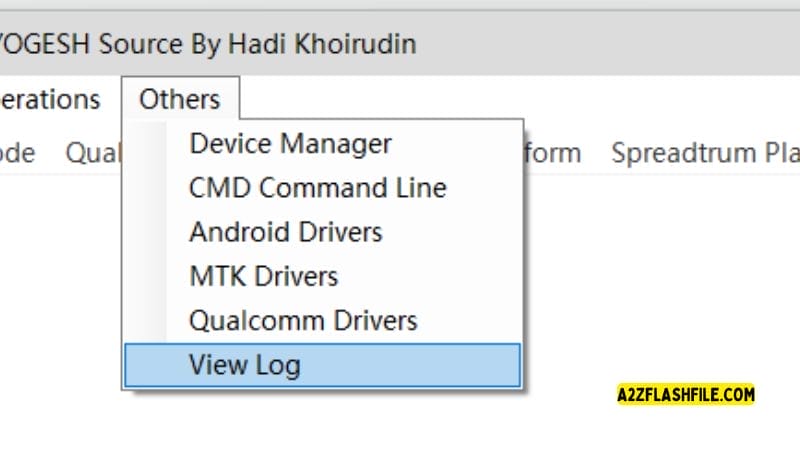
The others tab in multiflash tool providing quick access to install essential drivers and open device manager.
System Tools: Drivers Cmd And Device Management
Every Technician Has Lived Through The Moment Where The Tool Won’t See The Phone At All No Matter How Many Cables You Try. That’s Why The Multiflash Tool Bundles Supporting Utilities Like Device Manager Cmd Command Line Android Drivers Mtk Drivers And Qualcomm Drivers. You Don’t Have To Hunt Across The Internet To Solve Basic Connectivity Issues; Everything You Need To Make The Pc Recognize The Phone Is Under One Roof.
Once The Drivers Are Right You Can Use View Log To Watch Every Step Of The Process Instead Of Hoping The Progress Bar Tells The Full Story. Seeing Each Command And Response Helps You Understand Why A Fastboot Mode Device Didn’t Reboot Or Why An Frp Erase Failed. With That Clarity You Move From Guessing To Actually Diagnosing Problems Which Is The Real Difference Between A Beginner And An Expert.
Fastboot mode
Partition Table:
- Partition
- Operation
- Size
- File Path
- Browse
Understanding The Partition Table In Multiflash Tool
Behind Every Android System There’s A Map Of Where Everything Lives And That Map Is The Partition Table. In The Multiflash Tool You Can View This Table Through Fields Like Partition Operation Size File Path And Browse. This Gives You A Visual Picture Of System Boot Vendor Userdata And Other Partitions So You Know Exactly What You’re About To Touch.
Having This Overview Is Crucial When A Customer’s Device Is Half‑updated Or Missing Key Files. You Can Decide Which Partitions To Flash Or Erase Without Touching User Data If It’s Still Safe. The Tool’s Partition Table View Becomes Your Chart In A Storm Letting You Plan Each Move Instead Of Blindly Resetting Everything And Hoping For The Best.
Flash And Repair Function:
- Reboot
- Switch Slot A
- FBD Flash
- Oplus Flash
- Keep Data
- Wipe Data
- Lock BL
- Erase FRP
- Cloud Parse
- Read GPT
- Extract
- Fix Frd
- White Partition
- Erase Partition
- Execute
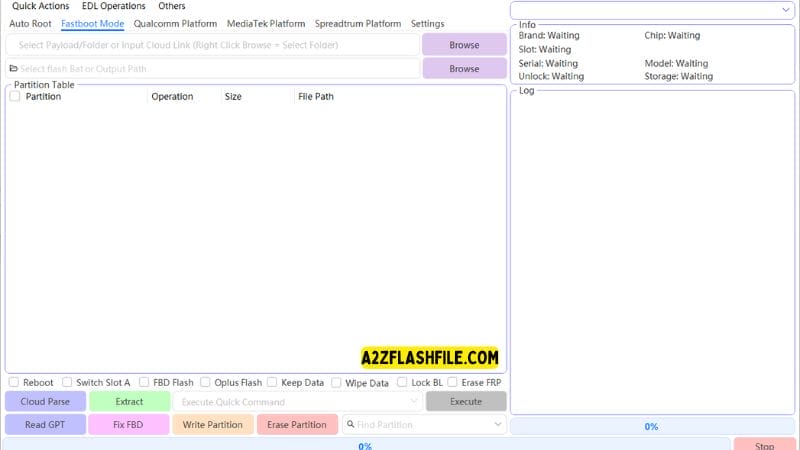
The advanced fastboot panel in multiflash tool featuring gpt reading partition writing and fbd fixing tools.
Flash And Repair Functions: From Simple Reboot To Deep Fix
Once You Understand The Device’s Layout The Flash And Repair Function Section Is Where You Actually Act On That Knowledge. Here You Find Everyday Tools Like Reboot Switch Slot A Keep Data Wipe Data And Lock Bl That Solve Common Issues Quickly. For More Complex Jobs Options Like Fbd Flash Oplus Flash Erase Frp And Cloud Parse Let You Push Full Firmware Or Selected Images To The Right Place.
If A Phone Keeps Bootlooping Tools Such As Read Gpt Extract Fix Frd White Partition Erase Partition And Execute Give You Granular Control Over Specific Blocks. You’re Not Just Pressing One “fix Everything” Button; You’re Doing Thoughtful Surgery. This Level Of Precision Is What Separates A Random Flash Attempt From A Careful Repair That Actually Lasts.
Qualcomm Platform
Cloud Auto Match
Storage type:
- Auto
- Ufs
- Emmc
Partition Table:
- Partition
- Browse
- Lun
- Size
- Start
- End
- Sector
- Start Addr
- End Addr
- File Path
Partition Flash Opetations
- Reboot
- Read GPT
- Skip Bootloader
- Generate XML
- Keep Data
- Protect
- oplus old
- oplus
- MetaSuper
- Read Partition
- Write Partition
- Frase Partition
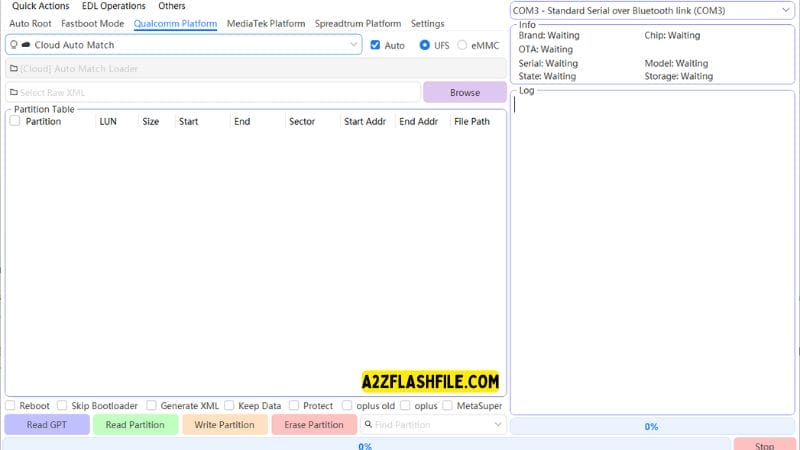
The qualcomm edl dashboard in multiflash tool offering safe format and mi cloud removal
Qualcomm Platform Support And Cloud Auto Match
For Qualcomm Devices The Multiflash Tool Adds A Layer Of Intelligence Through Features Like Qualcomm Platform And Cloud Auto Match. Instead Of Manually Hunting The Perfect File For Each Partition Cloud Matching Can Help Suggest Or Pair Correct Firmware With The Connected Device. That’s Especially Useful When You’re Working With Multiple Variants That Look Identical But Require Different Images.
Within This Panel You Can Also Choose The Storage Type Between Auto Ufs And Emmc Matching The Tool’s Behavior To The Phone’s Hardware. The Partition Table For Qualcomm Shows Fields Such As Partition Browse Lun Size Start End Sector Start Addr End Addr And File Path So You Can See Exactly How Data Is Spread Across Storage. It’s Like Lifting The Hood On A Complex Machine And Finally Seeing How Everything Is Wired.
Mediatek platform
- Auto
- Use Exploit
- Skip Userdata
- Reboot
- Partition Table
- Partition
- Type
- Size
- Address
- Filename
Partition Flash Operations
- Read GPT
- Read Partition
- Write Partition
- Erase Partition
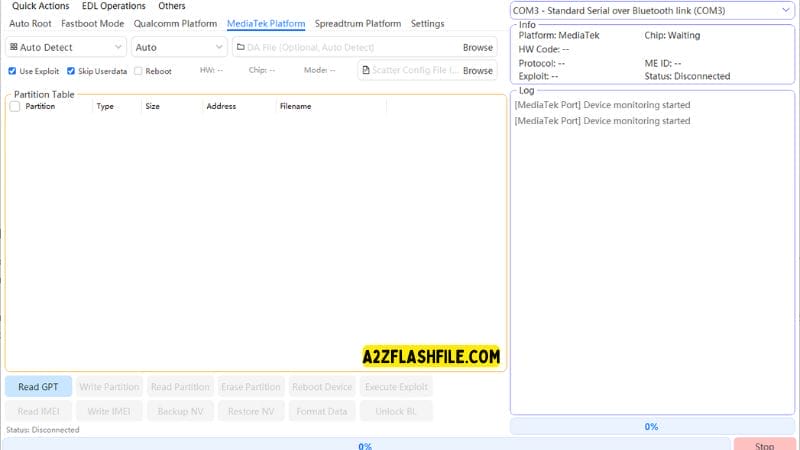
The mediatek brom panel in multiflash tool,
Mediatek Platform Exploits Userdata Skips And Partition Work
On The Mediatek Platform The Multiflash Tool Meets A Very Different Style Of Device From Budget Models To Popular Mid‑range Phones. You Can Set The Connection To Auto Decide Whether To Use Exploit And Choose To Skip Userdata So That Personal Files Stay Safe During Repairs. Simple Controls Like Reboot And Partition Table Access Keep The Workflow Familiar Even Though The Underlying Chipset Is Different.
Inside The Mtk Partition Table You’ll See Columns Such As Partition Type Size Address And Filename Letting You Analyze The Layout Before Touching Anything. Partition Flash Operations Include Read Gpt Read Partition Write Partition And Erase Partition All Geared Toward Solving Frp Locks Bootloops And Firmware Corruption Without Unnecessary Damage. For Technicians In Mtk‑heavy Markets This Part Of The Tool Often Becomes The Star Of The Show.
Spreadtrum
Auto Detect:
- SC65xx
- SC6531E
- SC6533G
- SC77xx
- SC7730
- SC7731E
- SC85xx
- SC8541E
- SC8581A
Auto Detect
Partition Table
- Partition
- Filename
- Size
- Type
- Load Address
- Offset
- Sparse
Partition Flash Operations
- Read GPT
- Write
- Read
- Erase
- Extract PAC
- Reboot
- NV Manager
- Read IMEI
- Write IMEI
- Backup NV
- Restore NV
- Factory Reset
- Unlock BL
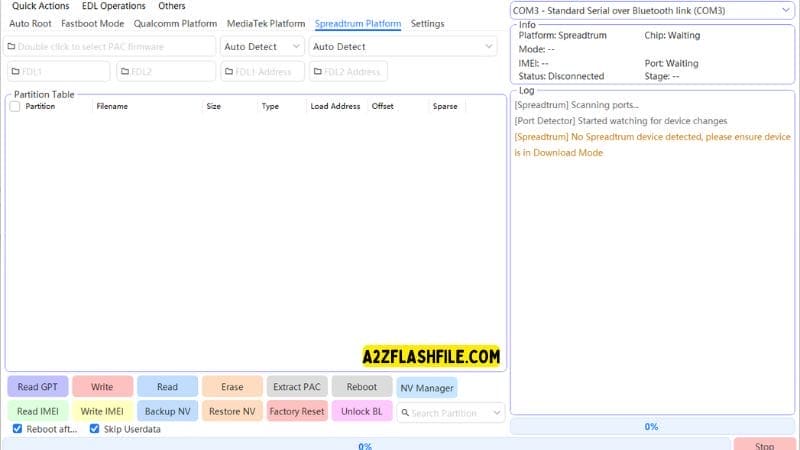
Spreadtrum Platform: Auto Detect And Nv Management
Spreadtrum Devices Create Their Own Challenges Especially With A Wide Range Of Chipsets And Pac‑based Firmware. The Multiflash Tool Simplifies This By Using Auto Detect Across Chip Families Like Sc65xx Sc6531e Sc6533g Sc77xx Sc7730 Sc7731e Sc85xx Sc8541e And Sc8581a. Once Detection Kicks In The Partition Table Shows Partition Filename Size Type Load Address Offset And Sparse So You Can See Exactly What You’re Dealing With.
For Flashing Partition Flash Operations Offer Read Gpt Write Read Erase And Extract Pac Alongside Simple Reboot Controls. When A Job Turns Into Network Trouble The Nv Manager Becomes Your Ally With Read Imei Write Imei Backup Nv Restore Nv Factory Reset And Unlock Bl. These Nv And Imei Tools Are Delicate But Vital When You’re Rescuing Devices Whose Identity Data Has Gone Missing Or Corrupt.
Why Multiflash Tool Matters For Daily Phone Repair
If You Look At All These Sections Together You Start To See Why Technicians Gravitate Toward A Single Well‑built Solution Instead Of A Pile Of Random Apps. The Multiflash Tool Doesn’t Just Handle Quick Action Reboots; It Walks Beside You From The First Connection Through Partition Analysis And Flashing All The Way To Final Reboots And Imei Checks. At Each Stage It Gives You Options That Match Real‑world Problems Rather Than Only Textbook Cases.
When A Customer Hands You A Device And Says “it Just Died” You Don’t Always Know The Full Story. Maybe It’s An Frp Lock Maybe A Bad Ota Maybe A Failed Custom Rom. With A Flexible Hub Like Multiflash Tool You Can Explore Each Theory Safely Taking Snapshots Of Nv Data Switching Slots And Moving Between Fastboot Recovery And Edl Until You Find The Path That Works. That Combination Of Power And Control Is What Turns A Stressful Job Into A Confident Repair Process.
Frequently Asked Questions (FAQ)
Is The Multiflash Tool Safe To Use On Customer Phones?
Yes It Can Be Safe If You Know What You’re Doing Take Backups And Only Erase Or Flash The Partitions You Understand. Most Risks Come From Using The Wrong File Or Option Not From The Tool Itself.
Can Multiflash Tool Remove Frp On All Android Devices?
No It Can’t Unlock Every Single Device But It Supports Many Qualcomm Mediatek And Spreadtrum Models. Success Always Depends On The Phone’s Brand Chipset And Security Patch Level.
Do I Need Special Drivers For Multiflash Tool To Work?
Yes You Need Proper Android Mtk And Qualcomm Drivers Installed So Your Pc Can Detect The Device In Each Mode. Many Builds Include Driver Installers Or Shortcuts Inside The Tool.
Can I Use Multiflash Tool To Save User Data?
In Some Cases Yes Especially When You Use Options Like “keep Data” Or Avoid Erasing Userdata Partitions. However Deep Repairs And Factory Resets Will Still Wipe Data So Always Warn Customers First.
Is Multiflash Tool Good For Beginners?
Beginners Can Use It For Simple Reboots Frp And Basic Flashing But They Should Move Slowly And Read Each Option Carefully. The More Advanced Partition And Nv Functions Are Better Handled By Experienced Technicians.
Conclusion
Phone Repair Is Stressful When Every Device Comes In With A Different Problem And Needs A Different Tool. A Good Multiflash Tool Turns That Chaos Into A Clear Workflow Letting You Reboot Fix Partitions Erase Frp And Recover Data From One Place. Instead Of Guessing In The Dark You See Exactly What The Phone Is Doing And Choose The Safest Next Step.
When You Use This Kind Of All‑in‑one Solution Every Day It Quietly Becomes Your Most Valuable Repair Partner. You Save More Phones Protect More Customer Data And Spend Less Time Fighting Drivers Or Random Utilities. With Practice Each Feature Feels Like Another Shortcut Between A “dead” Device And A Working One In Your Customer’s Hands.
How To Download
To Download SamFw Tool Follow These Steps:
- Go To The A2zflashfile.com Website Of SamFw Tool.
- Find The Download Page And Don’t Click Button And Click Only The (Download Link)
- Below Buttons Are Advertisements. Please Use The Download Links Above.
- Wait For The Download To Complete.
- Locate The Downloaded File On Your Device Once The Download
MultiFlash Tool V3.0
Download Link:: Usersdrive – Mediafire – 4shared – My.pcloud – Playbook – DropBox – Mega – Vexfile – Google Drive