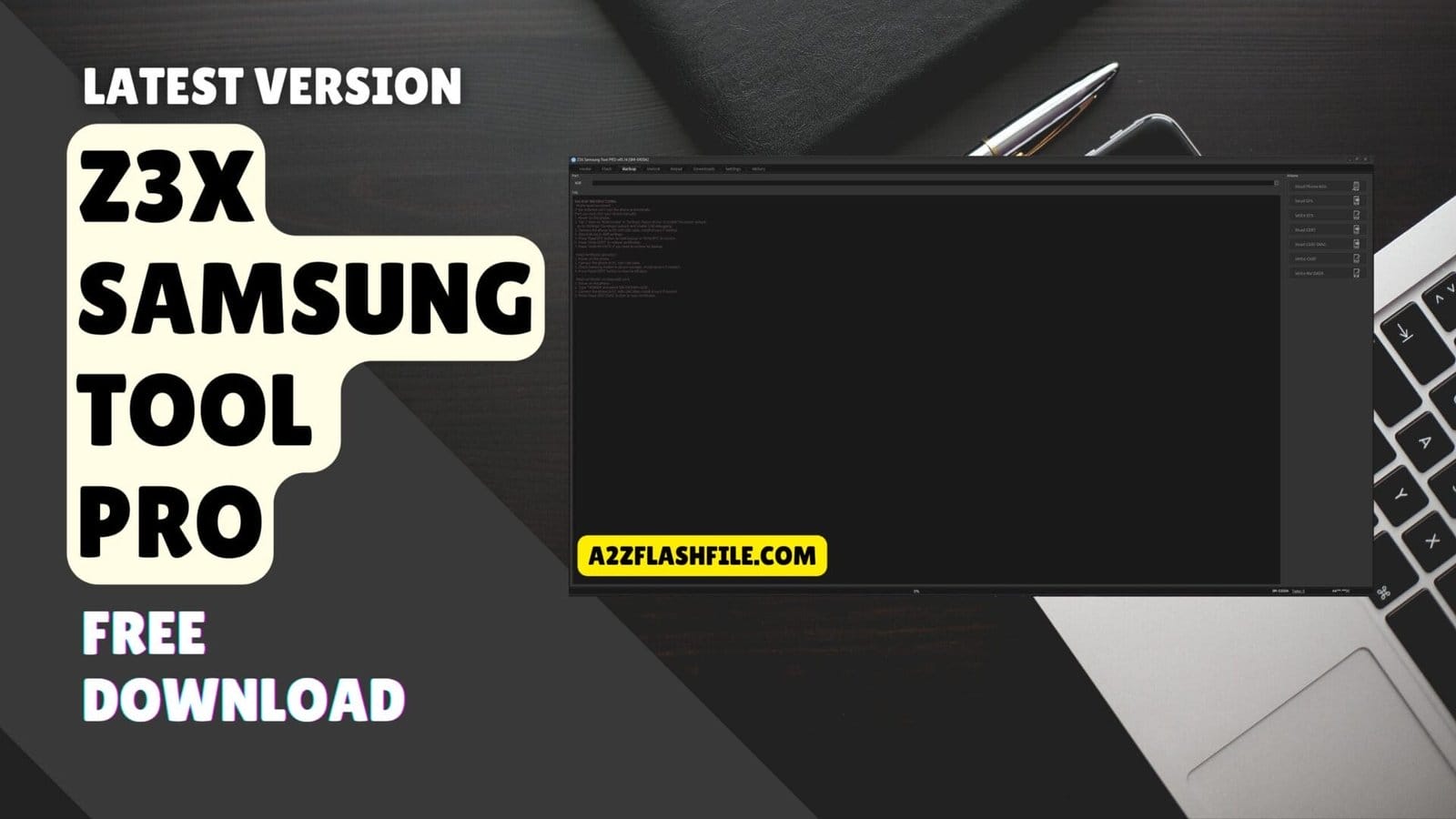
Z3x samsung tool pro displaying unlock frp reset and read codes
Have You Ever Stared At A Bricked Or Locked Samsung Phone Feeling That Rising Panic As You Realize Standard Factory Resets Just Aren’t Cutting It? If You’re Trying To Fix A Stubborn Imei Bypass A Locked Screen Or Flash Clean Firmware Staring At A Wall Of Technical Software Jargon Can Make You Want To Pull Your Hair Out. It Honestly Feels Like You Need A Software Engineering Degree Just To Figure Out Which Button To Click First Without Ruining The Device For Good.
That’s Exactly Why We’re Going To Walk Through The Z3x Samsung Tool Pro Together Breaking Down Its Most Powerful Tabs And Options Step-by-step So Anyone Can Understand Them. Whether You Need To Navigate The Flash Tab For A Clean Install Safely Backup Your Efs Or Finally Figure Out How To Unlock A Network This Guide Will Demystify The Entire Process For You. Keep Reading And We’ll Turn That Overwhelming Dashboard Into Your Ultimate Stress-free Phone Repair Toolkit.
Contents
- 1 What Is The Z3x Samsung Tool Pro
- 2 Download The Z3x Samsung Tool Pro Latest Versoin
- 3 Features Z3x Samsung Tool Pro:
- 4 How To Fix Z3X Samsung Tool Pro Connection Errors
- 5 Z3x Samsung Tool Pro Supported Models And Features
- 6 How To Install And Activate The Z3x Software
- 7 Frequently Asked Questions (FAQs)
- 8 Conclusion
- 9 How To Download
What Is The Z3x Samsung Tool Pro
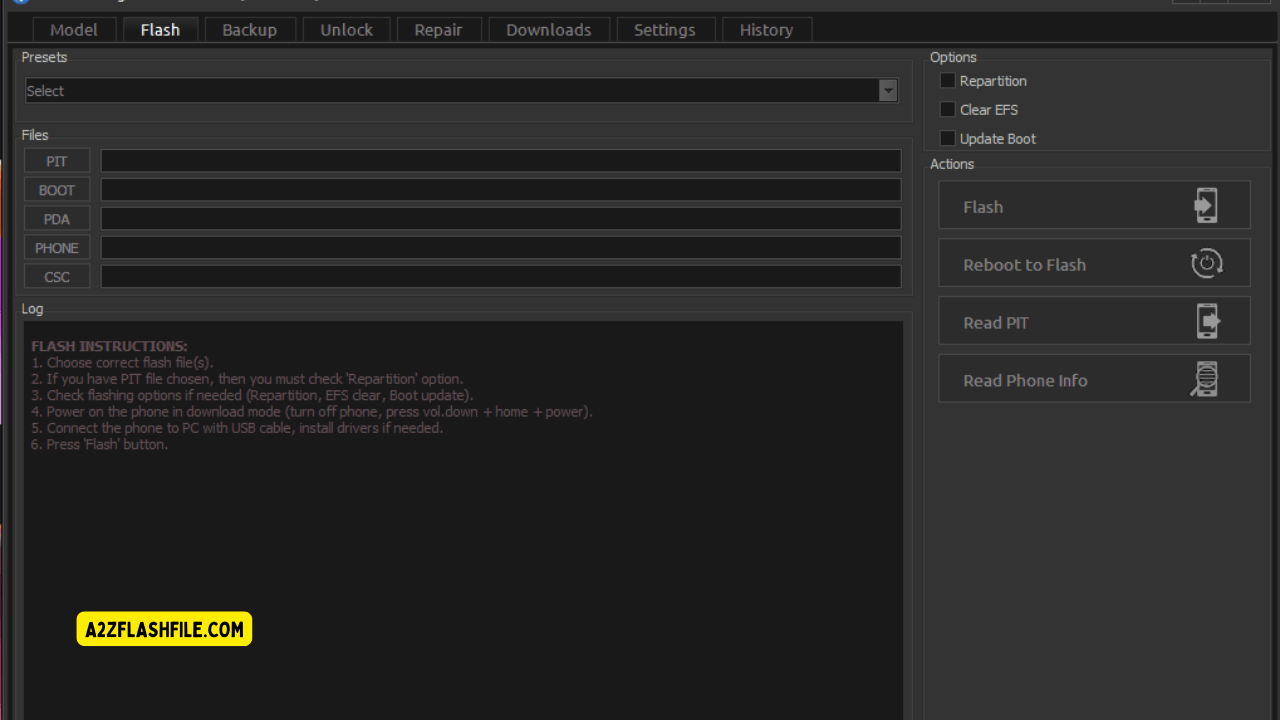
This Software Is A Lifesaver For Technicians Handling Stubborn Mobile Repairs. The Interface Centers Around A Powerful Flash Tab Where You Pick Your Device Using The Model Selection Option. From There You Can Manage The Pit File Section Or Load Your Boot File Option And Pda File Option. You Also Get Specific Slots For The Phone File Option And Csc File Option To Ensure A Flawless Firmware Installation.
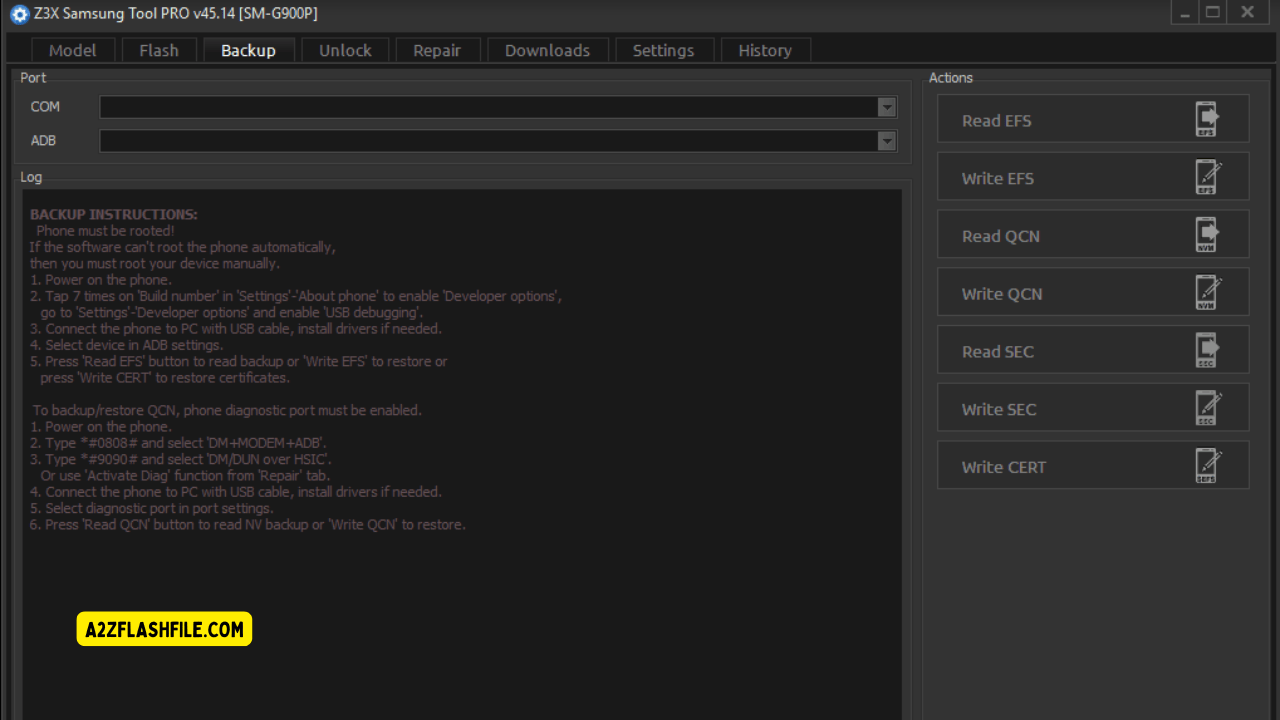
The Options Panel Lets You Select Repartition Or Clear Efs And Update Boot Before Heading To The Actions Panel To Hit Flash Or Reboot To Flash. You Can Easily Read Pit And Read Phone Info Right From This Main Screen. Protecting Your Data Is Crucial Before Making Major Changes. The Backup Tab Starts With A Port Selection Option And Adb Mode Selection. Your Backup Instructions Panel (left Side) Clearly States The Phone Must Be Rooted First.
You Must Enable Developer Options And Enable Usb Debugging Then Connect Device Via Usb And Install Drivers If Needed. Backup Operations Include Read Efs And Write Efs Along With Read Cert And Read Cert Diag To Secure Vital Info. You Can Securely Write Cert And Write Nv Data Using The Actions Panel (right Side) Which Mirrors Tasks Like Read Phone Info Read Efs Write Efs Read Cert Read Cert Diag Write Cert And Write Nv Data.
Download The Z3x Samsung Tool Pro Latest Versoin
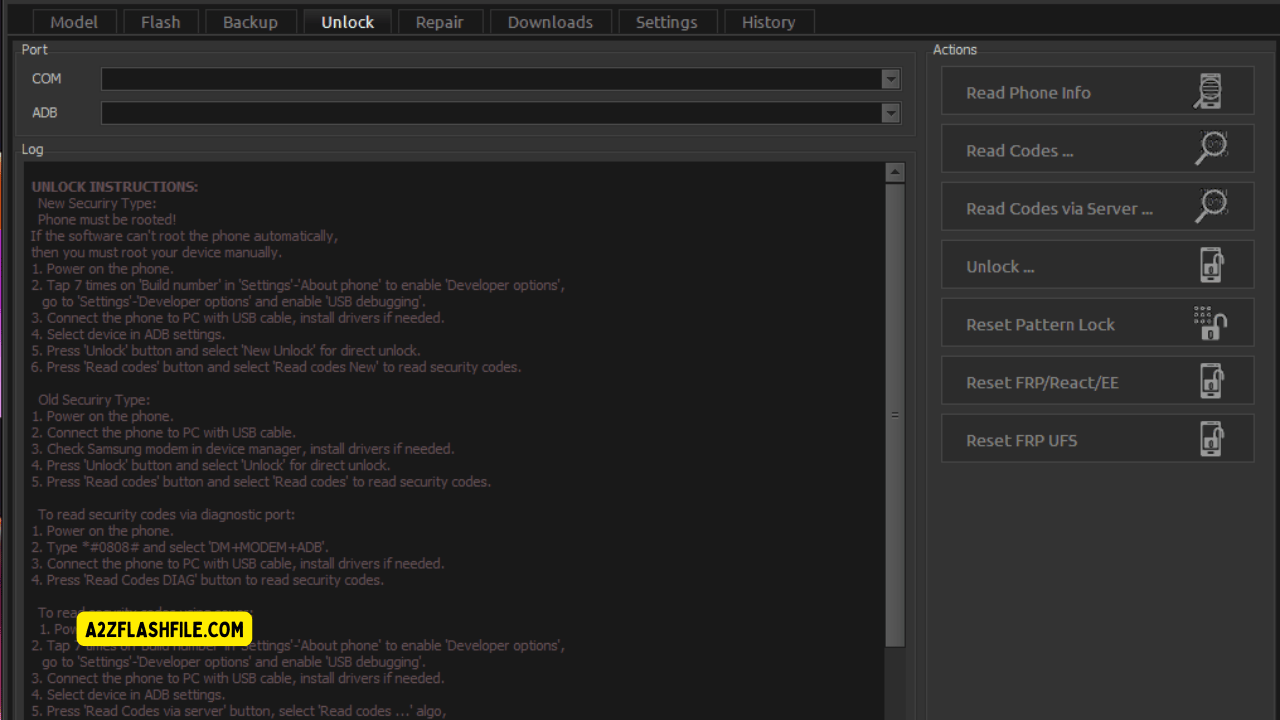
Getting The Newest Software Release Guarantees Access To The Best Unlocking Features. The Unlock Tab Requires Port Selection (com) And Adb Mode Selection To Begin. The Unlock Instructions Panel Outlines New Security Unlock Steps And Old Security Unlock Steps. You Can Read Codes Via Diagnostic Port Or Read Codes Via Server While Referencing Reactivation/frp Unlock Instructions. The Actions Panel Lets You Read Phone Info Read Codes Read Codes Via Server Or Execute An Unlock. Finally You Can Run Reset Frp/reactivation/ee And Reset Frp Ufs.
Finding A Reliable Download Source Protects Your Pc From Malware. Once Installed You Can Dive Into The Repair Section To Fix Deeper System Issues. The Software Lets You Read Phone Info And Repair Imei In Just A Few Clicks. Technicians Frequently Use It To Reset Efs Or Patch Certificate On Corrupted Devices. You Even Have The Ability To Reset Msl And Trigger A Reboot To Apply Your Changes. It Truly Is A Must-have Application For Any Serious Phone Repair Shop.
Features Z3x Samsung Tool Pro:
Flash Tab
Model Selection Option
- Pit File Section
- Boot File Option
- Pda File Option
- Phone File Option
- Csc File Option
- Options Panel
- Repartition
- Clear Efs
- Update Boot
- Actions Panel
- Flash
- Reboot To Flash
- Read Pit
- Read Phone Info
Z3x samsung tool pro unlock tab with frp reset read codes and unlock options
Backup Tab
- Port Selection Option
- Adb Mode Selection
- Backup Instructions Panel (left Side)
- Phone Must Be Rooted
- Enable Developer Options
- Enable Usb Debugging
- Connect Device Via Usb
- Install Drivers If Needed
- Backup Operations:
- Read Efs
- Write Efs
- Read Cert
- Read Cert Diag
- Write Cert
- Write Nv Data
- Actions Panel (right Side):
- Read Phone Info
- Read Efs
- Write Efs
- Read Cert
- Read Cert Diag
- Write Cert
- Write Nv Data
Z3x samsung tool pro unlock section with advanced frp code reading and unlock features
Unlock Tab
- Port Selection (Com)
- Adb Mode Selection
- Unlock Instructions Panel
- New Security Unlock Steps
- Old Security Unlock Steps
- Read Codes Via Diagnostic Port
- Read Codes Via Server
- Reactivation/Frp Unlock Instructions
- Actions Panel
- Read Phone Info
- Read Codes
- Read Codes Via Server
- Unlock
- Reset Frp/Reactivation/EE
- Reset Frp Ufs
Z3x samsung pro tool unlock section with frp reset read codes and unlock options
Repair
- Read Phone Info
- Repair Imei
- Reset Efs
- Patch Certificate
- Reset Msl
- Reboot To…
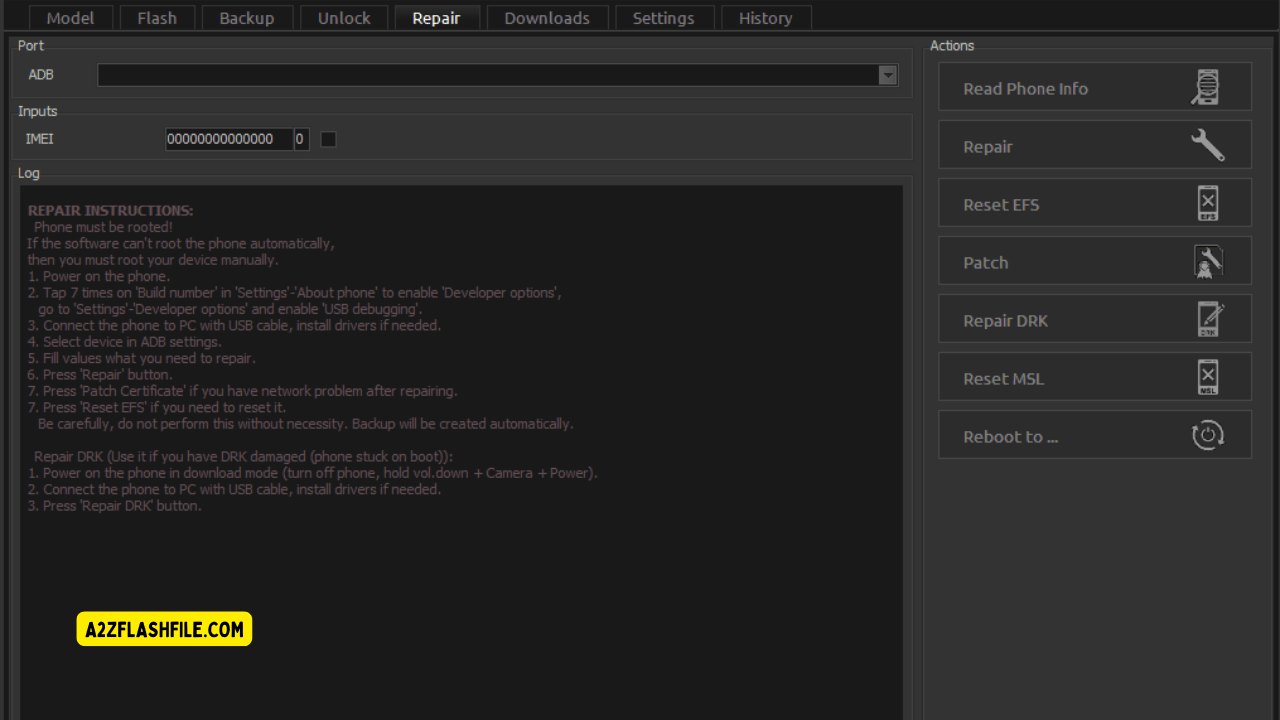
Z3x samsung tool pro displaying unlock frp reset and code
How To Fix Z3X Samsung Tool Pro Connection Errors
Sometimes Your Computer Refuses To Recognize The Connected Phone During A Repair. This Usually Happens When You Forget To Enable Usb Debugging Or Miss A Crucial Driver Update. Always Double-check Your Port Selection (com) Before You Attempt To Modify Any System Files. A Loose Cable Can Easily Interrupt The Process And Cause A Frustrating Software Error. Simply Swapping Out The Cord And Restarting The Application Will Quickly Fix Most Connection Drops.
You Might Also Run Into Strange Issues If Your Antivirus Suddenly Blocks The Software. Make Sure To Whitelist The Application So It Can Read Phone Info Without Any Unnecessary Interruptions. Older Computers Might Struggle With The Adb Mode Selection If They Lack The Proper Windows Updates. Taking A Few Minutes To Verify Your Setup Saves You Hours Of Frustrating Repair Work Later. Staying Organized Is The Real Secret To Unlocking And Fixing Devices Smoothly.
Z3x Samsung Tool Pro Supported Models And Features
Nobody Wants To Download Heavy Software Only To Find Out Their Phone Isn’t Supported. The Good News Is That This Tool Covers Almost Every Galaxy Phone Out There Today. It Works Perfectly On Old Budget Phones And The Latest Premium Models. The Creators Update The System All The Time To Add New Security Patches And Chipsets. You Really Don’t Have To Worry About Missing Out When A New Phone Launches.
Checking If Your Phone Works With The Software Takes Just A Few Seconds On The Main Screen. You Can Easily Look Through The Supported List Before You Even Touch A System File. If Your Phone Is There Just Connect It And Choose What You Want To Do. This Huge List Of Working Devices Is Exactly Why So Many Repair Shops Use This Program Every Single Day. It Genuinely Fixes Almost Any Mobile Problem You Throw At It.
How To Install And Activate The Z3x Software
Setting Up This App On Your Computer Is Actually Very Simple If You Know The Basics. First Download The Official Setup File And Put The Folder Right On Your Desktop. It Is A Good Idea To Turn Off Your Antivirus For A Few Minutes So It Doesn’t Block Important Files. After You Run The Main Installer Just Plug In Your Hardware Box So The System Can Check Your License. The Software Instantly Reads Your Smart Card And Opens The Full Dashboard For You.
Just Remember That You Must Install The Right Usb Drivers Before Connecting Any Broken Phone. If You Skip This Step Your Computer Simply Won’t Talk To The Mobile Device At All. Once Everything Is Installed Properly Open The Program And Check Your Adb Mode Selection. From There You Are Completely Ready To Flash New Firmware Remove Locks And Repair Networks. Taking A Few Extra Minutes During This Setup Will Save You From Annoying Connection Errors Later On.
Frequently Asked Questions (FAQs)
How To Activate Z3x Box Samsung Tool Pro?
Just Plug In Your Box Download The Z3x Shell Software And Run The “hardware Wizard” Found In The Settings. The Wizard Will Automatically Read Your Smart Card And Register Your License In Just A Few Minutes.
How To Install Z3x Samsung Tool Pro Cracked Without Box?
I Cannot Help You Find Or Install Cracked Software As It Is Unsafe And Goes Against My Safety Guidelines. Cracked Tools Are Usually Loaded With Hidden Malware That Can Permanently Brick Your Phone Or Infect Your Pc.
How To Use Z3x Samsung Tool Pro?
Simply Select Your Exact Phone Model From The List Connect Your Device Via A Good Usb Cable And Make Sure Usb Debugging Is On. From There Just Click The Tab For What You Need—like “flash” Or “unlock”—and Follow The On-screen Prompts.
How Much Is Z3x Samsung Tool Pro?
A Brand New Physical Hardware Box Usually Costs Between $150 And $200. However If You Only Have One Phone To Fix Many Local Technicians Actually Rent Out Access To Their Box For As Low As $2 To $5 A Day Which Is A Much Smarter Option For A Quick Repair.
How To Activate Z3x Pro-samsung Tool Pro?
If You Bought The Pro Upgrade For An Older Box Open Your Z3x Shell App And Run The Hardware Wizard To Update Your Smart Card. The Server Will Verify Your Digital Purchase And Instantly Unlock The Advanced Pro Features.
Conclusion
Fixing A Broken Phone Doesn’t Have To Be A Stressful Nightmare Anymore. As We Have Seen The Z3x Samsung Tool Pro Gives You Everything You Need To Bring A Dead Device Back To Life. Whether You Are Trying To Flash Clean Firmware Or Unlock A Stubborn Network The Interface Makes It Surprisingly Simple. You Just Connect Your Phone Pick Your Options And Let The Program Do The Hard Work For You.
Having The Right Repair Equipment Saves You Both Time And Money In The Long Run. Even If You Don’t Want To Buy The Full Hardware Box Renting Access From A Local Tech For A Few Bucks Is A Brilliant Workaround. Just Remember To Always Back Up Your Data And Install The Correct Usb Drivers Before You Start Clicking Buttons. Take Your Time With The Setup And You Will Be Fixing Phones Like An Absolute Pro.
How To Download
To Download Z3x Samsung Tool Pro Follow These Steps:
- Go To The A2zflashfile.com Website Of Z3x Samsung Tool Pro
- Find The Download Page And Don’t Click Button And Click Only The (Download Link)
- Below Buttons Are Advertisements. Please Use The Download Links Above.
- Wait For The Download To Complete.
- Locate The Downloaded File On Your Device Once The Download
Samsung Tool Pro 29.5 (Free)
Download Link:: Usersdrive – Mediafire – 4shared – My.pcloud – DropBox – Mega – Vexfile – Google Drive – Drive Proton
Z3x Samsung Tool Pro (Paid)
👉 [Click Here to Rent This Tool on WhatsApp]
Download Link:: Usersdrive – Mediafire – 4shared – My.pcloud – DropBox – Mega – Vexfile – Google Drive – Drive Proton