
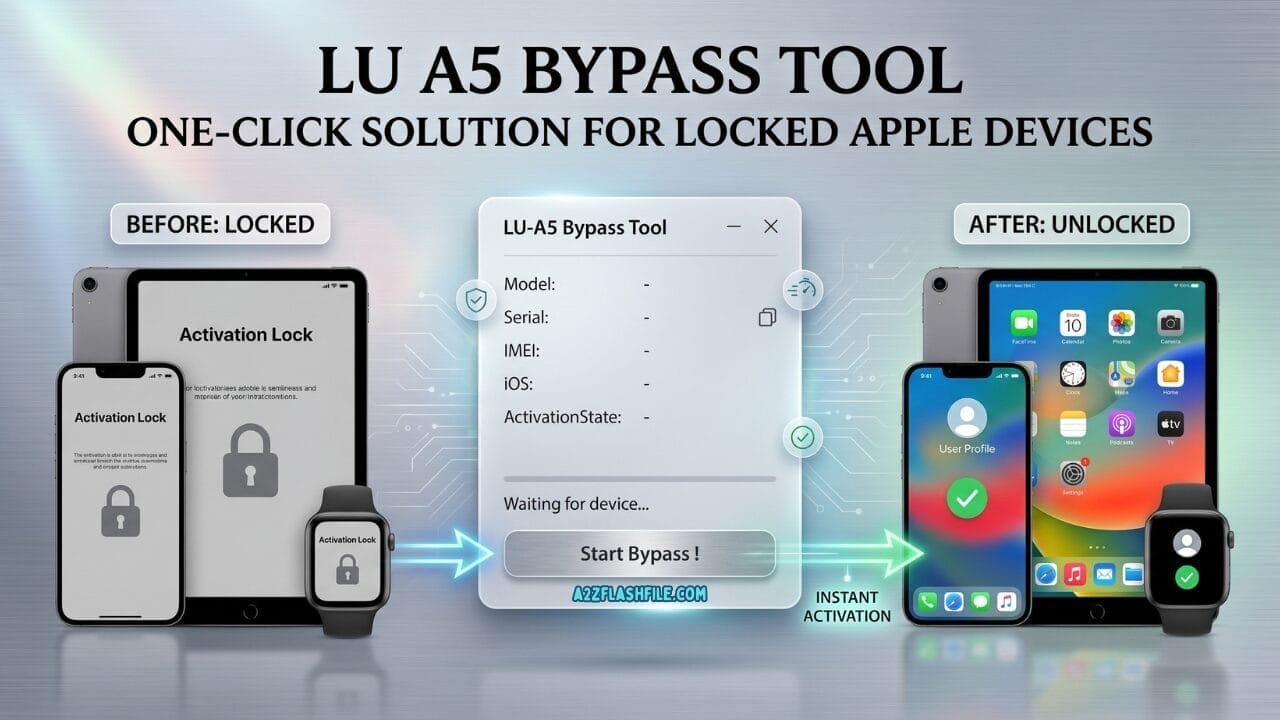
This is the lu a5 bypass tool interface — clean simple and straight to the point. Just connect your a5 or a5x device via usb and the tool automatically detects it. No complicated settings no confusing menus. Once your device shows up hit start bypass and let it do the rest.
If You’ve Been Staring At A Locked Iphone 4s Or Ipad 2 With No Way In You Already Know How Frustrating That Feeling Is. You’ve Tried Everything Different Cables Different Computers Maybe Even A Few Tools That Promised Results And Delivered Nothing. It’s Exhausting And Most Guides Out There Either Don’t Work Or Are Written For People Who Already Know What They’re Doing.
That’s Exactly Why This Post Is Here. We’re Going To Walk You Through The Lu A5 Bypass Tool A Straightforward No-arduino Solution Built Specifically For A5 And A5x Devices Like The Iphone 4s Ipad 2 Ipad 3 Ipod Touch 5g Ipod Mini And Apple Tv 3. No Complicated Setup No Wasted Time. Just A Fast Stable Process That Actually Gets The Job Done And We’ll Show You Exactly How It Works.
What Is The Lu A5 Bypass Tool
If You’re Dealing With An Activation Lock On An Older Apple Device You’ve Probably Hit A Wall. Most Modern Bypass Tools Don’t Even Support A5 Or A5x Chip Devices Anymore They’ve Moved On To Newer Hardware And Left Older Models Behind. That’s Where The Lu A5 Bypass Tool Comes In. It’s Built From The Ground Up Specifically For These Older Chipsets Which Means It Actually Works Where Other Tools Fail.
The Tool Runs On A One-click Process You Don’t Need Any Technical Background To Use It. In Fact That’s One Of The Biggest Reasons People Prefer It. No Arduino Board No Complicated Drivers No Confusing Command Lines. You Plug In Your Device Run The Tool And It Handles The Rest. It Delivers Stable Performance Throughout The Process So You’re Not Left Wondering If Something Went Wrong Halfway Through. Here’s A Quick Look At Everything It Supports:
Download The Lu A5 Bypass Tool Latest Version
Getting Your Hands On The Latest Version Is Straightforward. The Download Is Clean Lightweight And Doesn’t Require Any Extra Software Installation Before You Start. Once You Download It Everything You Need Is Right There In The Package No Hunting For Additional Files Or Drivers. It’s The Kind Of Setup Where You Download Open And Go.
Before You Download Just Keep One Thing In Mind The Lu A5 Bypass Tool Is Designed For Registered Users Only. Once You Register There’s No Cancellation So Make Sure Your Device Is On The Supported List Before You Proceed. If Your Device Is Listed Above You’re Good To Go. The Process Is Fast The Performance Is Reliable And Honestly For A5 And A5x Devices This Is One Of The Most Dependable Options Available Right Now. Hit The Download Button Below And Get Started.
Is Your Device Compatible With The Lu A5 Bypass Tool
Before You Download Anything The First Thing You Want To Confirm Is Whether Your Device Is Actually On The Supported List. The Lu A5 Bypass Tool Works Exclusively With Apple Devices Running The A5 Or A5x Chip — And Nothing Else. Using It On An Unsupported Device Won’t Give You Results So Always Check First.
Supported Devices:
| Device | Chip |
|---|---|
| iPhone 4S | A5 |
| iPad 2 | A5 |
| iPad 3 | A5X |
| iPod Touch 5G | A5 |
| iPod Mini 5G | A5 |
| Apple TV 3 | A5 |
If Your Device Is On This List You’re In The Right Place. If It’s Not For Example If You Have An Iphone 5 Or Later You’ll Need A Different Tool Built For A Different Chipset.
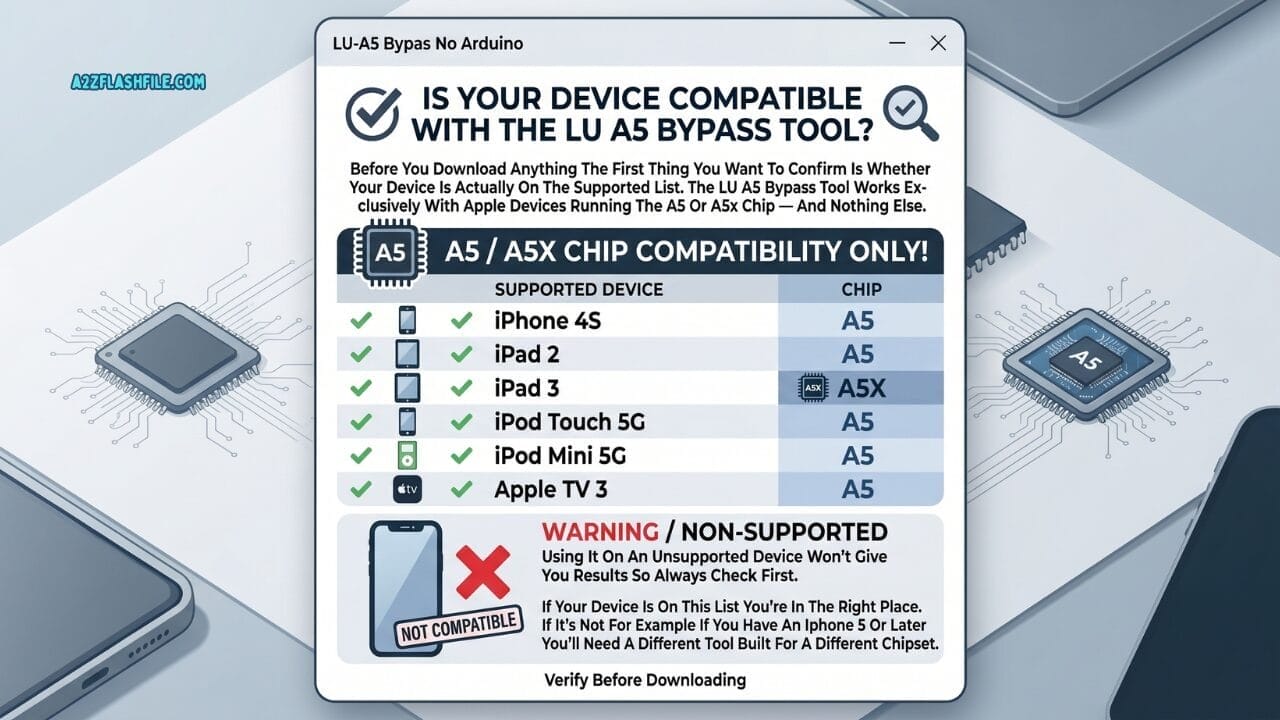
Not every device works with the lu a5 bypass tool — and that’s the first thing you need to check. This tool works exclusively with a5 and a5x chip devices. Iphone 4s ipad 2 ipad 3 ipod touch 5g ipod mini 5g and apple tv 3 are all supported. Anything newer like iphone 5 or later? You’ll need a different tool entirely.
Lu A5 Bypass Tool System Requirements
You Don’t Need A High-end Machine To Run This Tool. It’s Lightweight And Doesn’t Demand Much From Your Computer. That Said There Are A Few Basic Things You’ll Want To Make Sure Are In Order Before You Get Started.
Here’s What You’ll Need:
- Operating System: Windows 7 8 10 Or 11 (32-bit Or 64-bit)
- Usb Cable: Original Or Good-quality Cable For A Stable Connection
- Itunes: Latest Version Installed On Your Pc
- Storage: At Least 200mb Of Free Space
- Internet: Active Connection For Registration And Activation
- Device: Must Be From The Supported A5/a5x Device List Above
One Thing Worth Noting No Arduino Is Required At Any Stage. The Tool Handles Everything Through Your Usb Connection Which Makes The Whole Process A Lot Simpler Than Older Methods That Required Extra Hardware.
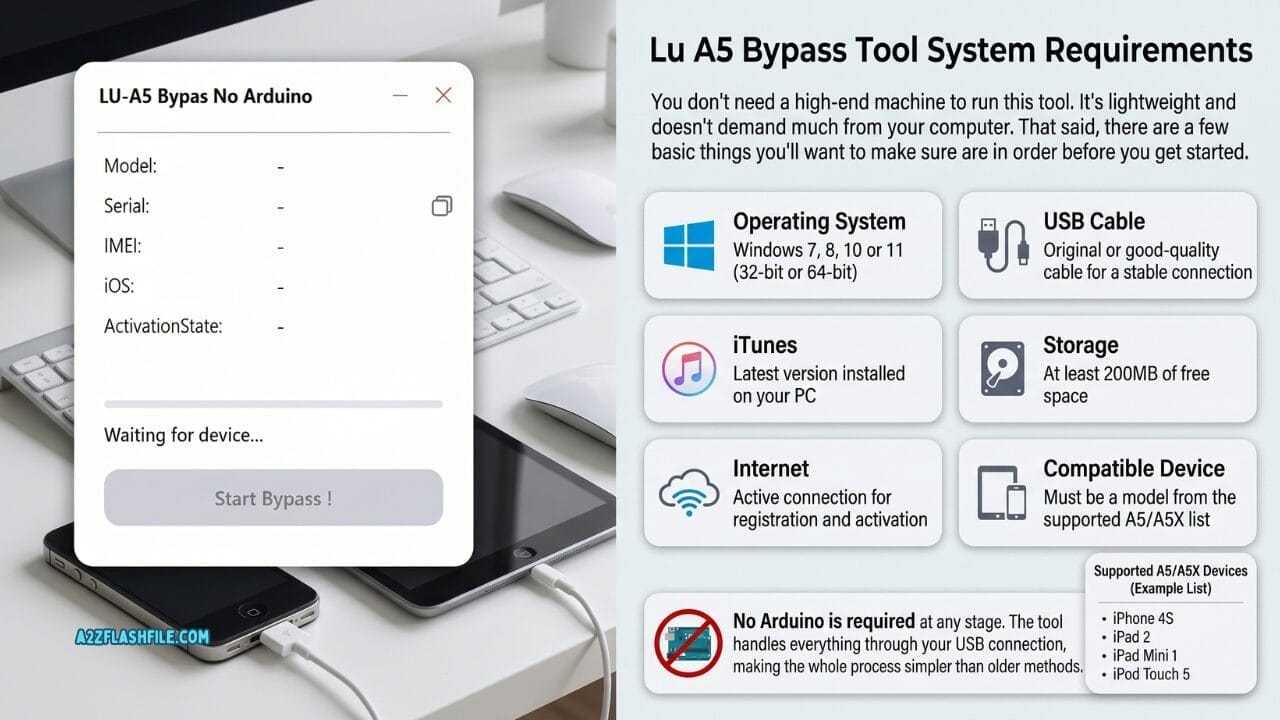
Good news — you don’t need a powerful computer to run the lu a5 bypass tool. Just windows 7 or later itunes a decent usb cable 200mb of free space and an active internet connection. No arduino required at any stage. Connect your device hit start bypass and you’re good to go.
How To Use The Lu A5 Bypass Tool Step By Step
Getting Through The Bypass Process Is Straightforward Once You Have Everything Ready. The Tool Is Designed To Be Simple So Even If You’ve Never Done Something Like This Before You Should Be Able To Follow Along Without Any Trouble.
Follow These Steps In Order:
- Download The Lu A5 Bypass Tool From The Official Source (Link Below)
- Extract The Zip File To A Folder On Your Desktop
- Open The Tool As Administrator (Right-click → Run As Administrator)
- Register Your Copy Using Your Registration Details — Note That Registration Is Final And Cannot Be Cancelled
- Connect Your A5/a5x Device To Your Pc Using A Usb Cable
- Wait For The Tool To Detect Your Device Automatically
- Click The Bypass Button And Let The Tool Do Its Work
- Wait For The Process To Complete — Don’t Disconnect Your Device Mid-process
- Done — Your Device Should Now Be Bypassed And Ready To Use
The Whole Process Is Fast. Most Users Report It’s Done In Just A Few Minutes. Keep Your Device Connected And Don’t Touch Anything Until The Tool Confirms It’s Finished.
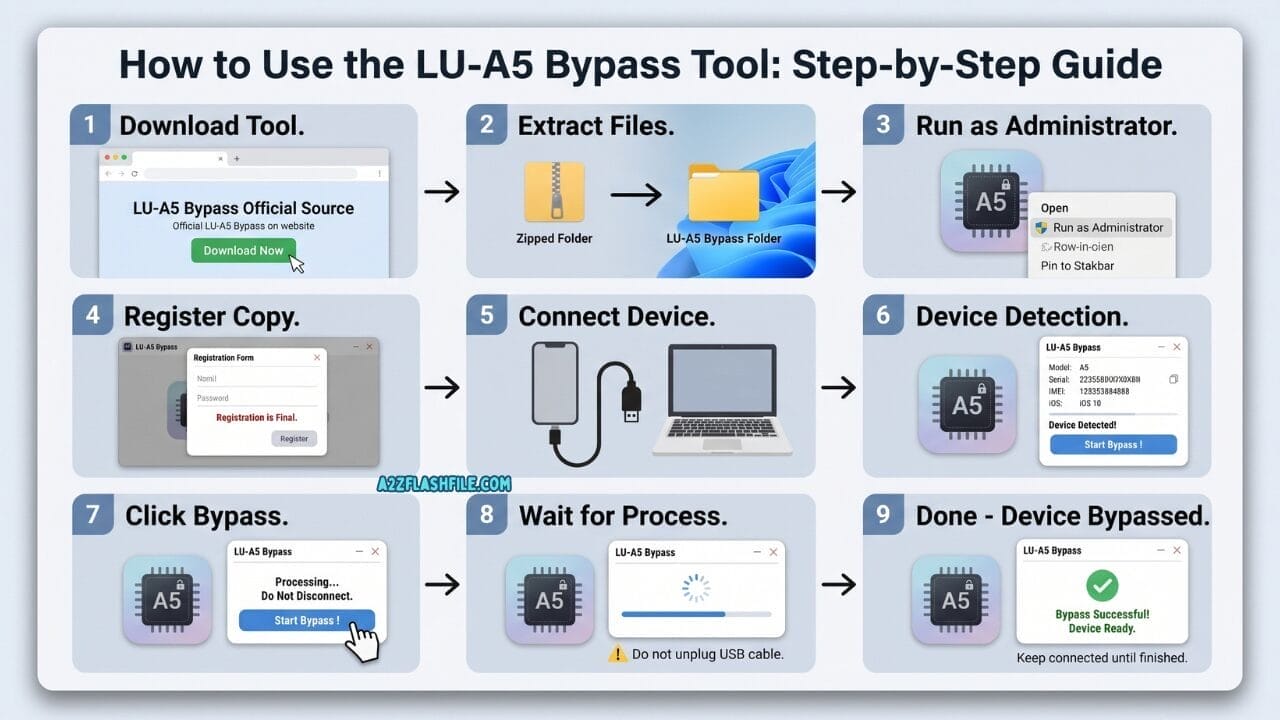
Never used a bypass tool before? No problem. The lu a5 bypass tool walks you through everything in just 9 steps — download extract register connect and hit bypass. The whole thing takes just a few minutes. Just don’t unplug your device until it says “bypass successful — device ready. ”
How To Install The Lu A5 Bypass Tool On Windows
Installing The Tool On Windows Is Quick And Doesn’t Require Any Advanced Technical Knowledge. Once You’ve Downloaded The File The Setup Takes Less Than Two Minutes. Just Make Sure You Have Itunes Installed Beforehand Since The Tool Relies On Apple’s Drivers To Communicate With Your Device.
Here’s How To Install It:
Download The Tool From The Link Provided Below
Right-click The Downloaded Zip File And Select Extract All
Open The Extracted Folder And Locate The Setup File
Right-click The Setup File And Choose Run As Administrator
Follow The On-screen Installation Prompts
Once Installed Open The Tool And Proceed With Registration
Connect Your Device And You’re Ready To Go
If Windows Defender Or Your Antivirus Flags The File That’s Completely Normal For Bypass Tools Of This Type. You May Need To Temporarily Disable Your Antivirus Or Add The Tool To Your Exceptions List Before Installing.
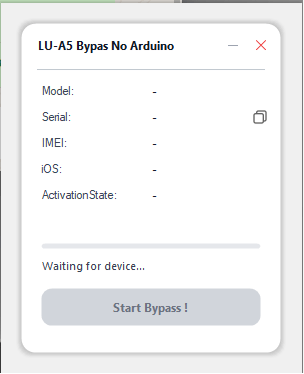
This is the lu a5 bypass tool interface — clean simple and straight to the point. Connect your a5 or a5x device and it automatically detects everything — model serial imei ios version and activation state. Once detected just hit start bypass and let the tool do the rest.
What Happens After The Bypass Is Complete
Once The Bypass Finishes Your Device Will Restart And Come Back On Without The Activation Lock Screen. You’ll Be Able To Access The Home Screen And Use The Device Normally — At Least For The Core Functions The Bypass Enables.
It’s Worth Knowing That A Bypassed Device Works Differently From A Fully Unlocked One. Here’s What You Can Typically Expect:
- Access To The Home Screen
- Use Of Wi-fi And Apps
- Camera And Basic Functions
- App Store Access In Most Cases
- Cellular Calling May Be Limited Depending On The Device And Ios Version
- Icloud-linked Features May Remain Restricted
The Bypass Gives You Functional Access To The Device. For Most People — Especially Those Using The Device As A Secondary Unit Or For Wi-fi Only Tasks — That’s More Than Enough.
Is The Lu A5 Bypass Tool Safe To Use
This Is A Question A Lot Of People Ask And It’s A Fair One. Any Time You’re Downloading A Tool That Interacts With A Locked Device You Want To Make Sure You’re Not Putting Your Computer Or Your Data At Risk.
The Lu A5 Bypass Tool Is Safe To Use As Long As You Download It From The Official Verified Source. The Tool Doesn’t Collect Your Personal Data Doesn’t Install Any Background Processes And Doesn’t Interfere With Your System Beyond What’s Needed To Communicate With Your Device. Antivirus Flags Are Common With Bypass Tools In General — That’s A False Positive Not A Genuine Threat. If You’re Downloading From A Trusted Source And Running It On A Supported Device You Have Nothing To Worry About.
Lu A5 Bypass Tool Free Or Paid
The Lu A5 Bypass Tool Is A Paid Tool. It Requires Registration Before Use And That Registration Is Permanent — Meaning Once You Register There Are No Refunds Or Cancellations. So Before You Buy Make Absolutely Sure Your Device Is On The Supported List.
Here’s A Quick Summary:
| Feature | Details |
|---|---|
| Price | Paid (registration required) |
| Cancellation | Not available after registration |
| Supported Devices | A5 and A5X only |
| Free Trial | Not available |
| Updates | Included with registration |
It’s A One-time Investment For The Tool And It Works Specifically For The Devices Listed. If You Own One Of Those Devices And Need To Bypass The Activation Lock It’s Worth It. Just Don’t Buy It Hoping It’ll Work On A Newer Device — It Won’t.
Common Errors And How To Fix Them
Even With A Tool As Simple As This One Things Can Occasionally Go Wrong. Most Errors Are Easy To Fix Once You Know What’s Causing Them. Here Are The Most Common Ones And How To Deal With Them:
Device Not Detected
Make Sure You’re Using A Genuine Or High-quality Usb Cable. Cheap Cables Often Cause Connection Issues. Also Check That Itunes Is Installed And Up To Date — The Tool Depends On Apple’s Drivers To Detect Your Device.
Tool Not Opening
Always Run The Tool As Administrator. Right-click The Icon And Select “run As Administrator.” If It Still Won’t Open Try Disabling Your Antivirus Temporarily And Then Launching It Again.
Process Stuck Or Frozen
Don’t Panic. Close The Tool Restart Your Device Reconnect It And Run The Process Again From The Beginning. Make Sure Your Device Stays Connected Throughout And That It Doesn’t Go To Sleep Mid-process.
Registration Not Working
Double-check Your Registration Details For Typos. If The Problem Continues Contact The Tool’s Official Support Team Directly — They’re Typically Responsive And Can Resolve Registration Issues Quickly.
Tool Flagged By Antivirus
This Is A False Positive. Add The Tool To Your Antivirus Exceptions List And Try Again. This Is Standard Behavior For Bypass Tools And Doesn’t Indicate Any Real Threat.
Frequently Asked Questions (FAQs)
Does The Lu A5 Bypass Tool Work On Iphone 5 Or Newer?
No — This Tool Is Exclusively Built For A5 And A5x Chip Devices. For Newer Iphones You’ll Need A Different Bypass Solution Designed For Later Chipsets.
Do I Need An Arduino To Use This Tool?
Not At All. One Of The Biggest Advantages Of The Lu A5 Bypass Tool Is That It Requires No Arduino Hardware — Just Your Device A Usb Cable And A Windows Pc.
How Long Does The Bypass Process Take?
Most Users Complete The Entire Process In Under Five Minutes. The Tool Is Built For A Fast Process So As Long As Your Device Is Detected Properly It Shouldn’t Take Long At All.
Can I Use The Tool On A Mac?
Currently The Tool Is Windows-only. You’ll Need A Windows Pc Running Windows 7 8 10 Or 11 To Run It.
What If My Device Isn’t Detected After Connecting?
First Try A Different Usb Cable — Connection Issues Are The Most Common Cause. Also Make Sure Itunes Is Installed And That Your Device Is Powered On Before Connecting.
Conclusion
Dealing With A Locked A5 Or A5x Apple Device Is Frustrating Especially When Most Tools Out There Simply Don’t Support Older Chipsets Anymore. That’s Exactly The Gap The Lu A5 Bypass Tool Fills. It’s Built Specifically For Devices Like The Iphone 4s Ipad 2 Ipad 3 Ipod Touch 5g Ipod Mini 5g And Apple Tv 3 And It Does The Job Without Requiring Any Arduino Hardware Or Technical Expertise.
The Process Is Straightforward. Download The Tool Register Connect Your Device And Hit Bypass. That’s Really All There Is To It. The Stable Performance And One-click Operation Make It One Of The Most Hassle-free Options Available For These Older Apple Devices Right Now. If Your Device Is On The Supported List And You Need A Reliable Way Back In This Tool Is Worth It.
Just Remember Confirm Your Device Is Compatible Before Registering Since The Registration Is Final. Download Only From A Verified Source Run The Tool As Administrator And Keep Your Device Connected Until The Process Is Fully Complete. Do That And You Should Be Up And Running In Just A Few Minutes.
LU A5 Bypass Tool
[Click Here to Serial Number Register This Tool on WhatsApp] (Paid)
Download Link:: Usersdrive – Mediafire – 4shared – My.pcloud – Playbook – DropBox – Mega – Vexfile


