

Maant maintenance assistant tool interface with bug tracking data updates and multi-brand mobile repair options
If You’ve Ever Stared At A Dead Smartphone With No Schematic No Test Points And Absolutely No Idea Where To Start — You Already Know How Draining That Feeling Is. Most Technicians Don’t Quit Because They Lack Skill; They Quit Because They’re Working Blind Without The Right Tools To Guide Them. Whether You’re Chasing A Short Circuit On An Iphone Tracing A Broken Signal Line On A Samsung Or Diagnosing A Xiaomi That Simply Won’t Power On — The Guesswork Alone Can Eat Up Hours You Don’t Have.
That’s Exactly Where The Maant Maintenance Assistant Tool Steps In And Changes Everything. In This Post We’ll Walk You Through Everything Maant Brings To The Table — From Detailed Schematic Diagrams And Pcb Point Maps To Real-time Current Analysis Signal Detection And An Intelligent Guided Workflow That Ties It All Together. We’ll Also Cover Its Powerful Software Features Brand Support For 18+ Major Manufacturers Including Apple Samsung Huawei And Xiaomi Plus Its Built-in Community Case Studies And Regular Data Updates. By The End You’ll Understand Exactly Why Serious Repair Technicians Are Calling It The Most Complete Diagnostic Tool They’ve Ever Used.
What Is The Maant Maintenance Assistant
If You Work On Phones At The Board Level You Already Know How Messy The Process Can Get. The Maant Maintenance Assistant Is Repair Software Designed Exactly For That Kind Of Work — It Pulls Together Schematics Pcb Test Point Maps Current Analysis And Signal Tracing Into One Place. No More Switching Between Apps Or Digging Through Random Pdf Folders. Everything You Need Sits In One Clean Workspace And It Actually Walks You Through The Repair Step By Step.
The Real Magic Is How All The Tools Talk To Each Other. Pull Up A Schematic To Understand The Circuit Then Jump To The Point Diagrams To Find Your Test Points Fast. If You’re Still Not Sure What’s Wrong The Current Analyzer Will Show You Exactly Where The Voltage Or Current Is Off. Signal Detection Then Helps You Follow The Signal Path And Catch Broken Lines Or Dead Ics Before They Waste More Of Your Time. Put It All Together And The Intelligent Maintenance Mode Gives You A Guided Workflow That Makes Even The Hardest Diagnosis Feel A Lot Less Overwhelming.
Download The Maant Maintenance Assistant Latest Version
Getting The Maant Maintenance Assistant Is Simple And Straightforward. Visit The Official Platform Or Its Authorized Page And Download The Latest Version Available. The Software Includes A Dedicated Update Section So You Always Know Exactly What Version You’re Running. A Data Update Log Tracks Every New Addition Schematics Point Maps Bitmap Updates And Firmware Data — So Your Repair Library Stays Current. It’s Worth Checking Regularly Because New Phone Models Drop Fast And Your Tools Should Always Keep Up.
One Thing Technicians Genuinely Appreciate Is The Built-in Bug And Feedback System. If A Point Map Looks Wrong Or A Schematic Seems Off You Can Flag It Directly Inside The App. Each Report Is Tracked By Id Version Hardware And Network Details And You Can Monitor Its Status In Real Time. There’s Also A Case Study Section Where You Can Learn From Real Repairs Others Have Already Solved. Combined With Quick-access Search Recently Used Files And The Point Map Bug Reporting System It Feels Less Like Software And More Like A Smart Repair Partner.
Features
- Schematic Diagrams – View Detailed Circuit Layouts Of Popular Smartphones And Electronics.
- Point Diagrams – Easily Locate Test Points On The Pcb For Faster Repairs.
- Current Analyzer – Monitor Voltage And Current To Detect Hardware Faults.
- Signal Detection – Trace Signal Paths And Locate Broken Lines Or Malfunctioning Ics.
- Intelligent Maintenance – Combines All Tools Into A Guided, Smart Workflow For Easier Diagnosis.
Software Functions
- iOS Crash (iOS Crash Analysis Tool)
- Serial Tool Support
- Thermal Management Section
- Shop Integration
- Community (Cmnty) Access
- Accounting Module
Data & Updates
- Data Update Log (Latest Updates Tracking)
- Software Update Section
- Case Study Access
- Data Update Management
Bug & Feedback System
- Bug Feedback Submission
- Bug Tracking (ID, Version, Hardware, Network)
- Status Monitoring (Processed / Unprocessed)
- Contact Info Display
- Update Time Logs
Brand Support
- Apple (iPhone, iPad)
- Samsung
- Huawei
- Oppo
- Vivo
- OnePlus
- Xiaomi
- Realme
- Tecno / Infinix
- Sony
- LG
- Nokia
- Lenovo
- ZTE
- Meizu
- Asus
- Black Shark
- Google Devices
Extra Utilities
- Recently Used Files Section
- Search Bar for Quick Access
- Point Map Bug Reporting System
- Bitmap / Firmware Data Updates
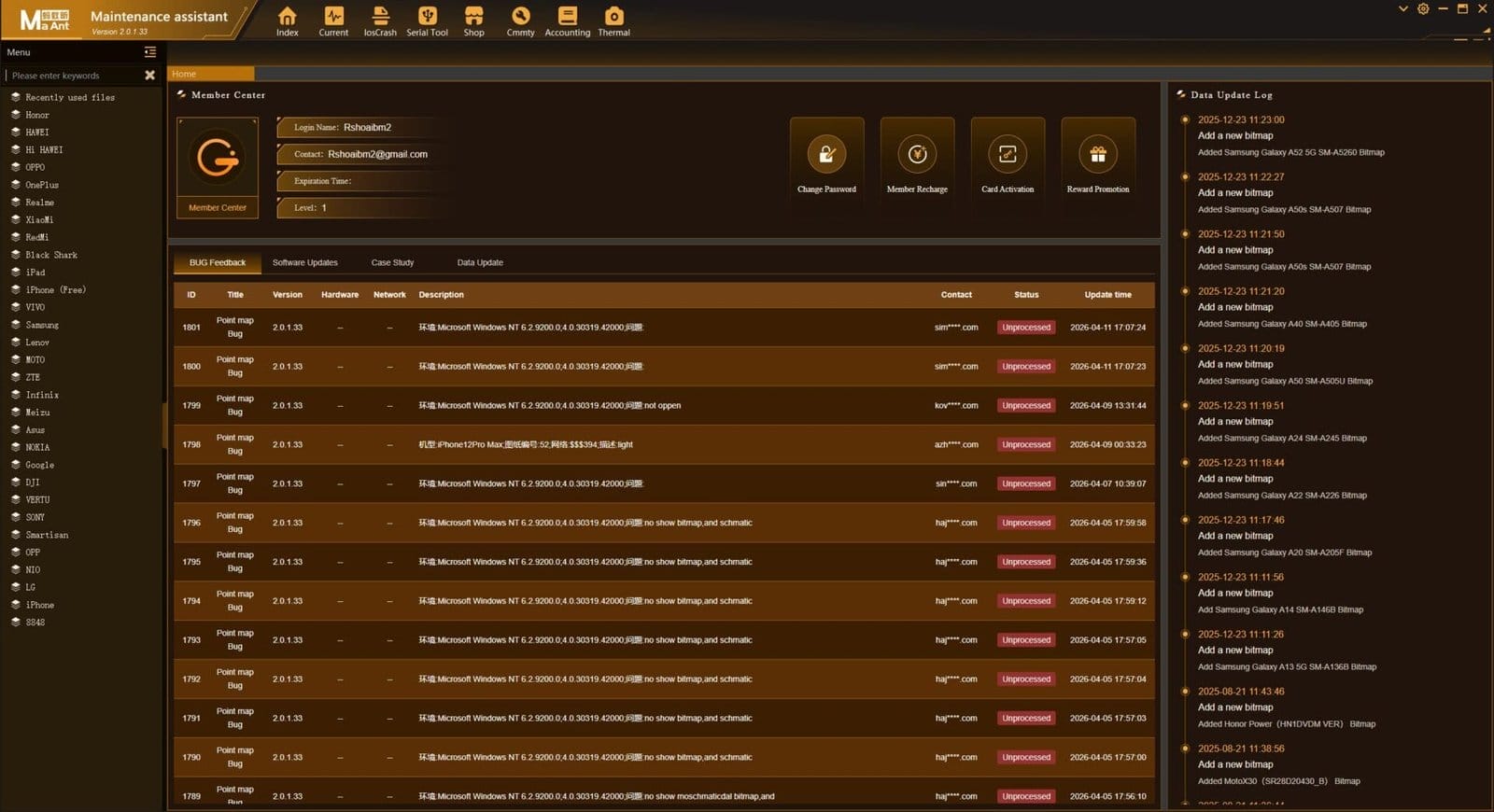
Maant maintenance assistant dashboard with multiple repair tools bug tracking system and device brand support
Brand Support — Devices Covered By Maant
One Of The Biggest Strengths Of The Maant Maintenance Assistant Is How Wide Its Device Coverage Actually Is. It Supports Over 18 Major Brands Including Apple Samsung Huawei Oppo Vivo Oneplus Xiaomi Realme Tecno Infinix Sony Lg Nokia Lenovo Zte Meizu Asus Black Shark And Google Devices. Whatever Lands On Your Repair Bench There’s A Solid Chance Maant Already Has The Data For It.
And It’s Not Just Basic Coverage Either. For Each Supported Brand You Get Proper Schematics Accurate Point Maps And Regularly Updated Firmware And Bitmap Data. The Team Keeps Adding New Models Through The Data Update Log So Your Library Grows Over Time. That Kind Of Ongoing Support Is Exactly What Separates A Tool Worth Investing In From One That Goes Stale After Six Months.
Bug Reporting And Feedback System
No Software Is Perfect And Maant Knows That. If You Spot An Error In A Point Map Or Notice Something Off In A Schematic You Can Report It Directly Inside The App Without Any Hassle. The Bug Feedback System Lets You Submit Issues Instantly And Tracks Each One By Id Version Hardware And Network Details So Nothing Gets Lost Or Ignored.
What’s Even Better Is The Transparency. You Can Check The Status Of Your Report Anytime — Whether It’s Been Processed Or Is Still Pending. Update Time Logs Show You Exactly When Fixes Went Live. It’s The Kind Of Accountability That Builds Real Trust Between The Developers And The Technicians Using The Tool Every Single Day.
Frequently Asked Questions (FAQs)
What Is The Maant Maintenance Assistant Used For?
It’s A Professional Phone Repair Software That Gives Technicians Access To Schematics Pcb Point Maps Current Analysis And Signal Detection Tools — All In One Place.
Which Phone Brands Does Maant Support?
Maant Supports 18+ Brands Including Apple Samsung Huawei Xiaomi Oppo Vivo Oneplus Realme Sony Lg Nokia Asus And More.
Is Maant Suitable For Beginner Repair Technicians?
Yes — The Intelligent Maintenance Mode Guides You Through A Smart Step-by-step Workflow Making It Easier Even If You’re Still Building Your Board-level Repair Skills.
How Often Does Maant Update Its Data?
Maant Regularly Pushes New Schematics Point Maps And Firmware Data Through Its Data Update Log So Your Repair Library Stays Current With New Device Models.
Can I Report Errors Or Bugs Inside The Maant App?
Absolutely — The Built-in Bug Feedback System Lets You Flag Issues Directly Track Their Status And See When Fixes Have Been Applied Through The Update Time Logs.
How To Download
To Download Follow These Steps:
- Go To The A2zflashfile.com Website Of MaAnt Maintenance Assistant Tool.
- Find The Download Page And Click Only The (Download Link).
- Wait For The Download To Complete.
- Locate The Downloaded File On Your Device Once The Download
Get Instant Access to All Professional Tools at Best Prices:
Unlock Tool | DFT Pro | Pandora | MDM Fix | Chimera | Cheetah | EFT Pro | UMT | NCK | CM2 | Hydra | Z3X | Sigma | Octopus | Griffin | TFM | TSM | EMT | MST | DT Pro | AMT | TR Tool | CF Tool | UAT | 360 Tool | Scorpion | Easy Box | Best Dongle | HCU | Sams Tool
Instant Activation | 24/7 Service | Worldwide Support
[Click Here to Get Tool on WhatsApp]
MaAnt Maintenance Assistant Tool
Download Link:: Usersdrive – Mediafire – 4shared – My.pcloud – Playbook – Google Drive – DropBox – Mega – Vexfile


