
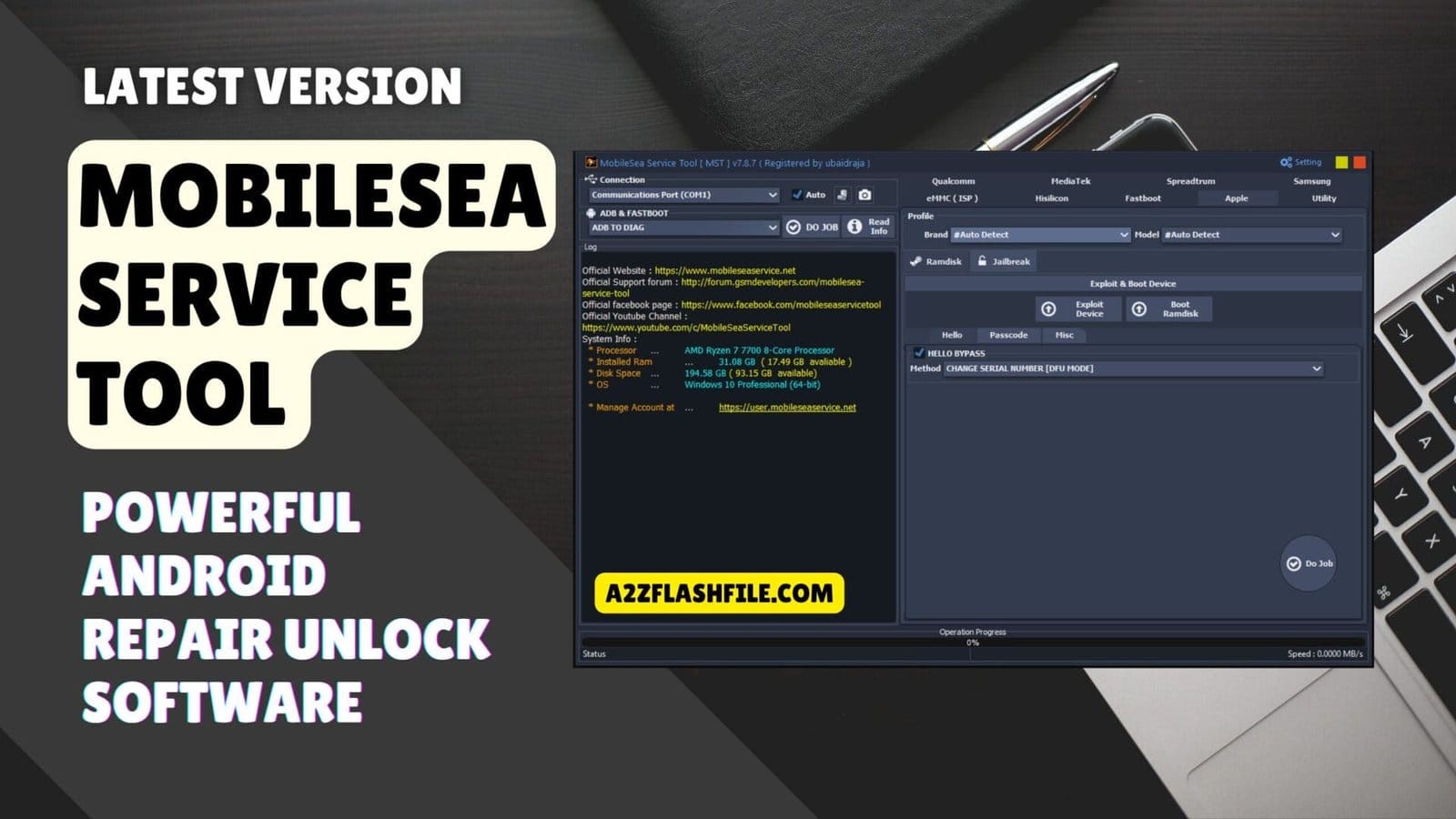
It Is Honestly So Heartbreaking When You’re Just Sitting There Staring At A Phone That’s Basically A Brick Because Of A Random Frp Lock Or A Bootloop That Just Won’t Stop. We’ve All Been In That Spot—sweating Over A Xiaomi Account Screen Or A Forgotten Pattern And Feeling Like We’ve Just Wasted Our Hard-earned Money On A Piece Of Plastic. You Just Want A Way To Fix It Yourself Without Spending A Fortune At A Repair Shop Or Getting Lost In Those Confusing Online Forums That Never Seem To Help.
Well That Is Exactly Why I’ve Put Together This Deep Dive Into The Mobilesea Service Tool Which Is A Total Lifesaver For Everything From Qualcomm Flashing To Those Annoying Samsung Frp Locks. Whether You Need To Repair An Imei On A Mediatek Device Handle A Samsung Softbrick Fix Or Even Extract Firmware In The Utility Section I’ve Broken Down Every Single Feature Into Plain Simple Steps. This Guide Is Here To Help You Navigate Every Tab And “do Job” Like A Pro So You Can Finally Get Your Device Back To Life Without Any More Stress.
What Is The Mobilesea Service Tool
Let’s Talk About What This Software Actually Does Behind The Scenes On Your Workbench. This Application Is Essentially A Digital Swiss Army Knife Built Specifically For Crazy Smartphone Repairs. It Gives You Raw Access Into Chipsets Like Mediatek And Spreadtrum So You Can Fix Almost Anything. You Can Easily Run A Quick Emmc-ufs Health Check Just To See What Is Surviving On A Dead Board. The Whole Dashboard Is Packed With Big Helpful Buttons Like Do Job To Make Your Day Way Easier.
It Handles All The Heavy Lifting Without Crashing Your Pc Or Causing Weird Driver Issues. You Can Easily Remove User Locks Without Data Lose Which Is Huge For Panicked Customers. You Could Also Trigger A Full Reset To Factory (master Clear) If A Phone Is Heavily Infected With Malware. Network Repair Is Huge Here Because You Literally Just Input An Imei 1 To Fix Broken Connections. You Can Also Enable Multi-sim Or Set A Spc Code 000000 For Specific Carrier Setups.
Download The Mobilesea Service Tool Latest Versoin
So You Want To Actually Download The Tool And Test These Features Out For Yourself Today? Please Do Not Just Click Random Sketchy Links On Google Because You Need The Official Installer. Grab The Download Straight From The Official Developer Forum So You Do Not Get Infected With Malware. Once You Finally Have The File Go Ahead And Run The Setup Carefully On Your Pc. You Also Need To Make Sure Your Adb And Mtk Drivers Are Installed Or It Will Not Connect.
Turn Off Your Antivirus Because Windows Defender Will Totally Freak Out Over The Legitimate Exploit Files. After It Is Installed Just Open The Software And Plug In Your Phone Then Hit Read Info. If You Are Doing Network Repairs You Just Select Database File Double Click Or Drag Database Files Here. You Literally Just Pick Your Desired Repair Method From The Drop-down Menu And Hit The Execute Button. This Software Is Honestly My Absolute Go-to Right Now Because They Constantly Update The Security Patches.
Features Mobile Sea Service Tool:
Qualcomm
Flash
- Flash Option
- Firmware Double Click For Firmware
- Backup EFS
- Auto Reboot
- Use Loader From Firmware
- Advance Mode
- Flash eMMC
- Reset FRP
- Flash
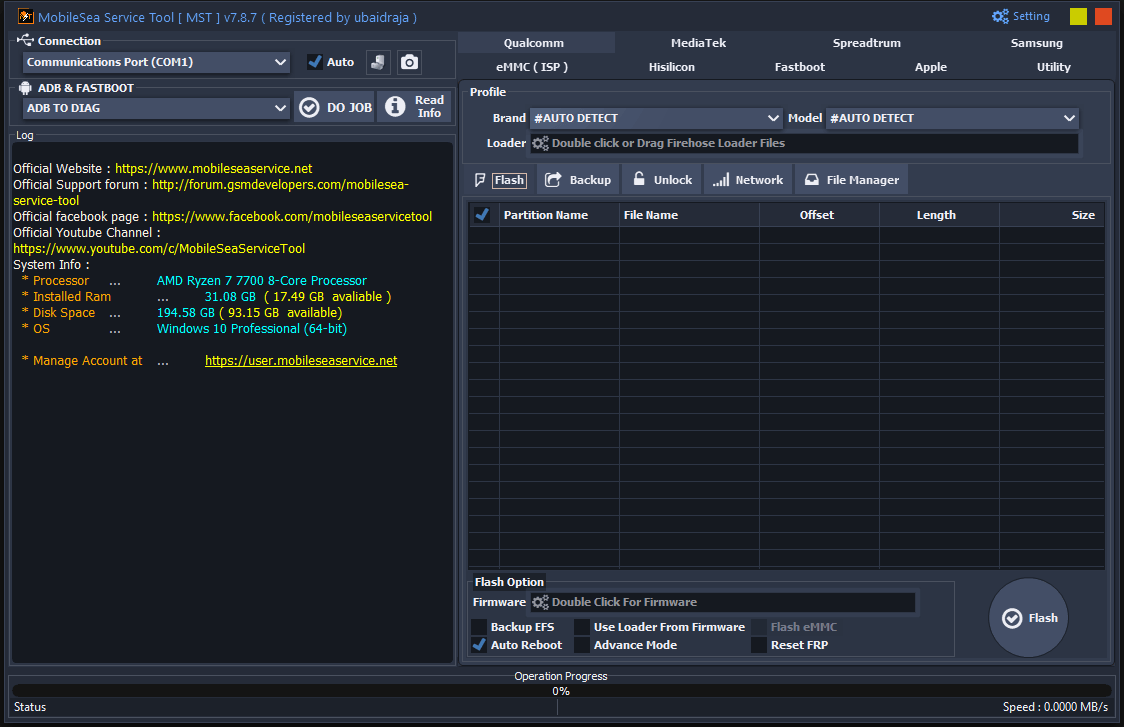
The qualcomm flash interface in the mobilesea service tool allows technicians to easily load firehose files select firmware and manage advanced flash options.
Unlock
Account Lock
- Frp Lock
- Frp Lock [ Assistant Mode ]
- Xiaomi Account Bypass ( Eu Rom )
- Xiaomi Account Bypass ( Method 1 )
- Xiaomi Account Bypass (method 1) [ Adb Mode Need Root ]
- Xiaomi Account Bypass ( Method 2 ) [ Adb Mode Need Root ]
- Xiaomi Account Bypass ( No Need Vpn )
- Xiaomi Account Bypass [ Adb Mode ]
- Xiaomi Account Bypass [ Assistant Mode] [ Offline Method]
- Xiaomi Account Bypass 2024 [ Adb Mode]
- Xiaomi Account Remove ( Method 1)
- Xiaomi Account Remove ( Method 2)
- Xiaomi Check Find Device Status
- Xiaomi Frp Lock [ Assistant Mode] [ Offline Method]
User Lock
- Read User Locks ( Patternpasswordpin)
- Reset To Factory
- Reset To Factory ( Master Clear)
- Reset To Factory [ Sideload Mode]
Utilities
- Disable Dm Verity
- Install Myanmar Unicode Font
- Install Myanmar Zawgyi Font
- Xiaomi Reset Network Security ( Efs Reset) [ Assistant Mode] [ Offline Method]
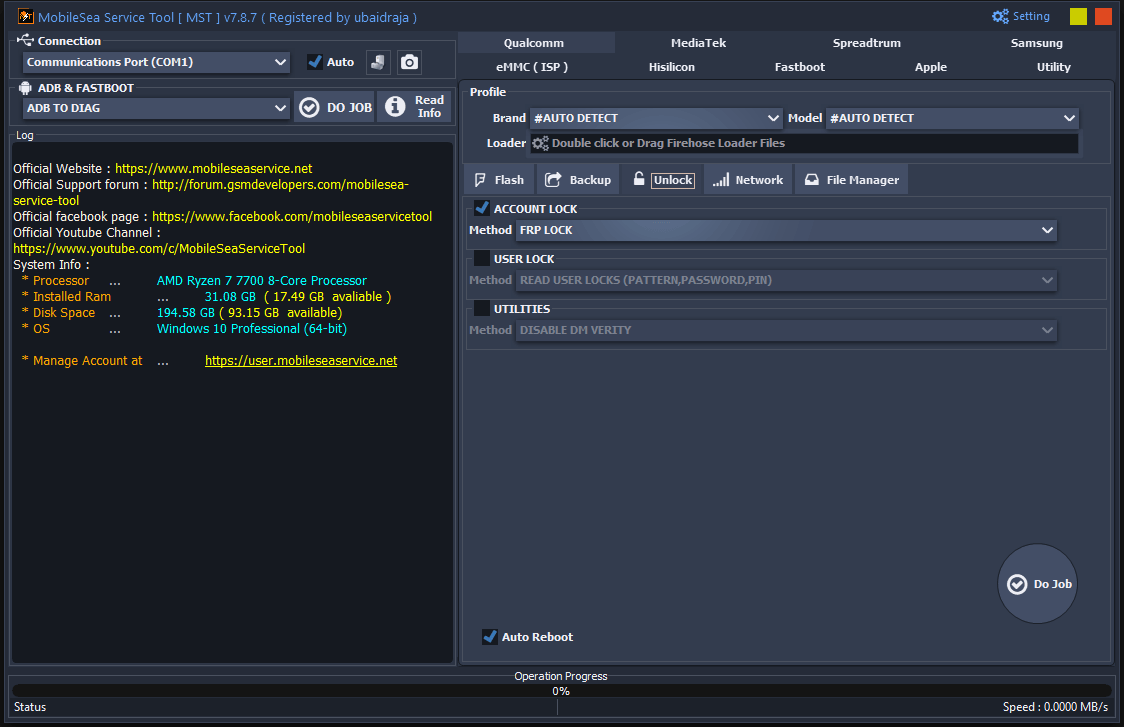
The qualcomm unlock tab in the mobilesea service tool provides powerful options to easily bypass frp locks read user passwords and manage device utilities.
Network
- Spc Code 000000
- Enable Multi-sim
- Network Repair
- Meid Enter Meid
- Imei 1 Enter Imei 1
- Imei 2 Enter Imei 2
- Sn Enter Serial Number
- Wifi Mac Enter Wilan Mac
- Bt Mac Enter Bt Mac
- B Sn Enter Board Serial Number
- Repair Method
- Generic
- Xiaomi Cpid
- Network Operations
- Method Name Backup Critical Data
- Warning Text (red Color)
- Note : Imei Changing Is Illegal In Some Countries.
- Use Of This Option Is At Your Own Risk.
- Do Job
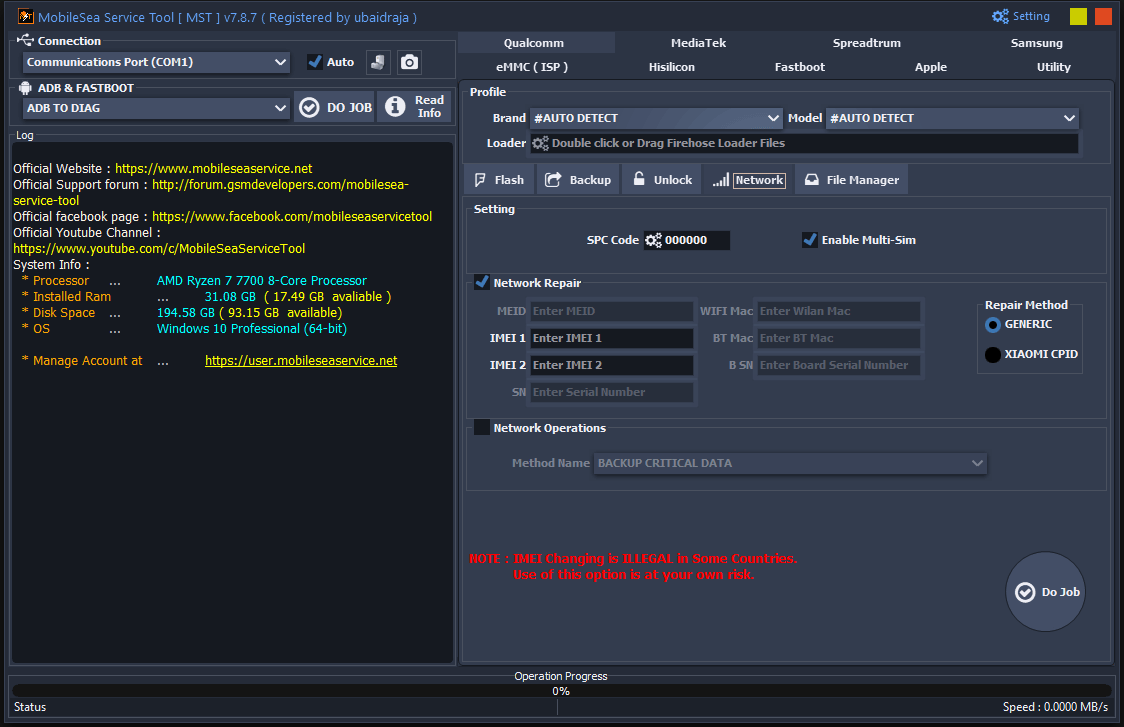
The qualcomm network tab in the mobilesea service tool provides powerful features for network repair including imei 1 and imei 2 restoration alongside options to backup critical data.
MediaTek
Flash
- Flash Option ( Bottom Right Section)
- Firmware: Double Click For Firmware
- Backup Nv ( Checked)
- Repartition
- Format All
- Firmware Upgrade
- Auto Sig Flash ( Checked)
- Dl Checksum
- Reset Frp
- Unlock Bl
- Advance Mode
- Flash ( Button)
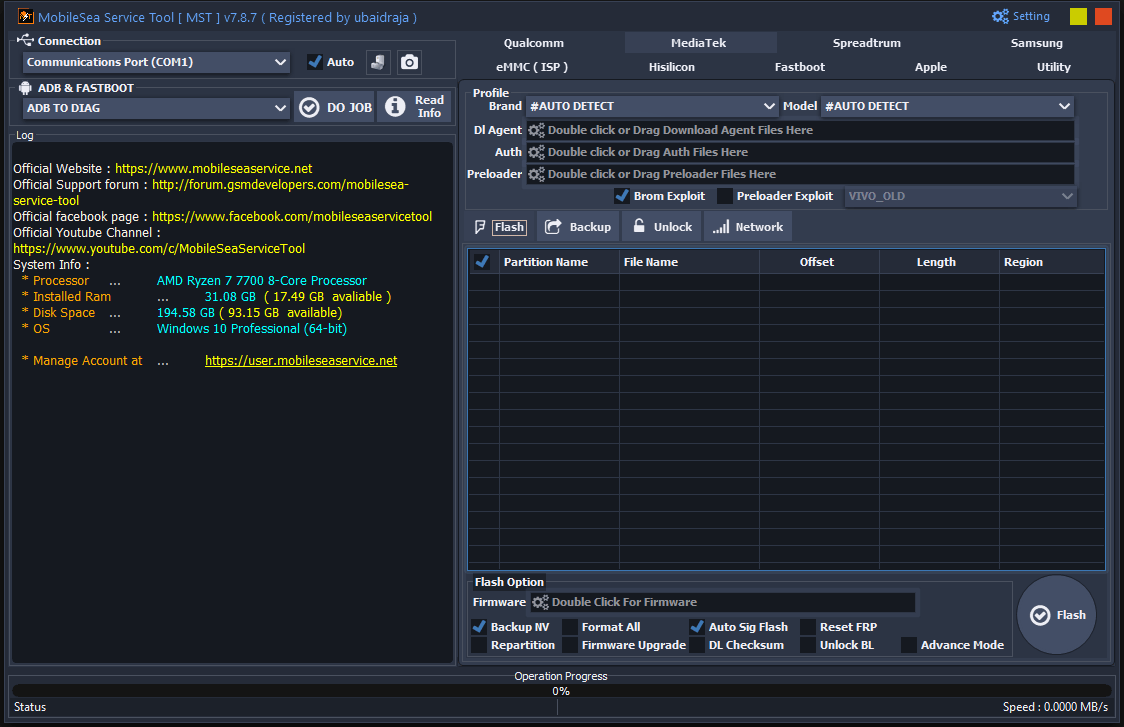
The mediatek flash interface in the mobile sea tool allows technicians to load specific agents utilize the brom exploit and manage crucial flash options like backup nv and auto sig flash.
Unlock
Account Lock
- Frp Lock
- Huawei Id Lock Remove
- Oppo Id Lock Remove
- Oppo Mdm Unlock
- Samsung Mdm Unlock
- Samsung Set Kg Flag
- Samsung Set Kg Flag
- Samsung Set Kg Flag
- Tecno Infinix Frp Lock
- Tecno Infinix Frp Lock Direct
- Vivo Mdm Unlock
- Vivo Mdm Unlock
- Xiaomi Account Bypass
- Xiaomi Account Bypass Miui 13
Misc Lock
- Direct Bootloader Unlock
- Oppo Demo Remove
- Tecno Infinix Adb Enable
- Tecno Infinix Remove Anti Crack
- Vivo Demo Remove
User Lock
- Read User Locks (Patternpasswordpin)
- Remove User Locks (Without Data Lose)
- Reset To Factory
- Reset To Factory (Huawei)
- Reset To Factory (Master Clear)
- Reset To Factory (Master Clear) [Meta Mode ]
- Reset To Factory ( Oppo Realme )
- Reset To Factory (Vivo)
- Reset To Factory [Meta Mode]
- Reset To Factory And Frp Lock
Utilities
- Auth Bypass
- Boot Slot Set [ A B ]
- Emmc-ufs Health Check
- Enter Brom Mode
- Exit Brom Mode
- Patch Dl Image Error
- Patch Dm Verify
- Patch Orange Message Error
- Rpmb Erase
- Rpmb Read
- Rpmb Write
- Vivo Imei Repair
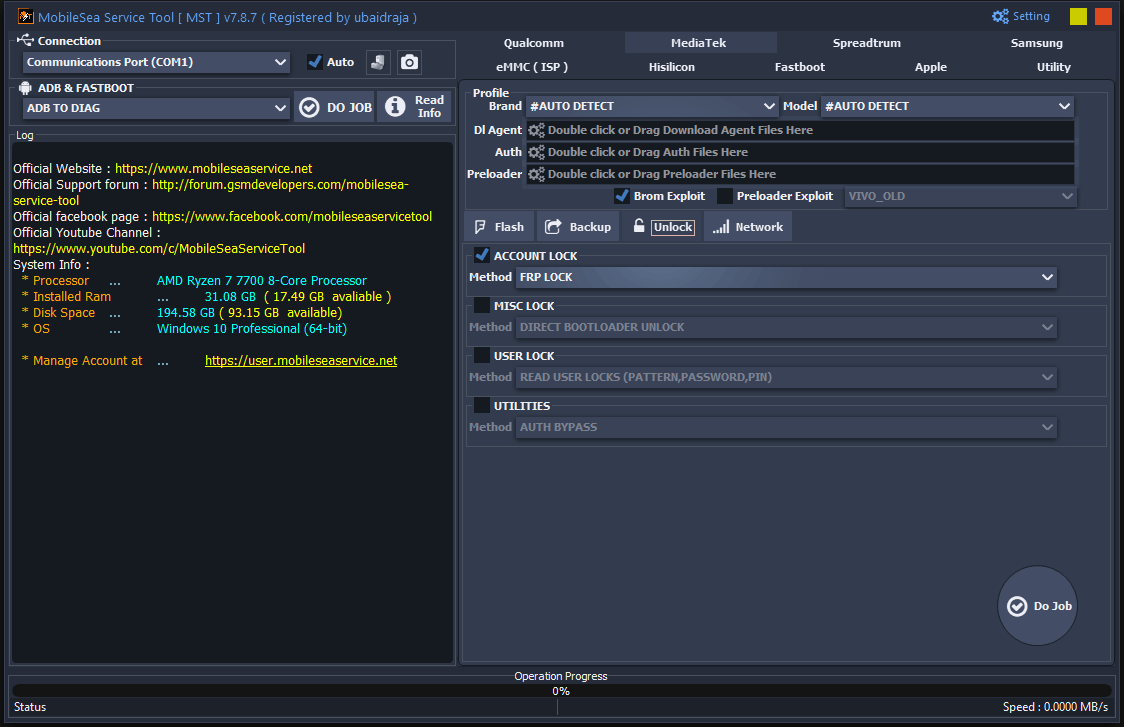
The mediatek unlock tab in the mobile sea tool provides powerful options to easily bypass frp locks execute direct bootloader unlocks and manage device utilities like auth bypass.
Network
- Database File Double Click Or Drag Database Files Here
- Auto Database
- Network Repair
- Imei 1
- Imei 2
- Repair Mode
- Adb
- Atci
- Meta (selected)
- Ets
- Brom
- Adb Method
- Old Mtk
- New Mtk
- Meta/ets Method
- Generic
- Xiaomi Cpid (selected)
- Network Operations (unchecked)
- Method Name Backup Critical Data
- Mode
- Meta
- Ets
- Warning Text (red Color)
- Note : Imei Changing Is Illegal In Some Countries.
- Use Of This Option Is At Your Own Risk.
- Do Job
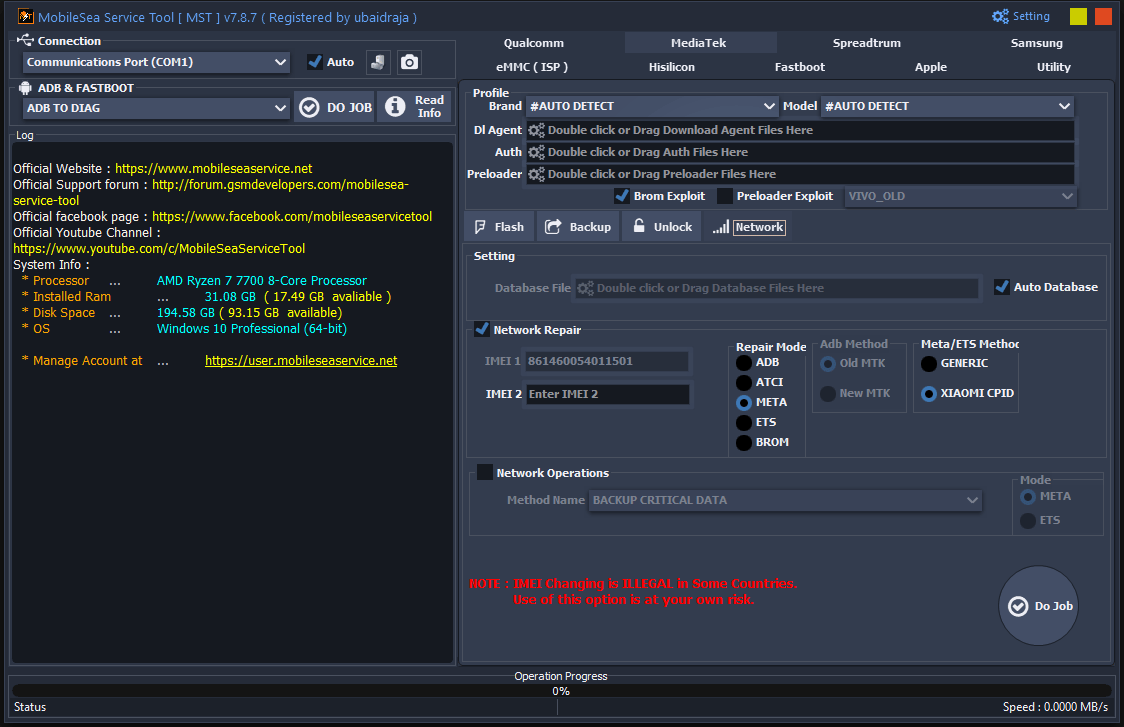
The mediatek network tab in the mobile sea tool provides advanced features for repairing network connections including imei restoration using meta mode and specific xiaomi cpid methods.
Spreadtrum
Flash
- Firmware Double Click For Firmware
- Backup Nvram Files
- Use Fdl From Firmware
- Repartition
- Auto Reboot
- Flash
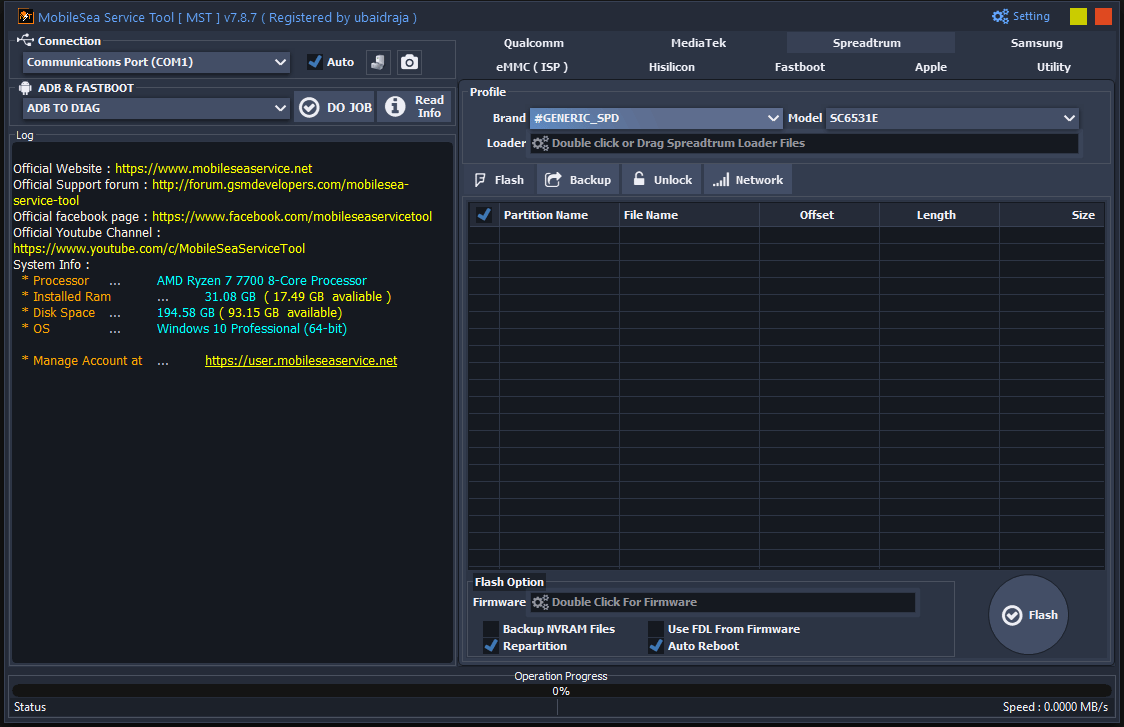
The spreadtrum flash tab in the mst tool allows technicians to load specific spreadtrum loader files and execute firmware flashing with options like repartition and auto reboot.
Unlock
Account Lock
- Frp Lock
- Samsung Mdm Unlock
Misc Lock
- Spreadtrum Direct Bootloader Relock
- Spreadtrum Direct Bootloader Relock [Fastboot Mode]
- Spreadtrum Direct Bootloader Unlock
- Spreadtrum Direct Bootloader Unlock [Fastboot Mode]
- Spreadtrum Direct Network Unlock
- Tecno Infinix Remove Anti Crack [Diag Mode]
User Lock
- Reset To Factory
- Reset To Factory [Diag Mode]
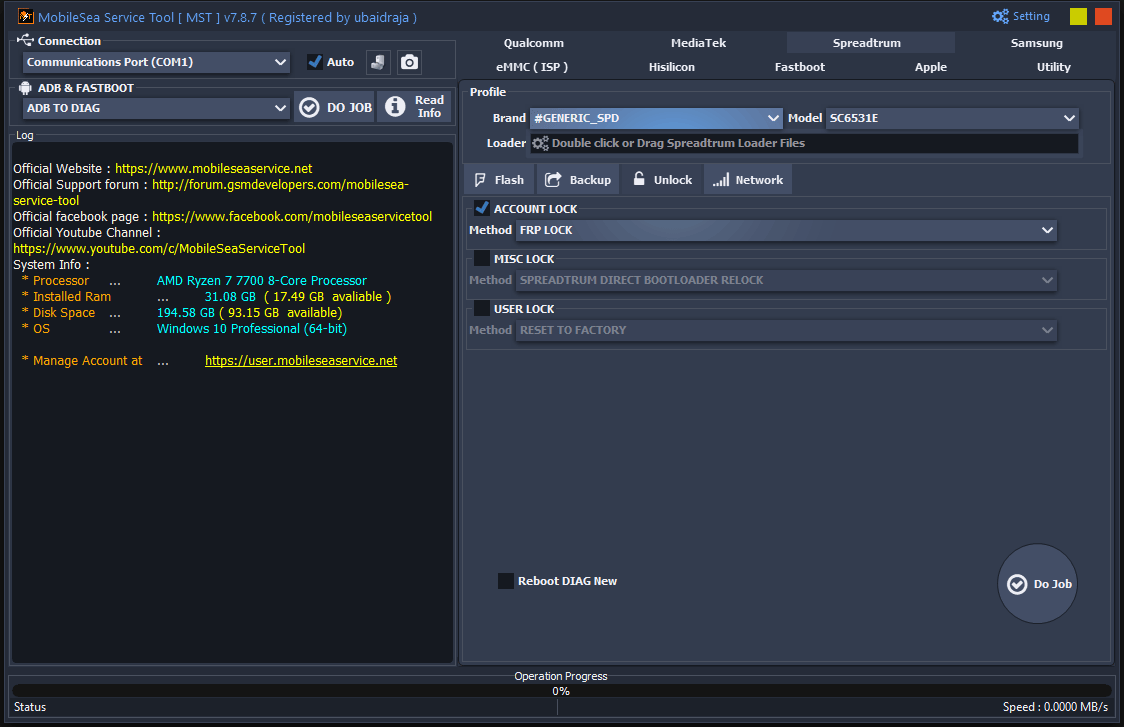
The spreadtrum unlock tab in the mst tool gives technicians quick access to bypass frp locks manage bootloaders and perform factory resets on generic spd devices.
Network
- Etwork Repair (Checked)
- Imei 1 (Blank Field)
- Imei 2 Enter Imei 2
- Wifi Enter Wilan Mac
- Psn Enter Serial Number
- Diag Mode (Unchecked)
- Flash Mode (Selected)
- Patch Cert (Unchecked)
- Warning Text (Red Color)
- Note : Imei Changing Is Illegal In Some Countries.
- Use Of This Option Is At Your Own Risk.
- Do Job (button)
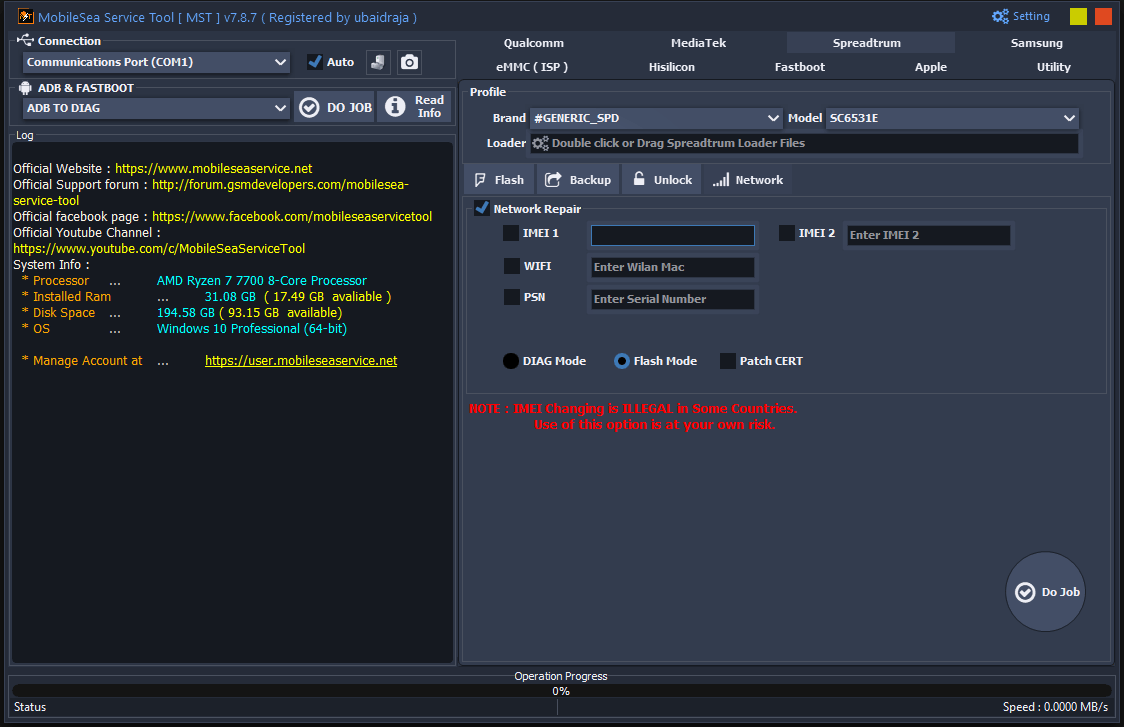
The spreadtrum network tab in the mst tool provides dedicated features for network repair allowing technicians to restore imei numbers and update wi-fi mac addresses using flash mode.
Samsung
Flash
- Partition Name | File Name | Offset | Length | Size
- Flash Option (Bottom Right Section)
- Pit Double Click Or Drag Firmware Here
- Bl Double Click Or Drag Firmware Here
- Ap Double Click Or Drag Firmware Here
- Cp Double Click Or Drag Firmware Here
- Csc Double Click Or Drag Firmware Here
- U.d Double Click Or Drag Firmware Here
- Format All
- Reset Efs (Unchecked)
- Repartition (Unchecked)
- Auto Reboot (Checked)
- Flash (Button)
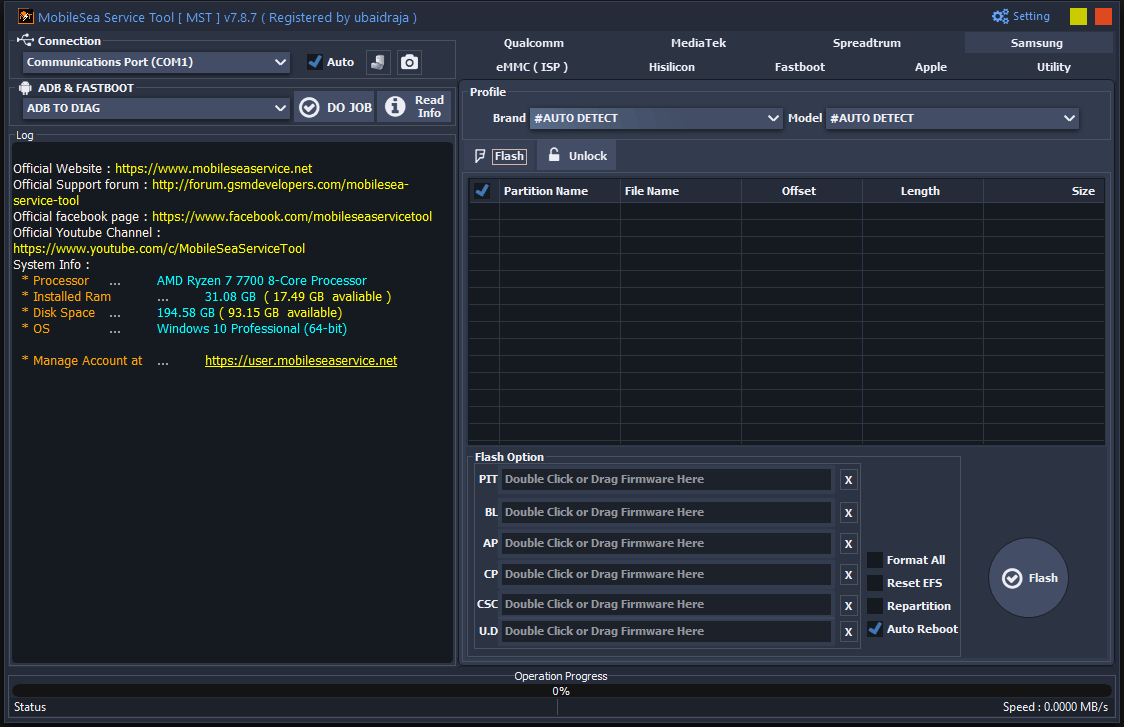
The samsung flash interface in the mst download allows technicians to easily load multi-file firmware components (pit bl ap cp csc) for complete device flashing.
Unlock
Account Lock
- Frp Lock (Call Method) [Mtp Mode]
- Frp Lock (Exploit Android 16) [Mtp Mode]
- Frp Lock (Exploit Method) [Mtp Mode]
- Frp Lock Mtk [Download Mode]
- Samsung Disable Payjoy And Mdm Lock [Adb Mode]
- Samsung Frp Lock [Adb Mode]
- Samsung Remove Payjoy And Mdm Lock [Download Mode]
User Lock
- Reset To Factory (New Security) [Download Mode]
- Reset To Factory [Mtp Mode]
Utilities
- Backup Pit [Download Mode]
- Softbrick Fix [Download Mode]
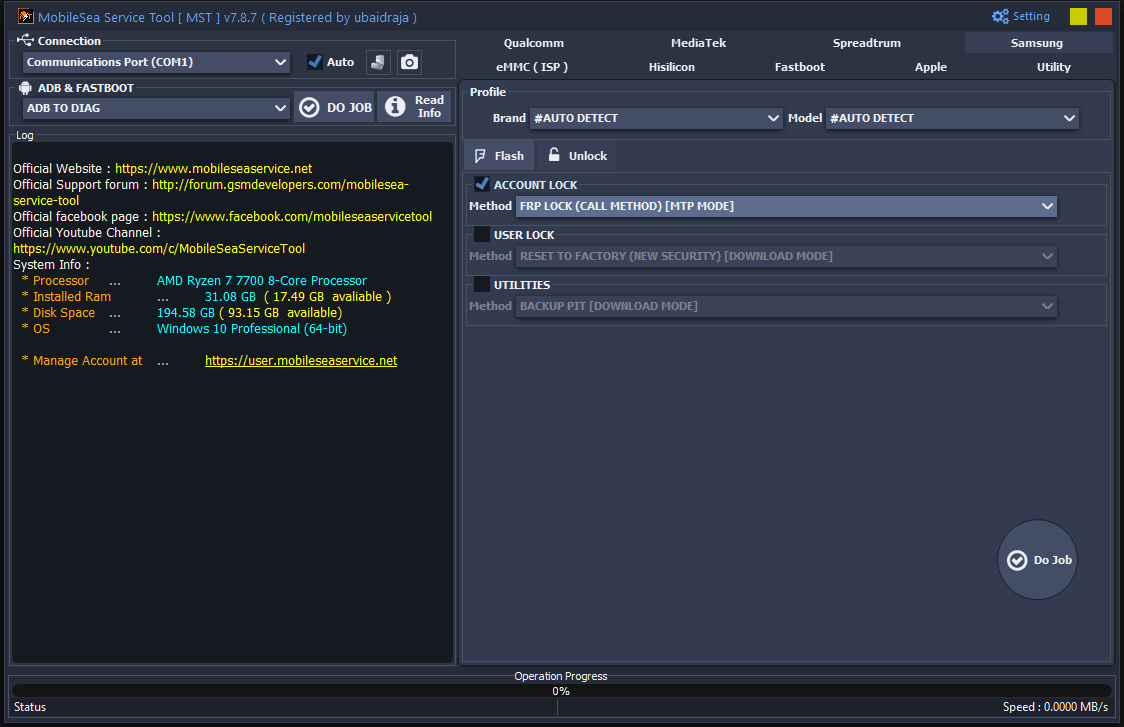
The samsung unlock tab in the mst download provides powerful methods to easily bypass frp locks using mtp mode and reset devices with new security in download mode.
eMMC ( ISP )
Flash
- Partition Name | File Name | Offset | Length | Size
- Flash Option
- Firmware Double Click For Firmware
- Backup Efs
- Auto Reboot
- Flash Emmc
- Advance Mode
- Flash
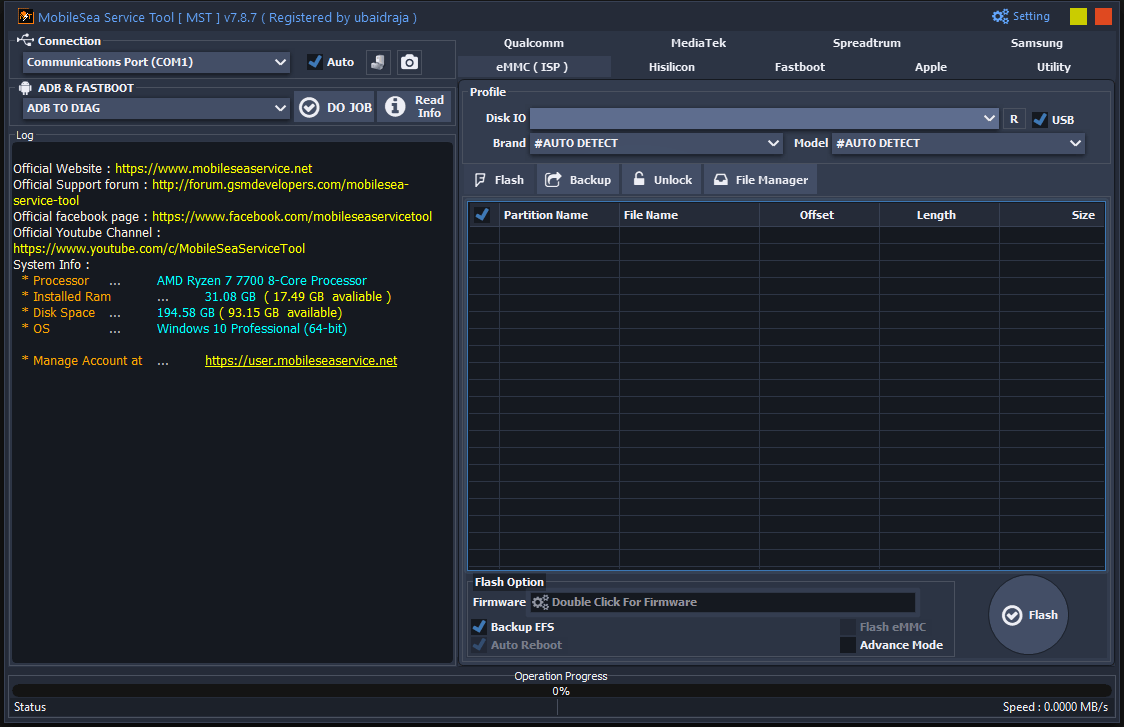
The emmc (isp) flash interface in the mobileservice provides direct storage access allowing technicians to easily load firmware and manage essential backups like efs before flashing.
Unlock
Account Lock
- Method Frp Lock
User Lock
- Read User Locks (Patternpasswordpin)
- Reset To Factory
- Reset To Factory (Master Clear)
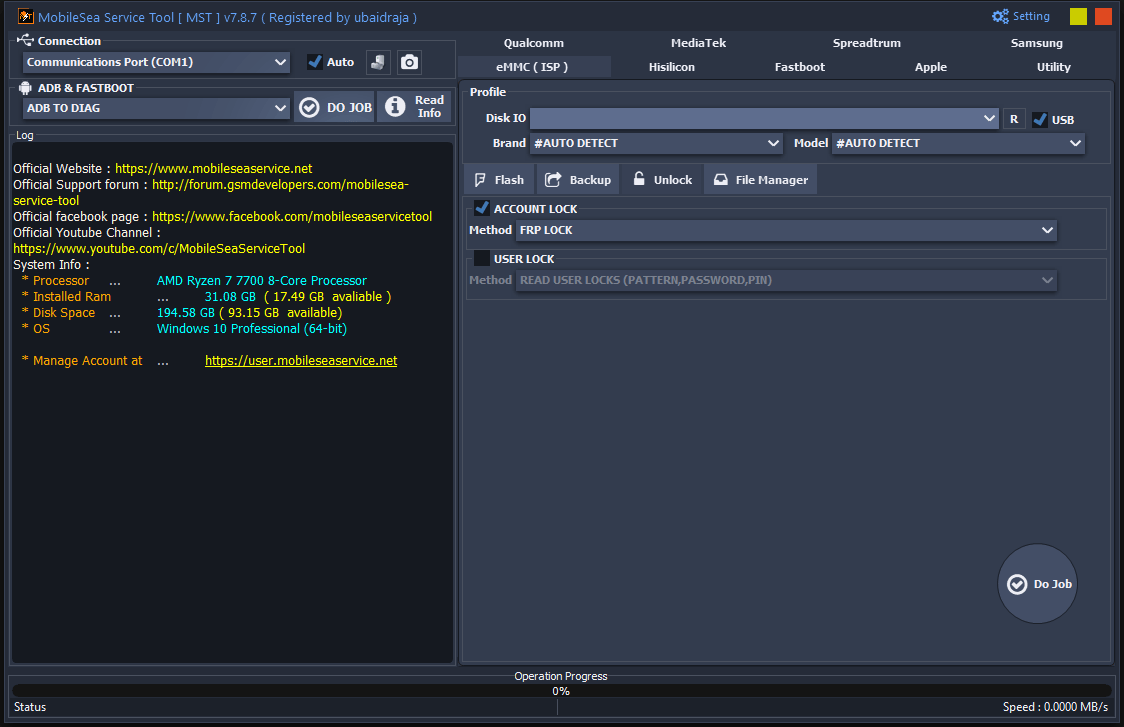
The emmc (isp) unlock tab in the mobileservice tool allows technicians to easily bypass frp locks and read user passwords directly via an isp or usb connection.
Hisilicon
Flash
- Partition Name | File Name | Offset | Length | Size
- Flash Option
- Double Click Huawei Ptable Base
- Double Click Huawei Update Base
- Double Click Huawei Ptable Cust
- Double Click Huawei Update Cust
- Double Click Huawei Ptable Preload
- Double Click Huawei Update Preload
- Fastboot To Erecovery
- Auto Reboot
- Flash
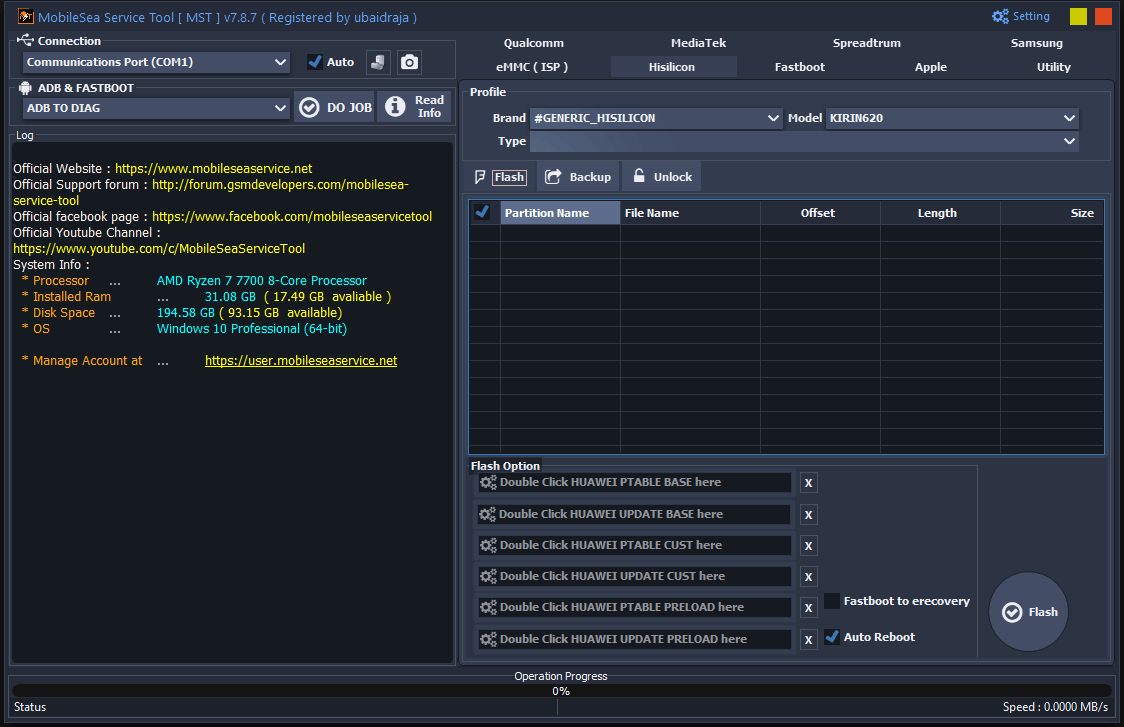
The hisilicon flash tab in the mobileservice tool allows technicians to easily load huawei ptable and update firmware files for devices running kirin processors.
Unlock
Service
- Bootloader Unlock (Build Method)
- Reset To Factory
- Reset To Factory (Master Clear)
- Temp Bootloader Unlock
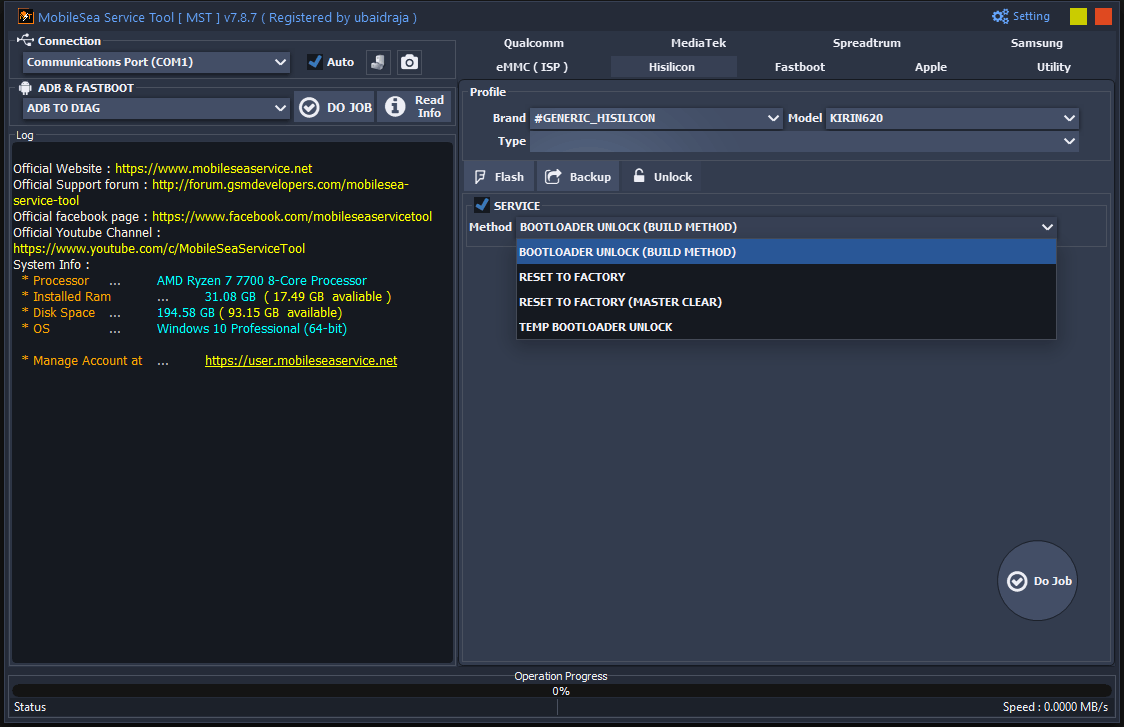
The hisilicon unlock tab in the mobilesea service tool provides essential service options for kirin devices including permanent and temporary bootloader unlocks alongside master clear factory resets.
Fastboot
Unlock
Vivo Fastboot To Edl
- Xiaomi Check Find Device Status
- Xiaomi Fastboot To Edl
Vivo Generic Function
- Vivo Bootloader Relock
- Vivo Bootloader Unlock
- Vivo Demo Remove
- Vivo Factory Reset & Frp
- Vivo Fastboot To Edl
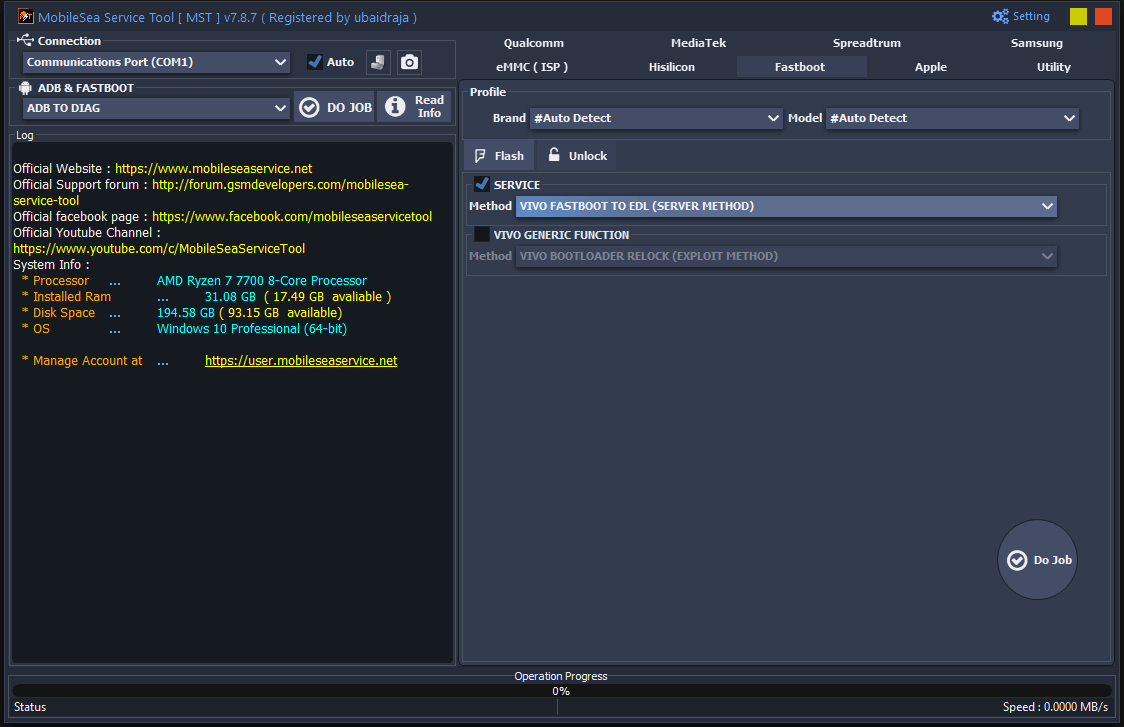
The fastboot unlock tab in the mobilesea service tool allows technicians to execute advanced system commands such as forcing vivo devices directly from fastboot into edl mode for deep flashing.
Apple
Ramdisk
Hello
- Change Serial Number [Dfu Mode]
- Generate Activation Data ( No Need Sn Change )[Normal Mode]
- Generate Activation Data [Normal Mode]
- Hello Screen Bypass [Dfu Mode]
Passcode
- Backup Activation Files [Dfu Mode]
- Restore Activation Files [Dfu Mode]
Misc
- Bypass Mdm [Dfu Mode]
- Hide Icloud (Sign Out Icloud) [Dfu Mode]
- Read Ios Version [Recovery Mode]
- Reset To Factory [Dfu Mode]
- Reset To Factory [Purple Mode]
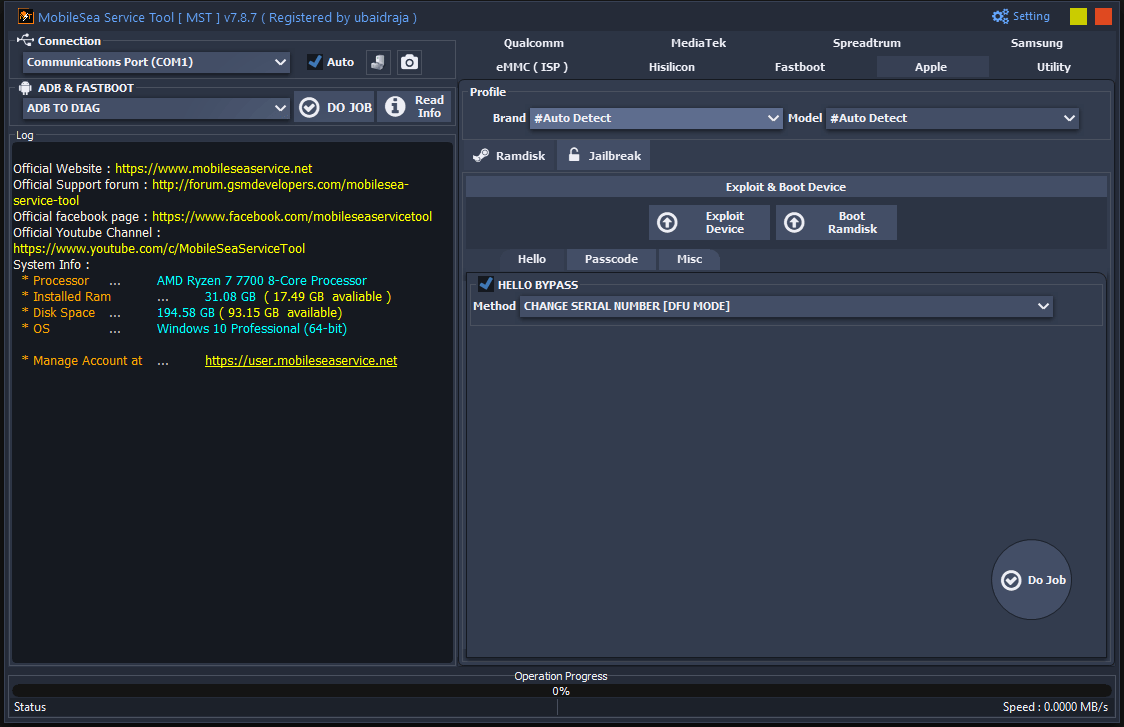
The apple ramdisk tab in the mobilesea service tool gives technicians powerful options to exploit ios devices boot ramdisks and easily bypass the hello screen using dfu mode.
Jailbreak
Hello
- Bypass Broken(ios 12-14)
- Bypass Gsm With Signal(Ios 12-14) [Jailbreak Mode]
- Bypass Meid No Signal(Ios 12-14) [Jailbreak Mode]
Passcode
- Backup Activation Files [Jailbreak Mode]
- Restore Activation Files [Jailbreak Mode]
Misc
- Auto Fmi Off Open Menu [Normal Mode]
- Bypass Mdm [Jailbreak Mode]
- Bypass Mdm [No Jailbreak]
- Disable Ota Updates
- Enable Ota Updates
- Fix Iservices
- Jailbreak (Ios 15-17)
- Reset To Factory
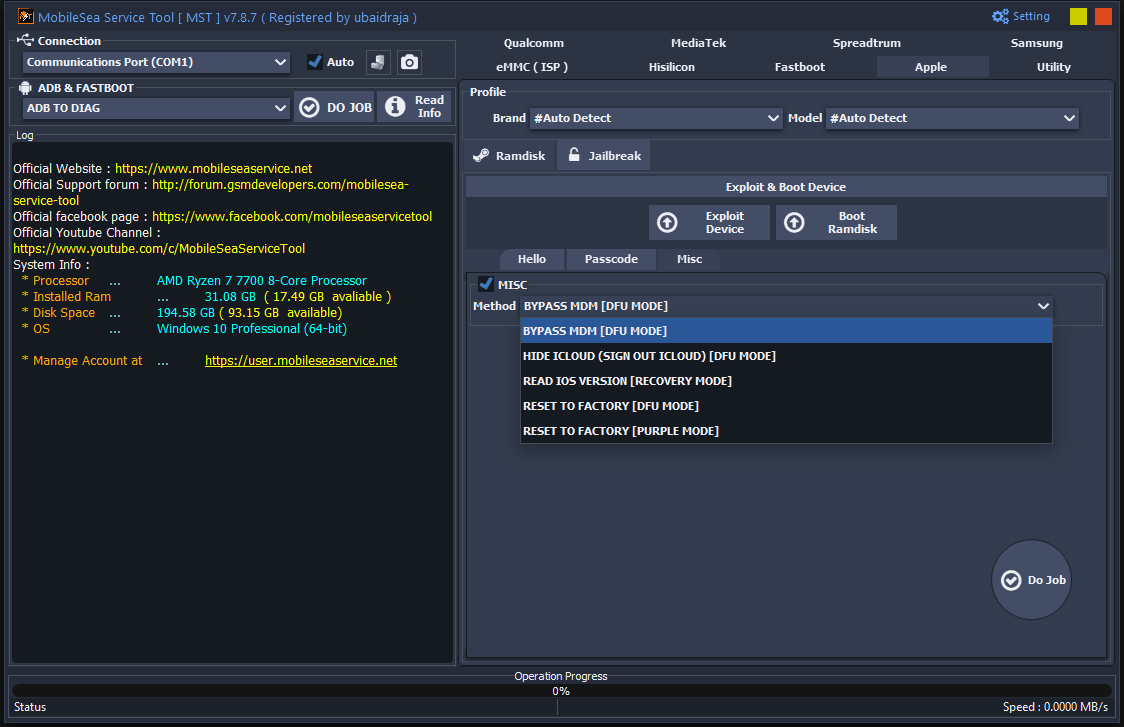
The apple ramdisk misc tab in the mobilesea service tool provides advanced ios utility functions allowing technicians to easily bypass mdm restrictions hide icloud accounts and perform deep factory resets.
Utility
- Extract Nokia Nb0 File
- Extract Huawei App Firmware File
- Extract Android Sparse Image
- Extract Android Super Image
- Extract Ofp File (oppo/realme)
- Extract Spreadtrum Pac File
- Extract Asus Raw Firmware File
- Extract Lg Kdz Firmware File
- Spreadtrum Bootloader File Maker
- Patch Qualcomm Mi Account

The utility tab in the mobilesea service tool offers a suite of powerful extraction features allowing technicians to unpack huawei app firmware oppo ofp files and asus raw packages effortlessly.
Mastering Qualcomm Mediatek & Spreadtrum
Just Keep Your Eyes On The Warning Text (red Color) On The Screen Before Doing Network Tasks. It Clearly States Note : Imei Changing Is Illegal In Some Countries So Obviously Use Of This Option Is At Your Own Risk. You Can Even Select Method Name Backup Critical Data Before Messing Around With The Baseband. Techs Use The Flash Option Constantly To Run A Backup Efs Or Prepare A Clean Install. They Just Tick Auto Sig Flash ( Checked) To Ensure The Firmware Goes On Perfectly Every Time.
Sometimes You Need A Tricky Xiaomi Account Bypass ( Method 1 ) [ Adb Mode Need Root ] To Get Inside. Other Times A Quick Xiaomi Frp Lock [ Assistant Mode] [ Offline Method] Does The Trick Perfectly Without Servers. Spreadtrum Fans Can Hit Spreadtrum Direct Bootloader Relock [fastboot Mode] To Secure A Device Quickly. You Can Even Enter Brom Mode To Resolve A Really Annoying Patch Dl Image Error In Seconds. Users Can Choose To Flash Emmc Directly Or Hit Firmware Double Click For Firmware To Load Files.
Handling Samsung Hisilicon & Fastboot
Whether It Is A Quick Reset Frp Or Xiaomi Cpid Repair This Software Handles It Flawlessly. Fixing A Samsung Feels Like An Absolute Breeze Because Everything Is Laid Out Logically For The User. You Just Drop Files Straight Into The Pit Double Click Or Drag Firmware Here Slot Alongside The Ap. You Also Fill The Cp Double Click Or Drag Firmware Here And Csc Double Click Or Drag Firmware Here Boxes. You Can Easily Knock Out Security Using The Frp Lock (call Method) [mtp Mode] On Modern Galaxy Phones.
You Can Also Completely Wipe Restrictions With Samsung Disable Payjoy And Mdm Lock [adb Mode] Easily. Over On The Hisilicon Side You Just Hit Double Click Huawei Ptable Base To Start Flashing. It Is So Easy To Run A Bootloader Unlock (build Method) To Get The Ball Rolling Fast. Fastboot Mode Lets You Trigger A Vivo Fastboot To Edl Or Run A Xiaomi Check Find Device Status Easily. You Can Even Read User Locks ( Patternpasswordpin) Or Do A Quick Reset To Factory [ Sideload Mode].
Apple Ramdisk & Jailbreak Secrets
Dealing With Locked Ios Devices Is Usually A Total Headache But The Apple Tab Simplifies The Mess. You Can Pull Off A Hello Screen Bypass [dfu Mode] On Older Devices Without Breaking A Sweat. You Can Also Perform This Sneaky Generate Activation Data ( No Need Sn Change )[normal Mode] Trick Effortlessly. The Jailbreak Section Lets You Backup Activation Files [jailbreak Mode] Before Wiping The Phone Completely. You Can Then Restore Activation Files [jailbreak Mode] To Keep The Network Signal Working Perfectly.
You Can Even Bypass Shattered Basebands Using Bypass Broken(ios 12-14) To Save A Broken Iphone. You Can Force A Strict Reset To Factory [purple Mode] On Stubborn Ipads That Refuse To Wipe Cleanly. Whether You Need To Bypass Mdm [dfu Mode] Or Run An Auto Fmi Off Open Menu [normal Mode] It Works. It Even Has Tools To Disable Ota Updates Or Enable Ota Updates So Your Bypassed Device Stays Safe. You Literally Have Full Control Over The Ios System Environment Right From Your Desk.
Utility Extraction Tools
Sometimes You Just Need To Rip Apart A Massive Firmware File And This Utility Section Is Perfect. You Can Easily Extract Ofp File (oppo/realme) Archives Or Simply Extract Asus Raw Firmware File Packages. It Also Lets You Extract Android Sparse Image Chunks Or Use The Spreadtrum Bootloader File Maker. You Can Even Hit Patch Qualcomm Mi Account Directly From This Menu To Save Precious Hours. You Can Extract Huawei App Firmware File Or Extract Nokia Nb0 File Right On Your Workbench.
Need To Handle Mtk Devices Safely Without Bricking The Preloader? You Can Use Auth Bypass Or Setup A Boot Slot Set [ A B ] Easily To Manage Partitions. You Can Do A Rpmb Read Or Rpmb Write And Even Completely Erase The Chip With Rpmb Erase. The Software Also Packs Options Like Tecno Infinix Remove Anti Crack And Oppo Demo Remove. You Never Have To Turn Away A Customer With A Weird Retail Phone Ever Again.
How to Use?
- You Will Need To First Download The Zip From The Below Link.
- Then, Unzip All The Files In The C Drive.
- Then, Install The Setup With The Basic Instructions.
- Run The Tool As Admin “MobileSea Service Tool“
- If You Already Have Drivers Installed, Skip This Step.
- Enjoy ! !!
How To Download
To Download MobileSea Service Tool Follow These Steps:
- Go To The A2zflashfile.com Website Of Android Fastboot Reset Tool
- Find The Download Page And Don’t Click Button And Click Only The (Download Link)
- Below Buttons Are Advertisements. Please Use The Download Links Above.
- Wait For The Download To Complete.
- Locate The Downloaded File On Your Device Once The Download
MobileSeaTool V7.8.7
👉 [Click Here to Rent This Tool on WhatsApp]
Download Link:: Usersdrive – Mediafire – 4shared – My.pcloud – Mega – Vexfile – Google Drive – Drive Proton


