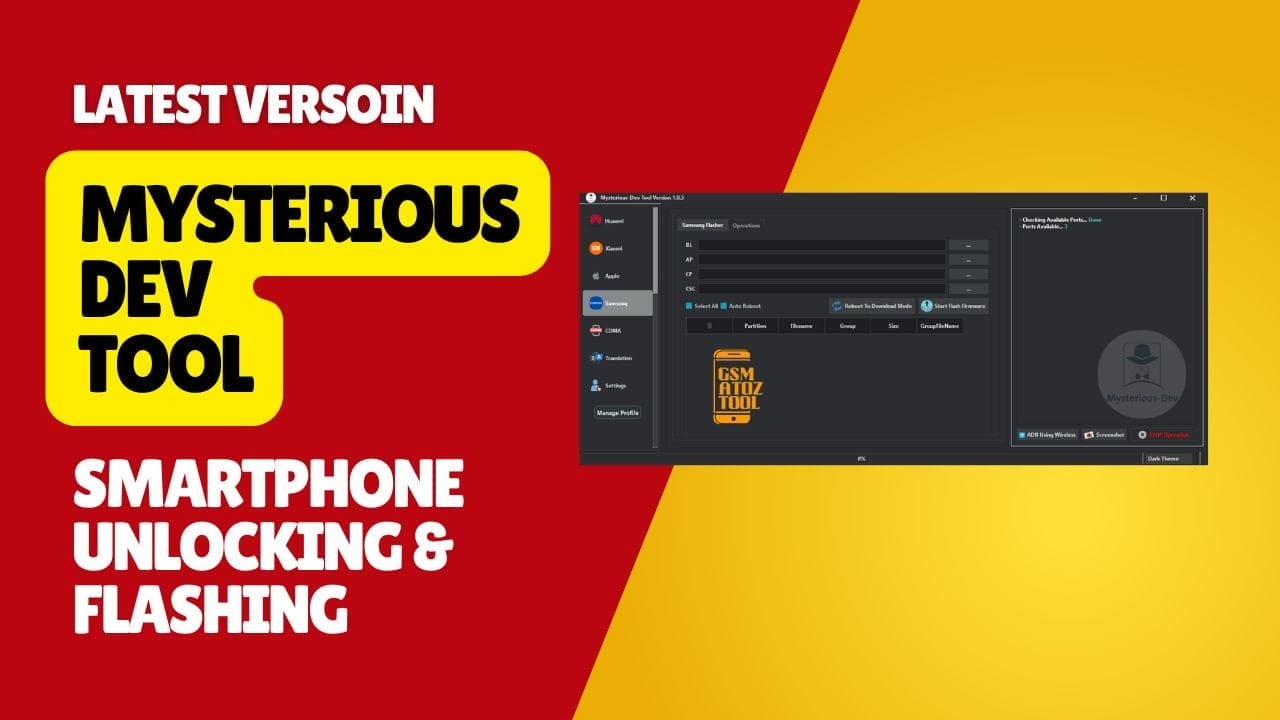
Mysteriousdev tool provides powerful features for sim unlocking frp removal imei repair and firmware flashing in one platform.
If You’ve Ever Struggled With Blocked Sim Services Locked Accounts Frp Issues Or Phones Stuck In Endless Boot Loops You Know How Stressful Mobile Repairing Can Feel. Sometimes You Just Want One Tool That Actually Works—no Fake Promises No Messy Methods And No Wasting Time Searching For Drivers Or Commands Everywhere. I’ve Been There Too Jumping Between Different Software Just To Fix One Small Problem. That Frustration Is Exactly Why People End Up Searching For Mysterious-dev Tool In The First Place.
In This Blog You’ll Finally Get A Clear Idea Of What Mysterious-dev Tool Can Do For You And How It Can Make Phone Servicing Easier Faster And More Reliable. I’ll Walk You Through Major Features Like Sim Unlocking Samsung Services Partition Management Imei Repair Frp Removal Firmware Flashing And Much More—without Overwhelming Technical Language. By The End You’ll Know Exactly When And Why To Use This Tool And What Makes It Stand Out From Others. Let’s Begin.
Contents
- 1 What Is The Mysterious-dev Tool
- 2 Download Mysterious-dev Tool Latest Verosin
- 3 Features Mysterious-dev Tool:
- 4 When You Should Use Advanced Modes
- 5 Why Many Shops Keep It Installed
- 6 How to Use?
- 7 Frequently Asked Questions (FAQs)
- 7.1 What Smartphone Brands Does The Mysterious Dev Tool Support?
- 7.2 Can I Bypass Or Remove Factory Reset Protection (Frp) With This Software?
- 7.3 Does The Tool Allow Me To Flash Firmware Onto A Device?
- 7.4 Is It Possible To Repair Imei And Network Connectivity Issues?
- 7.5 What Kind Of Services Does It Offer For Apple Ios Devices?
- 8 Conclusion
- 9 How To Download
What Is The Mysterious-dev Tool
The Mysterious-dev Tool Is A Multi-brand Mobile Servicing Software That Helps Technicians Unlock Flash And Repair Smartphones From One Clean Interface. It Supports Popular Chipsets Like Qualcomm Mediatek And Unisoc Along With Brands Such As Samsung Xiaomi Huawei Motorola And Even Apple In Certain Functions.
With It You Can Handle Jobs Like Frp Removal Sim Unlocking Imei Repair Network Fix And Full Factory Reset Without Jumping Between Different Tools. This Makes Daily Repair Work Faster And Reduces The Chances Of Mistakes When A Customer Is Waiting In Front Of You. Inside The Software You Find Focused Modules For Real-world Tasks Instead Of Random Buttons.
Unlock Sim Services Deal With Sim Locks And Carrier Issues While Samsung Certificate Services Handle Write Cert And Read Cert Jobs. Application Manager Lets You Backup Apk Files List System Or Third-party Apps And Then Clear App Data Disable Bloatware Or Uninstall Problem Apps.
Under The Hood You Also Get Powerful Service Areas Like Edl Services With Brand Model Detection And Manual Firehose Flash Firmware For Xml Or Multiraw Files And Diag Services For Xiaomi Network Repair Backup Qcn Restore Qcn And Selected Imei Repair Operations.
Also Read
Whatsapp Group
- GSM ATOZ TOOL :: Group Link Join
- GSM ATOZ TOOL 1:: Group Link Join
- GSM ATOZ TOOL 2 :: Group Link Join
- GSM ATOZ TOOL 3 :: Group Link Join
- GSM ATOZ TOOL 4 :: Group Link Join
- GSM ATOZ TOOL 5:: Group Link Join
- GSM ATOZ TOOL 6 :: Group Link Join
- Gsm Atoz Tool Remotely Services :: Group Link Join
- Telegram Group GSM ATOZ TOOL :: Group Link Join
- Telegram Group GSM ATOZ TOOL 1 :: Group Link Join
Download Mysterious-dev Tool Latest Verosin
When You Download The Latest Verosin Build You Get Updated Support For Newer Android Versions And Recently Released Devices Along With Bug Fixes For Previous Functions. The Current Release Improves Stability For Flash Firmware Tasks Partition Manager Actions Like Read Write Erase And Restore Backup And Complex Modes Such As Repartition Or Full Erase On Unisoc.
It Also Includes Better Handling For Frp Removal On More Samsung And Xiaomi Models Improved Reset Efs And Wipe Efs Options Plus Safer Bootloader Operations. For Many Users This Version Makes Mysterious-dev Tool Feel Closer To A Professional Servicing Box Than A Normal Utility.
After Installing The Software You Just Prepare Your Drivers Connect The Device And Choose The Correct Tab For The Job You Want To Perform. For Example You Can Put A Qualcomm Phone Into Edl Detect Ports Load The Right Firehose File And Then Flash Firmware Or Repair Partitions.
On A Xiaomi Device You Might Use Fastboot Operations To Reboot To Edl Fix Bootloop Or Reset Mi Account Or Switch To Advanced Services To Enable Diag Backup Qcn And Write It Back After Hardware Repair. Samsung Technicians Can Move Between Operations And Flasher To Handle Frp Change Csc Read Pit And Full Bl Ap Cp Csc Flashing. With Careful Use And Good Backups This Tool Becomes A Central Part Of Any Serious Mobile Repair Setup.
Features Mysterious-dev Tool:
General
Unlock SIM Services
- Unlock SIM
- Unlock SIM Google Pixel [New]
Samsung Certificate Services
- Write Cert
- Read Cert
Units Services
- SAMSUNG Change Serial Number [BETA]
- Samsung Change CSC Code [Change Carrier]
Application Manager
- Backup APK
- Listing Disabled Apps
- Listing System Apps
- Listing 3rd Party Apps
- Listing Installed Apps
- Search For Package Name [App Package Name]
- Clear App Data
- Uninstall App
- Disable App
- Enable App
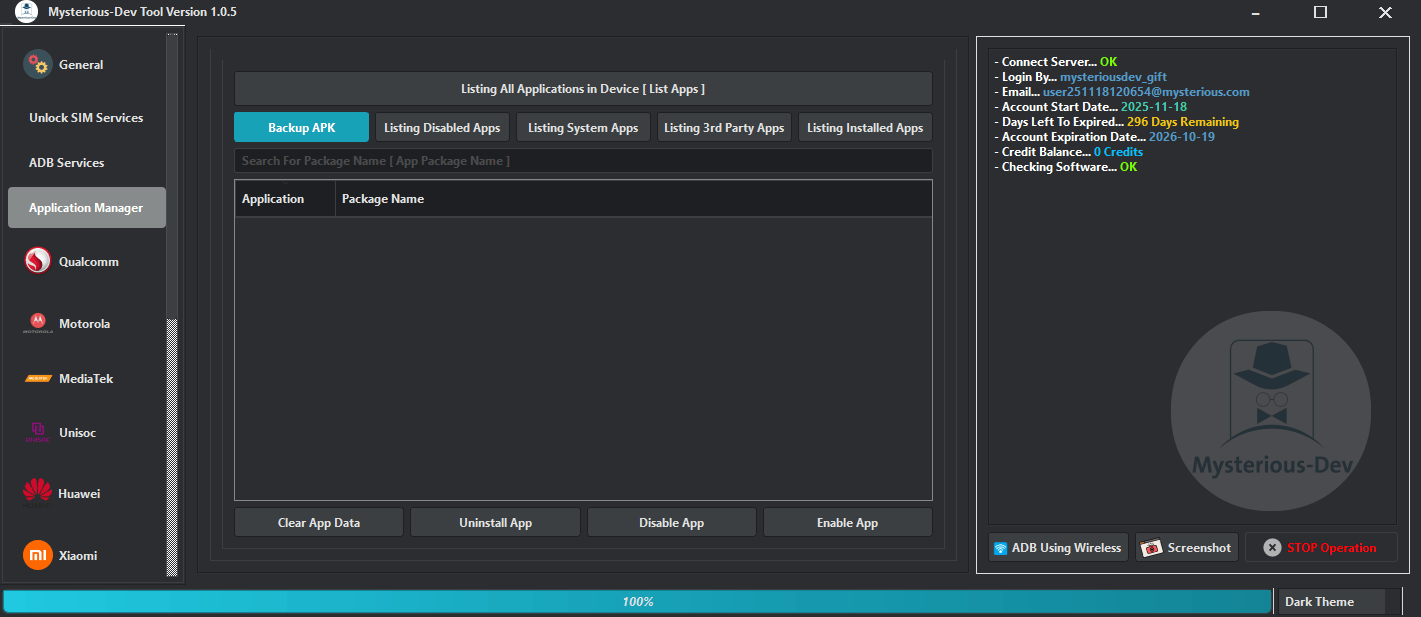
Mysterious-dev tool helps technicians unlock sim remove frp repair imei flash firmware and manage apps across multiple smartphone brands.
Qualcomm
EDL Services
- Getting Ports
- Brand Model Detection
- Manual Firehose
- Read Device Information
- Read XML Firmware
- Factory Reset Protection [FRP] Services
- Factory Reset Services
- Accounts Protection Services
- Samsung Services
- Security Data Services
Flash Firmware
- Getting Ports
- Brand Model Detection
- Manual Firehose
- XML File
- Patch File
- MultiRaw File
- Select All Partitions
- Single Firmware
- Multi Firmware
- Start Firmware Flash
Diag Services
- Getting Ports
- Brand Model Detection
- Manual Firehose
- Xiaomi Network Repair
- Repair Network
- Backup QCN
- Restore QCN
- Skip Writing IMEIs during QCN restore
- IMEI Repair (RSA Protected – Xiaomi and other brands)
- IMEI Repair Operations
- IMEI 1
- IMEI 2
- Enter MEID
- Write MEID
- Write IMEI’s
Partition Manager
- Getting Ports
- Brand Model Detection
- Manual Firehose
- List Device Partitions
- Select All
- Read
- Write
- Erase
- Restore Backup
- Execute Operation
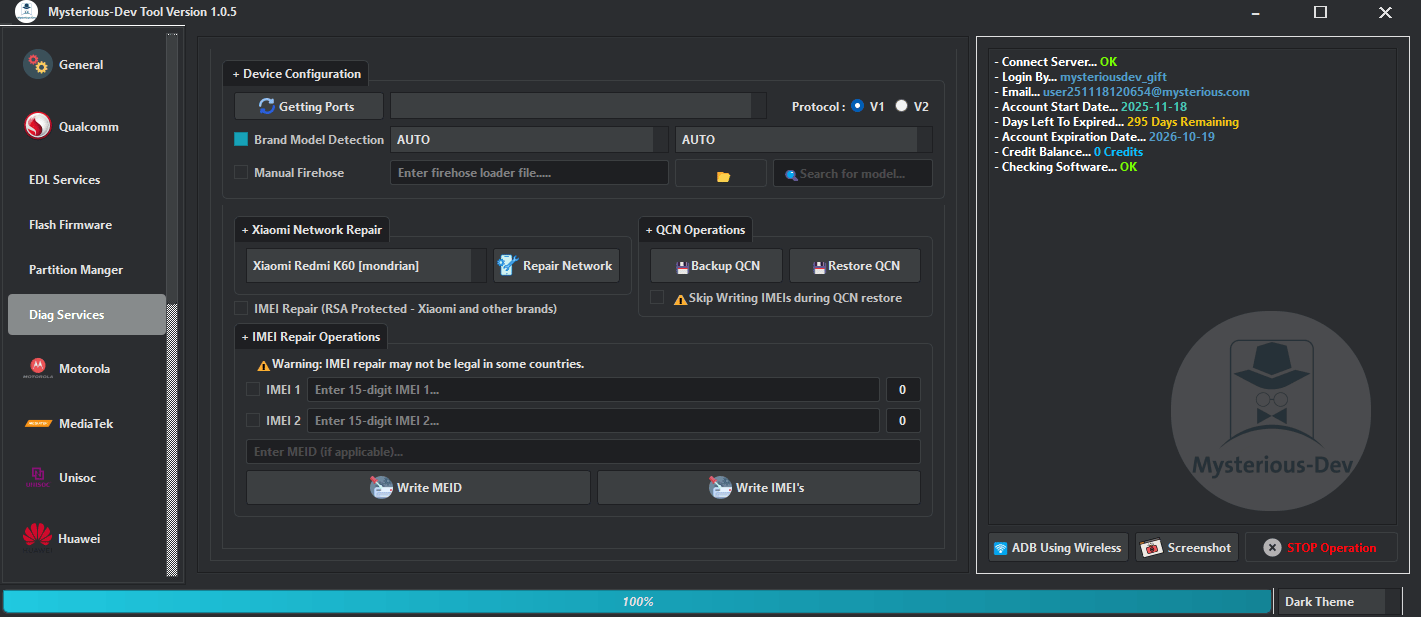
Mysterious-dev tool: all-in-one software for unlocking flashing removing frp repairing imei and managing smartphones.
Motorola
- Flash Main
- Firmware
- Select ALL
- Disable AVB
- Ignore MD5
- Start Flash Firmware

Mysterious dev tool provides multi-brand support for frp removal imei repair sim unlocking firmware flashing and advanced mobile servicing.
MediaTek
- Preloader Image File
- DA Agent File
- Exploit Authorization [BROM]
- Exploit Authorization [Preloader]
- Read Phone Info
Services
- Read Information
- Remove FRP
- Factory Reset [Safe]
- Factory Reset [UserData]
- Factory Reset [EXT]
- Factory Reset [Reset Settings]
- Unlock Bootloader
- Relock Bootloader
- Read NVDATA
- Write NVDATA
- Erase NVDATA
- Disable Update [Xiaomi]
- Remove Mi Account [Xiaomi]
- Remove MDM & KNOX Infinix/Tecno/Itel
Repair IMEI
- General
- Auto Detect
- IMEI 1
- IMEI 2
- Patch Cert
- Patch Cert New
- Flash Mode
- Meta Mode
- Write IMEI
- Enable Meta Repair [Xiaomi]
- Switch Meta Mode
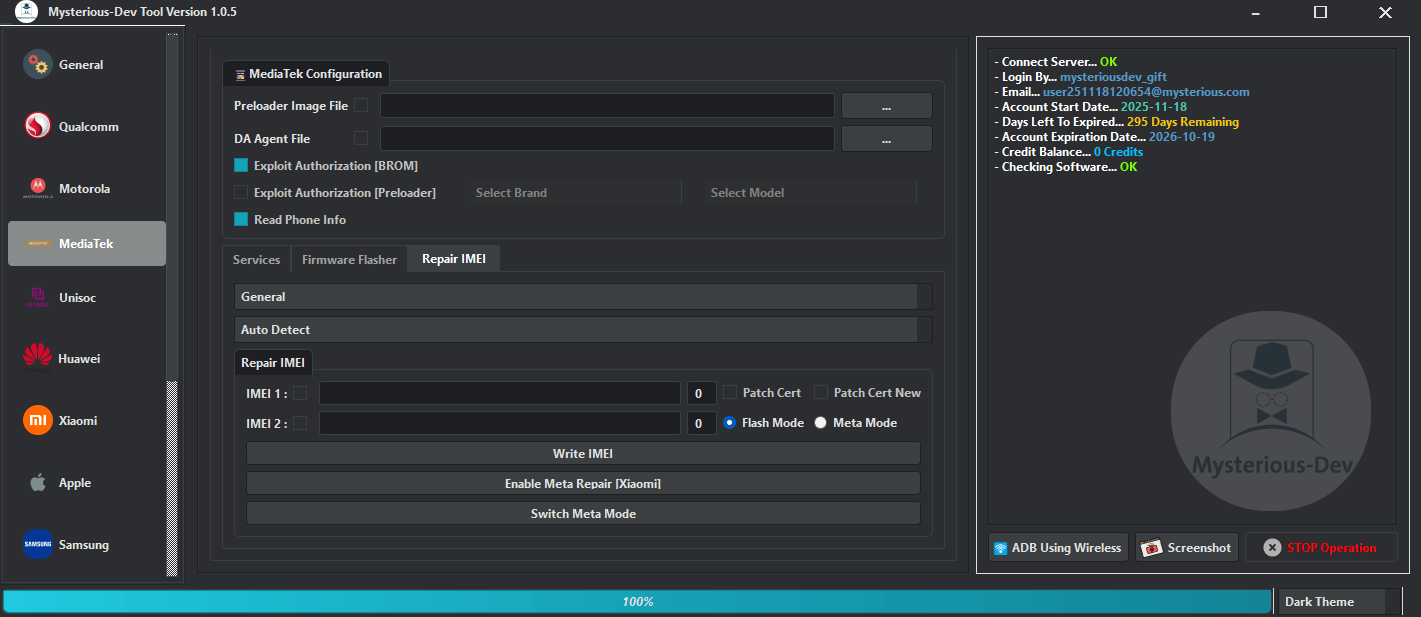
Mysterious dev tool download gives technicians access to sim unlocking frp removal imei repair flashing and advanced service operations for multiple smartphone brands.
UNISOC
Flash
- Firmware
- Reboot After Finish
- RePartition
- Full Erase
- Start Flash Firmware
Operations
- Brand
- By CPU
- Model
- Advanced Authorization (Auth)
- Read Phone Info
- Custom loader
- FDL1
- FDL2
- PAC
- Read Information
- Factory Reset
- Remove FRP
- Remove FRP [SAMSUNG]
- Unlock Bootloader
- Lock Bootloader
- Read RPMB
- Write RPMB
- Erase RPMB
- Realme Unlock Network (BETA)
- Remove MDM (BETA)
- Execute Operation
DIAG
- IMEI 1
- IMEI 2
- Read Info
- Switch Diag
- Factory Reset
- Reboot Recovery
- Repair IMEI
- Execute Operation
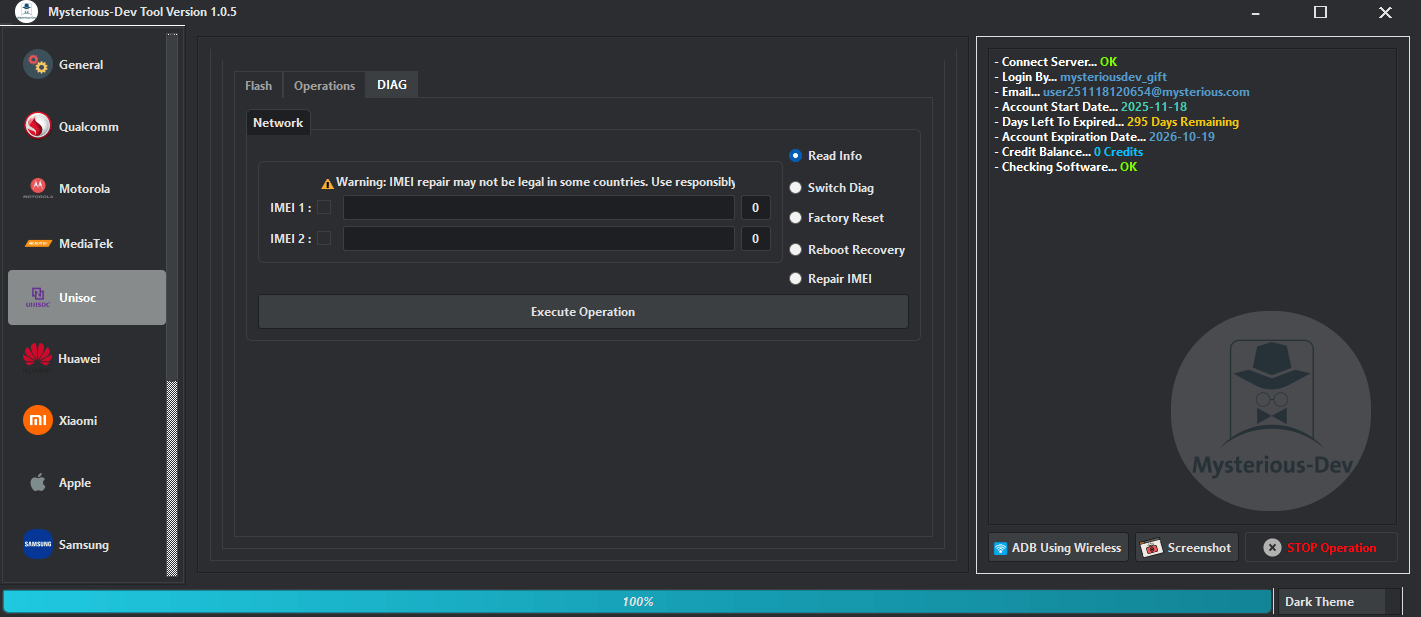
Step-by-step guide to setup mysterious dev tool and prepare your system for mobile servicing tasks.
Huawei
- By Kirin Chip
- By Model
- Read Device Informations
- Unlock Bootloader [Temporary]
- Remove FRP
- Remove Demo
- Remove Huawei ID [Direct]
- Remove Huawei ID 2nd Method
- Repair Oeminfo
- Backup Oeminfo
- Write Oeminfo
- Erase Oeminfo
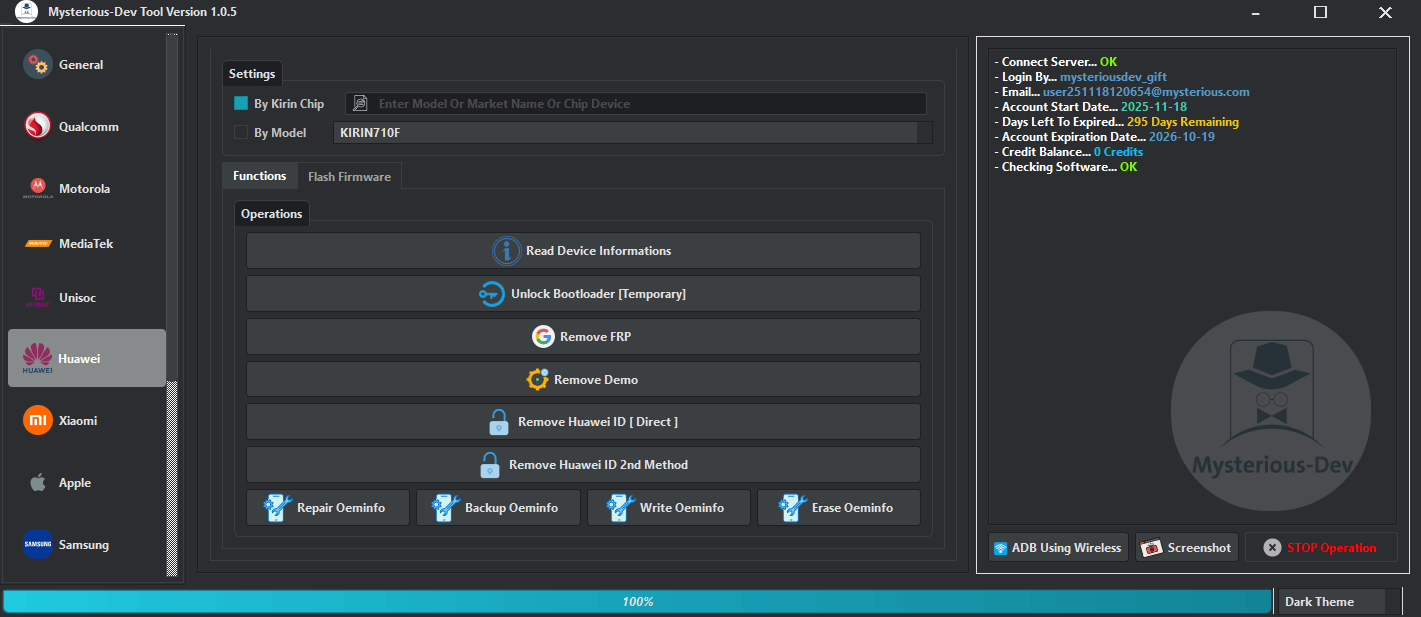
Mysterious-dev lets technicians unlock sim remove frp flash firmware and repair smartphones across multiple brands.
Xiaomi
Sideload Advanced
- Device Selection & Search
- Search
- Models
- Firmware Management
- Firmware
- Select All Partitions
- Read Full Dump
- Flash Firmware
- Backup Network
- Bypass FRP Protection
- Remove Mi Account
Fastboot Pro
Fastboot Flasher
- Firmware Selection
- Firmware
- Partitions Manager
- Select All
- Skip Security Parts
- Reboot After Finish
- Start Flash Process
Fastboot Operations
- Wipe EFS [Qualcomm]
- Wipe EFS [MediaTek]
- Reboot To EDL
- Read Device Info
- Reboot To Recovery
- Reboot To System
- Set Boot Slot A
- Set Boot Slot B
- Fix DM-Verity
- Fix Bootloop [BETA]
- Remove FRP [Unlocked BL]
- Factory Reset [Unlocked BL]
- Reset Mi Account [Unlocked Bootloader]
Advanced Services
ADB Mode
- Port Detection
- Check Port
- Enable Diag [No Root]
- Reboot To Fastboot
- Reset EFS [Root]
- Enable Diag [Root]
- Reboot To Recovery
- Wipe EFS [Root]
- Xiaomi Network Repair [Diag Mode]
- Backup QCN
- Write / Restore QCN
- Skip Write IMEIs
- Enter IMEI 1
- Enter IMEI 2
- Enter MEID
- Write MEID
- Write IMEI
TWRP Mode
- Port Detection
- Check Port
- Wipe EFS
- Backup EFS
- Restore EFS
- Reboot To System
- Reboot To Fastboot
- Reboot To EDL
- Xiaomi Network Repair [Diag Mode]
- Backup QCN
- Write / Restore QCN
- Skip Write IMEIs
- Enter IMEI 1
- Enter IMEI 2
- Enter MEID
- Write MEID
- Write IMEI
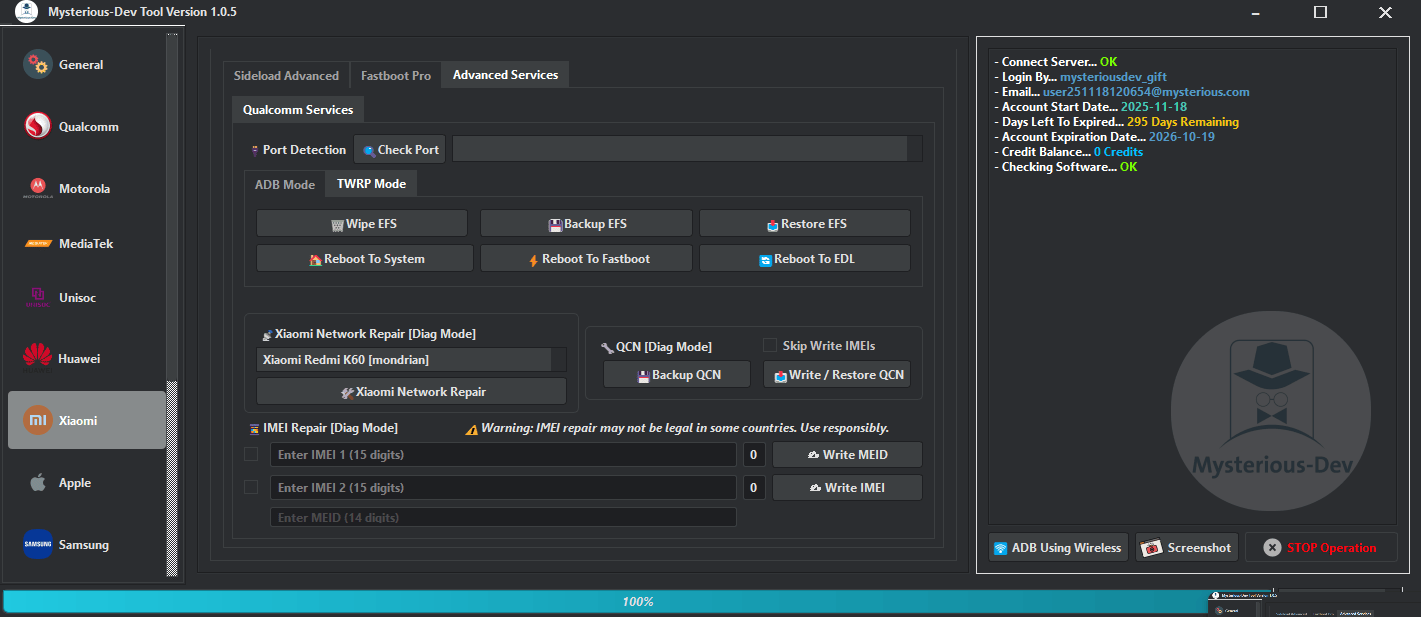
Download mysterious dev tool and access multi-brand smartphone services including frp removal sim unlock firmware flashing and imei repair.
Apple
- Read Device Info
- Device Activate
- Device Deactivate
- Restart
- Shutdown
- Disable OTA Update [iOS 12 – 15]
- Disable Factory Reset [iOS 12 – 15]
- Remove MDM [ALL iOS] (No JailBreak)
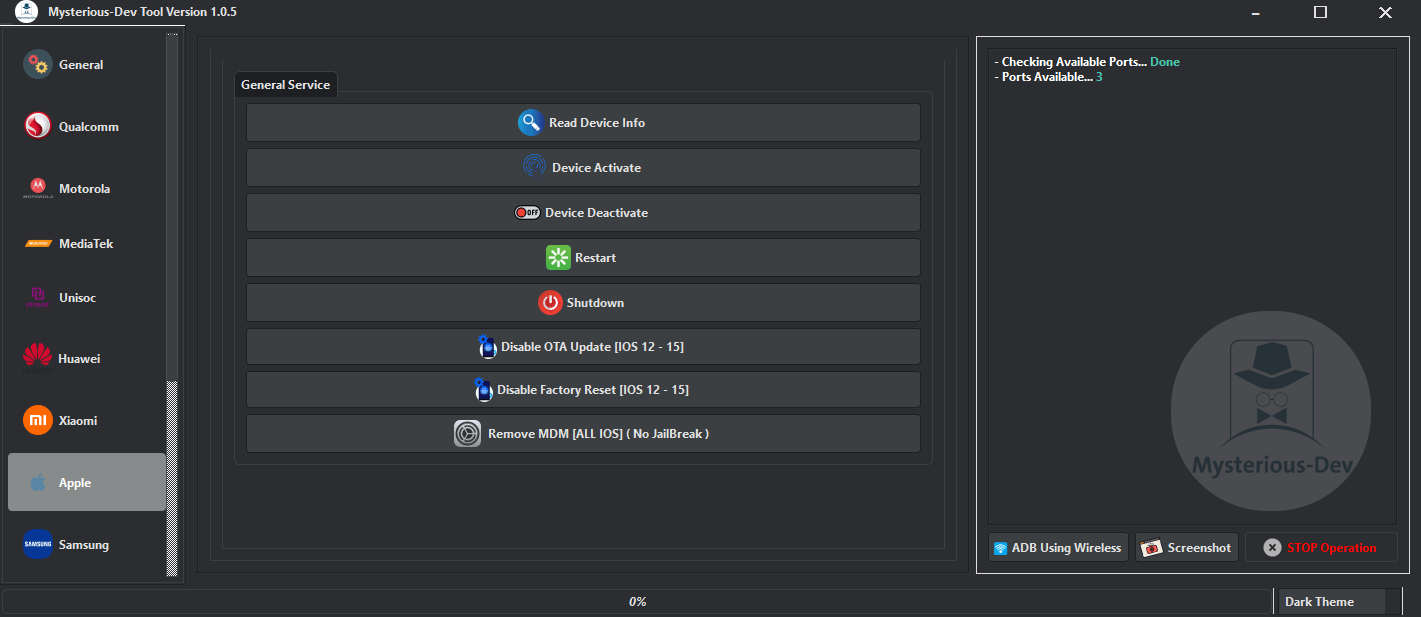
Mysterious dev tool helps technicians remove frp unlock sim flash firmware and repair smartphones from one platform.
Samsung
Operations
- Reboot To Download Mode [MTP]
- Factory Reset [MTP]
- Reboot To Recovery [ADB]
- Reboot To Download [ADB]
- Remove FRP [ADB]
- Restore IMEI | Reset EFS [ADB]
- Remove FRP Android 16 [MTP] [Direct]
- Change CSC [Carrier Change] [ADB] [MTP]
- Read PIT [DM]
- Exit Download Mode
- Read Info [DM]
- SAMSUNG MTK FRP [Direct DM] [Sec 0/1]
- Direct Factory Reset [Force Erase DM]
- Remove Lost Mode Lock [DM]
Flasher
- BL
- AP
- CP
- CSC
- Select All
- Auto Reboot
- Reboot To Download Mode
- Start Flash Firmware
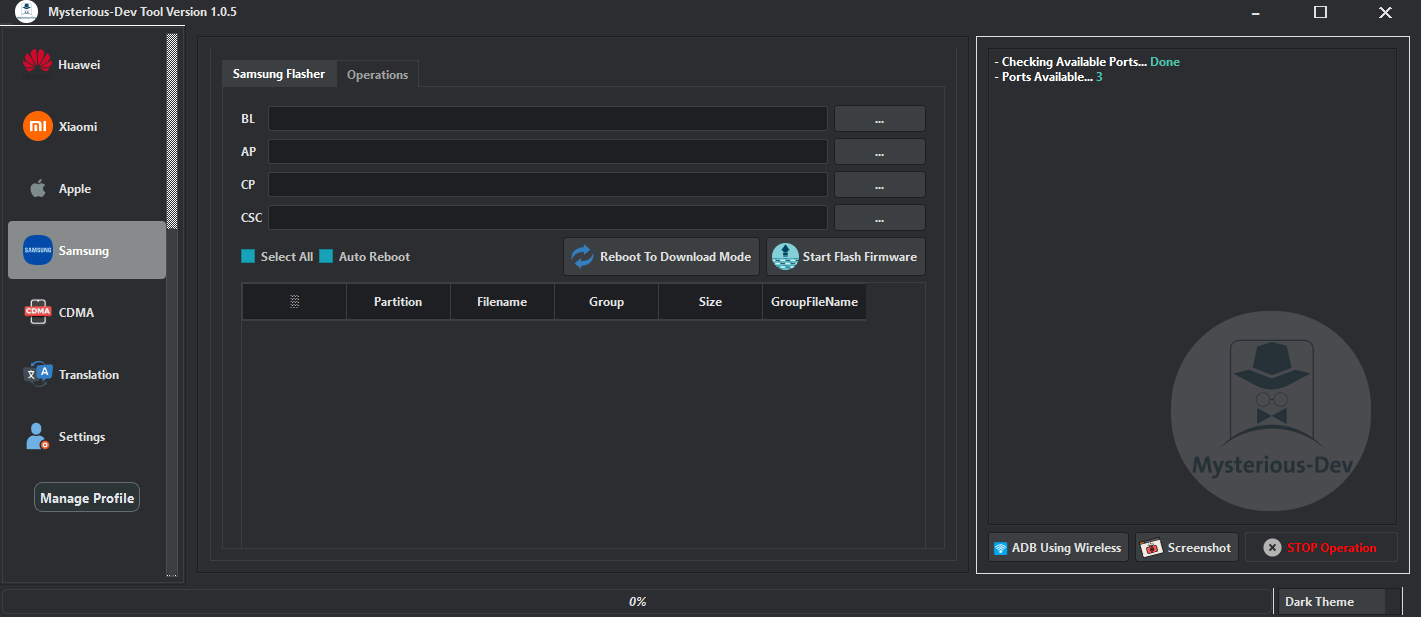
Mysterious-dev tool provides multi-brand support for frp removal sim unlock imei repair firmware flashing and system recovery.
Translation
- Set Default Language
- Install Keyboard
- Auto Reboot
- Android Lollipop 5
- Android Marshmallow 6
- Android Nougat 7
- Android Oreo 8
- Android Pie 9
- Android Q 10
- Android 11
- Android 12
- Android 13
- Android 14
- Android 15
- Android 16
- Remove Translation Data [Clean Themes]
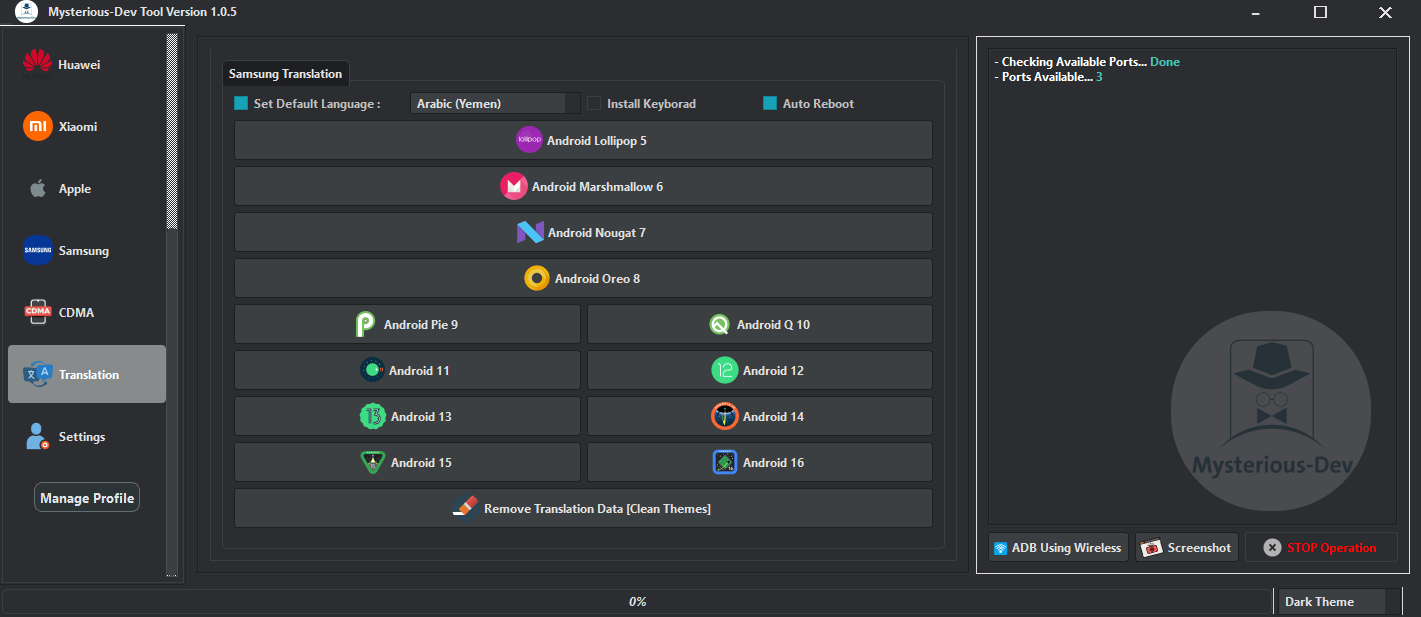
Mysterious-dev tool provides multi-brand support for frp removal sim unlocking imei repair firmware flashing and advanced service operations.
When You Should Use Advanced Modes
Advanced Modes Are Designed For Deeper Repairs That Go Beyond Standard Resets Or Frp Removal. Partition Manager Allows You To Read Write Erase Or Restore Backup Partitions Which Is Useful When Dealing With Corrupted Storage Or Mixed Firmware Versions. Repartition And Full Erase On Supported Unisoc Models Help Clean Devices Before A Fresh Flash Which Can Bring Stability Back To Phones Showing Random Reboots Or App Crashes.
Diag Mode Offers Direct Access To Radio Configuration And Qcn Operations And Should Be Used When Devices Lose Network After Board Repair Or Improper Flashing. Fastboot Operations Such As Set Boot Slot A Or Set Boot Slot B Are Lifesavers When A Phone Boots To The Wrong Partition. These Modes Require Careful Handling But Once You Understand Them You Can Solve Problems That Normally Require Hardware-level Work.
Why Many Shops Keep It Installed
Repair Centers Value Software That Increases Output Without Raising Costs And This Tool Supports Multiple Brands Without Recurring License Fees For Every Feature. It Helps Reduce Waiting Time Since You Don’t Switch Programs For Frp Flashing Network Repair And Certificate Tasks. Shops That Specialize In Refurbished Phones Appreciate Options Like Remove Huawei Id Reset Mi Account Remove Mdm And Change Csc Because These Jobs Appear Frequently When Importing Devices From Different Regions.
Its Broad Coverage Also Means Customers Don’t Walk Away Because The Shop Lacks Support For Their Device. Being Able To Service Requests Like Sim Unlocking Bootloader Repair Or Fixing Data Services For Different Chipsets Keeps Business Flowing And That Reliability Is Why Many Shops Run The Software Daily.
How to Use?
- You Will Need To First Download The Zip From The Below Link.
- Then, Unzip All The Files In The C Drive.
- Then, Install The Setup With The Basic Instructions.
- Run The Tool As Admin “Mysterious-dev Tool“
- If You Already Have Drivers Installed, Skip This Step.
- Enjoy !!!
Frequently Asked Questions (FAQs)
What Smartphone Brands Does The Mysterious Dev Tool Support?
The Software Supports A Wide Range Of Major Brands Including Samsung Xiaomi Apple Motorola Huawei And Devices Utilizing Mediatek Qualcomm And Unisoc Chipsets.
Can I Bypass Or Remove Factory Reset Protection (Frp) With This Software?
Yes The Tool Provides Comprehensive Frp Removal And Bypass Services Across Multiple Brands Using Various Connection Modes Like Adb Brom And Fastboot.
Does The Tool Allow Me To Flash Firmware Onto A Device?
Absolutely. It Features Dedicated Firmware Flashing Sections That Allow Technicians To Select Partitions Read Dumps And Flash Full Firmware For Brands Like Motorola Samsung Unisoc And Xiaomi.
Is It Possible To Repair Imei And Network Connectivity Issues?
Yes The Tool Supports Advanced Network Operations Such As Sim Unlocking Qcn Backup/restore And Imei Repair (including Rsa-protected Models) For Multiple Chipsets.
What Kind Of Services Does It Offer For Apple Ios Devices?
For Apple Devices The Tool Allows You To Read Device Info Activate Or Deactivate The Device Disable Ota Updates And Factory Resets (ios 12-15) And Remove Mdm Without Requiring A Jailbreak.
Conclusion
The Mysterious-dev Tool Is The Ultimate All-in-one Software For Any Busy Mobile Technician. It Effortlessly Handles Everything From Frp Bypass And Imei Repair To Full Firmware Flashing And Sim Unlocking Across Major Brands Like Samsung Xiaomi Apple And Motorola. Instead Of Buying Multiple Expensive Programs This Single Tool Gives You Complete Control Over Complex Smartphone Repairs Safely And Quickly.
How To Download
To Download Mysterious-dev Tool Follow These Steps:
- Go To The A2zflashfile.com Website Of Mysterious-dev Tool
- Find The Download Page And Don’t Click Button And Click Only The (Download Link)
- Below Buttons Are Advertisements. Please Use The Download Links Above.
- Wait For The Download To Complete.
- Locate The Downloaded File On Your Device Once The Download
Mysterious-dev Tool
Download Link:: Usersdrive – Mediafire – 4shared – My.pcloud – DropBox – Mega – Vexfile – Google Drive