Contents
Tecno Spark 5 (KE5) Userlock + FRP SP Flash Tool File Download
This Tecno phone is powerful to the core as it lets you enjoy a breezy-smooth performance while accessing multiple apps since it is powered with Octa-core, 2 GHz, Cortex A53 MediaTek Helio A22. Moreover, the phone comes with 2 GB of RAM and 32 GB of internal storage so that you can store all your songs, videos, games, pictures, and other stuff without worrying about space constraints.
- Samsung 350K Tool Latest Version Free Download (Samsung Download Mode One – Click)
- MTK Auth Bypass Tool V33 (MTK META MODE UTILITY) Latest Version Free Download
- Samsung ADB Mode FRP Bypass For New Models Tool
- Download Redmi Note 8 Bootloader Unlock File
- GiliSoft Video Editor Pro 15 Free Download
- Like, Follow, Subscribe me on :
- YouTube: Subscribe
- Pinterest: Follow
- Instagram:: Follow
- Facebook: Like & Follow
- All Mobile Firmware:: Link
The mobile paves the way for crystal clear visuals as it comes with a 6.6 inches (16.76 cm) display that has a resolution of 720 x 1600 pixels…
Furthermore, the aspect ratio of the Tecno Spark 5 is 20:9 so that you can enjoy vivid and crystal clear visuals while watching videos, playing games, or streaming movies online…
Tecno Spark 5 (KE5) Userlock + FRP SP Flash Tool File Download
The camera specifications of the phone are very captivating. The Tecno Spark 5 comes with a Single-camera setup on the rear which has 13 MP + 2 MP + 2 MP cameras so that you can capture portraits, landscapes, and more in the form of beautiful pictures. Features on the rear camera setup include Digital Zoom, Auto Flash, Face detection, Touch to focus. On the front, the mobile features an 8 MP camera so that you can click some amazing selfies and do video chats.
Tecno Spark 5 (KE5) Userlock + FRP SP Flash Tool File Download
Besides, the Tecno Spark 5 runs Android v10 (Q) operating system and houses a decent 5000 mAh battery that lets you use it for hours on end while watching movies, listening to songs, playing games, and doing other stuff without worrying about charging it frequently.
Various connectivity options on the Tecno Spark 5 include WiFi – Yes Wi-Fi 802.11, b/g/n, Mobile Hotspot, Bluetooth – Yes v5.0, and 4G (supports Indian bands), 3G, 2G. Also, the handset is a treat to use as the sensors on the Tecno Spark 5 include a Light sensor, Proximity sensor, Accelerometer.
The dimensions of the Tecno Spark 5 are 164.7 mm x 76.3 mm x 8.75 mm, and it weighs around 191 grams…
Tecno Spark 5 (KE5) Userlock + FRP SP Flash Tool File Download
How Many Issue
- If your device is dead, you can unbrick using the Stock ROM file
- You can fix or repair the IMEI on your device using DB files from Stock ROM
- Remove any malware or Adwares from Tecno Spark 5
- You can select the boot loop issue on Tecno Spark 5 Boot Dead
- Fix Unfortunately, the app has stopped errors on Tecno Spark 5
- Fix Network related issue
- Patch Boot image to Root using Magisk
- You can unroot Tecno Spark 5
- To Reset or Remove FRP on your device
- Restore Tecno Spark 5 to Factory State
Tecno Spark 5 (KE5) Userlock + FRP SP Flash Tool File Download
Install LibUSB and Filter MTK Driver:
- Now Run LibUSB and install it on your Computer
- Open LibUSB and Install it on your Computer
- Click Next =>> Agree =>> Install =>> Finish
- Open the extracted folder => Redmi 6A =>> Driver
- Select CDC-ACM and Right Click on it
- Tap Install = >> OK
- Open LibUSB driver window
- Click Install a device filter
- Now Power Off and connect your phone to the Computer
- Press Volume Up and Insert USB Driver
- Now you can see the device’s MTK USB COM Port in the LibUSB window and Click Install.
- Click OK
Tecno Spark 5 (KE5) Userlock + FRP SP Flash Tool File Download
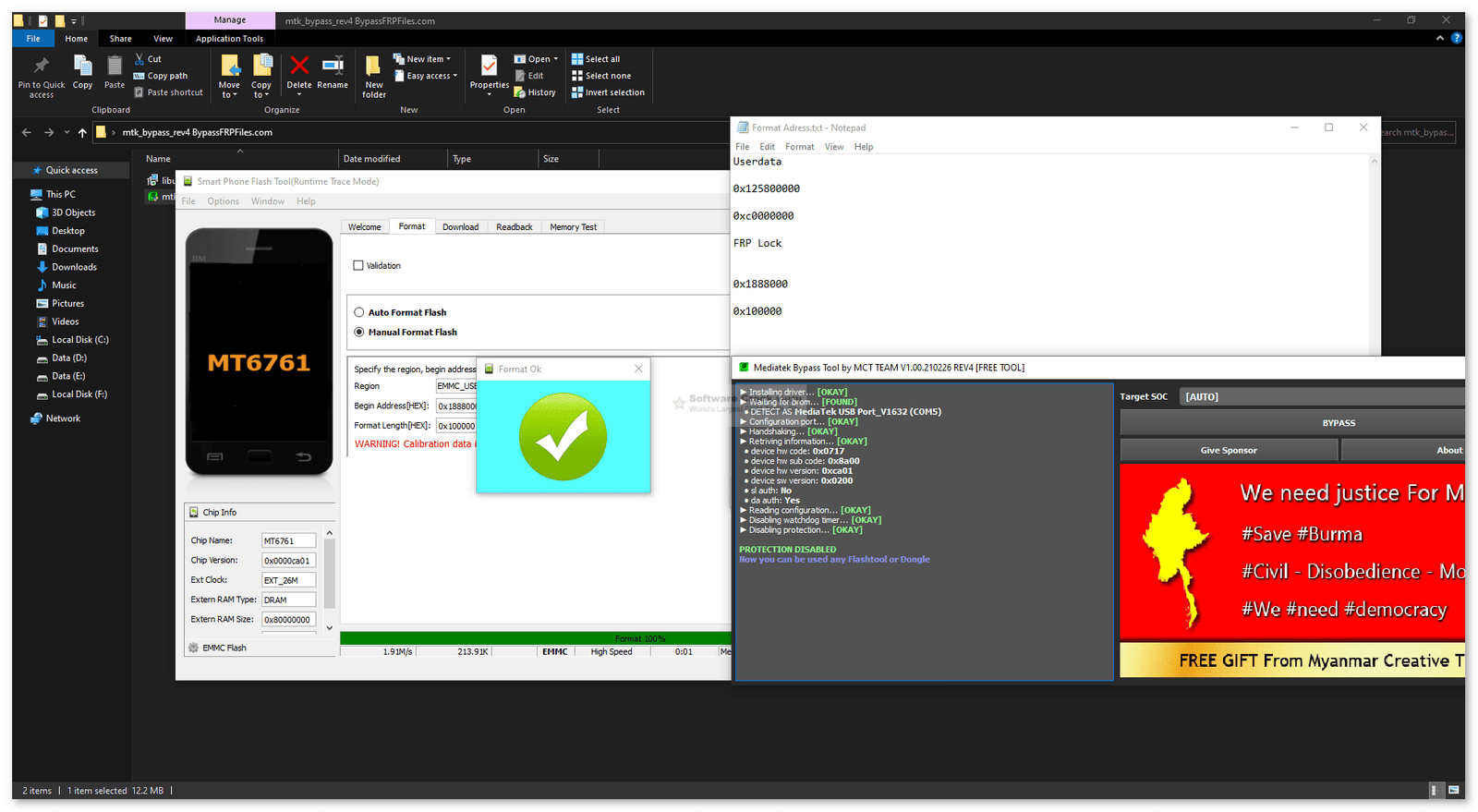
Run SP Flash Tool and Select FRP File:
- Run SPFlash.exe
- Click on Choose from Scatter-Loading File Tab
- Choose the Tecno Spark 5 scatter.txt file and Click Open.
- Now Select Options from the top-left corner and choose Option.
- Select Connection Change Boud rate to 921600 (Leave it as it is)
- Now you have to bypass the USB Security of your phone.
- Bypass the USB Protection and Flash Tecno Spark 5 phone
- Open First Disable DAA and SLA Authentication
- Reconnect your Redmi phone
- It will detect your device Port and disable the USB protection
- Now Open the SP Flash Tool and select the COMPORT in the Connection window; that’s it.
- Untick the Preloader, Click on Download, Wait for finished.
- Once finished, disconnect and Power On Tecno Spark 5
- Setup all initial steps.
- Now you have Tecno Spark 5 passcode FRP Bypass successfully with File quickly.
- Now You Frp Unlock Without Any Box Or Pc
- Done.