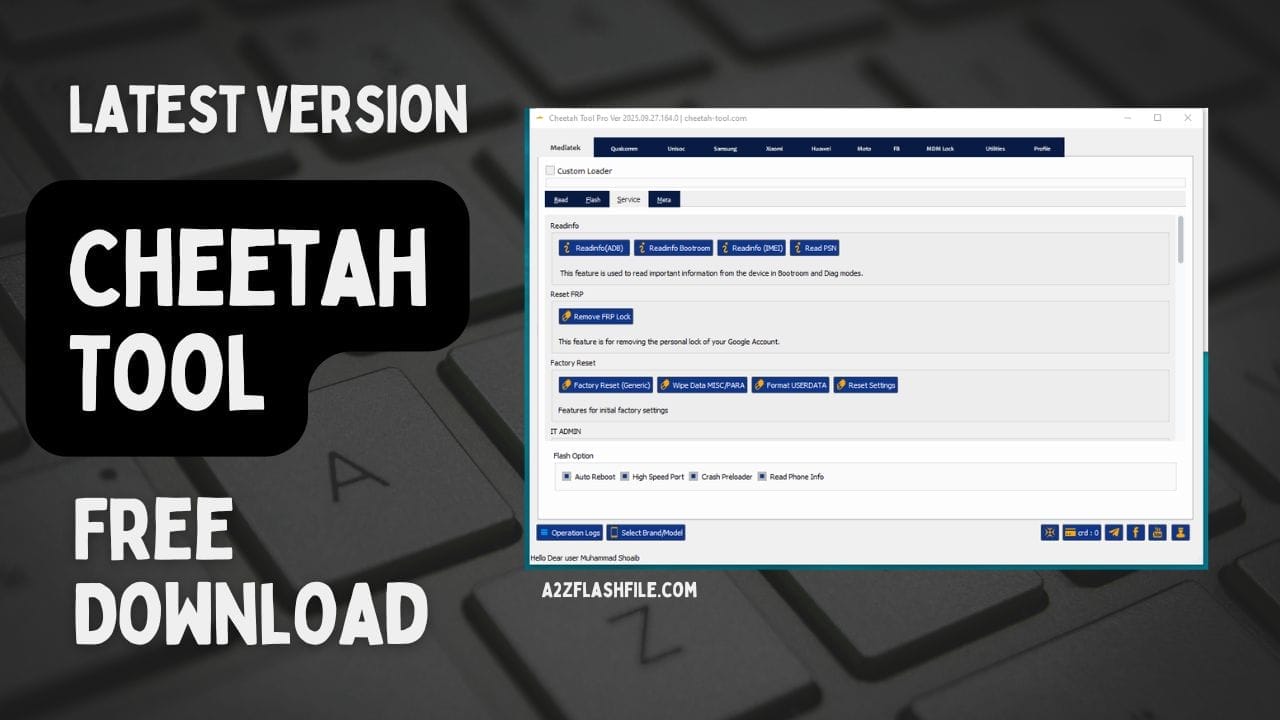
Cheetah tool helps technicians and users repair android devices with one click.
Have You Ever Been Stuck Trying To Fix A Phone That Just Won’t Boot Keeps Looping Or Is Locked Down With Frp? It’s Frustrating When You Know The Problem Is Software Related But You Don’t Have The Right Tool Or Knowledge To Get Past It. Many Users Searching For Cheetah Tool Are Usually At That Point Tired Of Wasting Hours And Looking For Something Reliable To Handle Mediatek Qualcomm Unisoc Samsung Xiaomi Huawei And More.
That’s Exactly What This Blog Is Here To Help With. We’ll Walk Through How Cheetah Tool Works Across Its Tabs—like Read Flash Service And Meta And Explain Key Options Such As Custom Loaders Partition Backups Firmware Flashing Frp Resets And Even Imei Repair. By The End You’ll Have A Clear Idea Of What Each Feature Does When To Use It And How It Can Save You Time And Frustration When Working On Smartphones.
Contents
- 1 Cheetah Tool Fix Your Phone In One Click
- 2 Download The Cheetah Tool Latest Version
- 3 What Is The Cheetah Tool
- 4 Key Features
- 5 Cheetah Tool Pro – New Update Released (V 2026.01.27)
- 5.1 Qualcomm Snapdragon Chipset Support – Oppo / Realme / Oneplus
- 5.2 Qualcomm Vip Auth (9008 Mode) – New Supported Models
- 5.3 Samsung – Frp / Factory Reset Support
- 5.4 Carrier Relock Support
- 5.5 Samsung Tools
- 5.6 Oppo / Realme / Oneplus
- 5.7 Nothing Phone Support
- 5.8 New Brand Support
- 5.9 Improvements & Fixes
- 6 Why Technicians Prefer Cheetah Tool Pro
- 7 Is Cheetah Tool Pro Safe And Legal To Use?
- 8 How to Install
- 9 Frequently Asked Questions (FAQs)
- 10 Conclusion:
- 11 How To Download
Cheetah Tool Fix Your Phone In One Click
If You’ve Ever Struggled With A Phone That Won’t Boot Keeps Looping Or Is Stuck Because Of Frp You Know How Frustrating It Can Be. Many People Spend Hours Searching For Solutions Downloading Random Files Or Even Paying Technicians Who Don’t Always Deliver Results. That’s Where The Cheetah Tool Comes In — A Professional Mobile Repair Tool That Helps You Fix Problems In Just A Few Clicks.
Whether You’re A Technician Or Just Someone Who Wants To Repair A Device At Home This Tool Makes It Easier To Manage Flashing Resetting And Unlocking Across Different Brands. From Mediatek To Qualcomm And Samsung To Huawei It Supports A Wide Range Of Chipsets And Devices Giving You Flexibility And Control Without Needing Dozens Of Separate Programs.
Download The Cheetah Tool Latest Version
The First Step In Using This Software Is Making Sure You Have The Latest Version. Updates Often Bring Bug Fixes Support For New Phone Models And Extra Functions That Make Repairs Smoother. You Can Find The Newest Release On Trusted Sources And Once Downloaded The Installation Process Is Straightforward.
Most Users Choose The Cheetah Tool Pro Download Option Because It Includes Advanced Features Like Frp Bypass Imei Repair And Extra Flashing Modes. Always Check That You’re Downloading From A Reliable Site To Avoid Malware Or Fake Copies.
What Is The Cheetah Tool
In Simple Terms Cheetah Tool Is A Mobile Repair Solution Built For Technicians And Individual Users Who Want To Fix Devices Efficiently. It Combines Features Like Flashing Unlocking Resetting And Reading Device Information Into A Single User-friendly Interface.
This Tool Is Designed To Handle Tricky Situations Such As Password Removal Bypassing Frp Locks And Repairing Corrupted Firmware. Instead Of Juggling Multiple Apps For Each Brand You Can Use One Program To Support Samsung Oppo Xiaomi Huawei Vivo And Many Others.
Supported Brands And Chipsets
One Of The Reasons Cheetah Tool Has Gained Popularity Is Its Broad Compatibility. It Supports Mediatek Qualcomm Unisoc And Samsung Chipsets As Well As Popular Brands Like Huawei Xiaomi Oppo Vivo And Lg.
For Example With Samsung Devices You Can Reset Frp In Download Mode While Huawei Users Benefit From Functions Like Id Reset And Mdm Lock Removal. Having This All-in-one Solution Saves Technicians From Switching Between Multiple Programs For Different Brands.
Frp Bypass And Reset Functions
Factory Reset Protection (frp) Is A Security Feature Designed To Protect Android Devices If They’re Lost Or Stolen. However It Often Locks Out Real Owners Who Forget Their Google Account Credentials. That’s Where The Cheetah Tool Frp Bypass Option Comes In Handy.
With Just A Few Clicks You Can Remove Frp Locks On Samsung Xiaomi Huawei And Other Android Devices. It’s A Quick Way To Regain Access But It Should Only Be Used Responsibly On Devices You Own Or Have Permission To Repair.
Flashing And Firmware Management
Flashing Is Another Core Function Of This Tool. Whether It’s A Scatter File For Mediatek A Pac File For Unisoc Or Rawprogram.xml For Qualcomm The Software Makes Firmware Installation Much Easier. Options Like Auto Reboot Dl Checksum Protect Repartition And Backup Security Allow You To Handle Repairs Without Risking Unnecessary Damage.
Technicians Often Use Cheetah Tool To Fix Phones Stuck In Boot Loops Or To Update Devices To The Latest Firmware Version. Since The Process Is Step-by-step Even Less Experienced Users Can Follow Along With Guidance.
Key Features
Mediatek
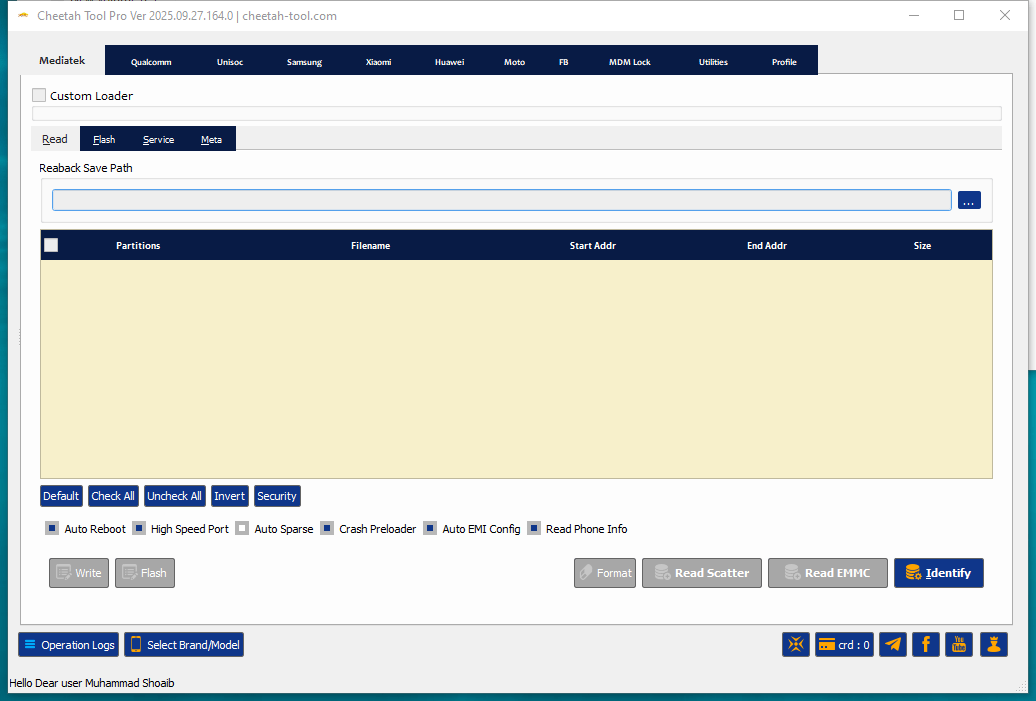
Read Tab
- Custom Loader (option to use)
- Reaback Save Path (set location for saving backup)
- Partition list display (Partitions | Filename | Start Addr | End Addr | Size)
- Controls:
Default / Check All / Uncheck All / Invert / Security
Options:
- Auto Reboot
- High Speed Port
- Auto Sparse
- Crash Preloader
- Auto EMI Config
- Read Phone Info
Buttons:
- Write
- Flash
- Format
- Read Scatter
- Read EMMC
- Identify
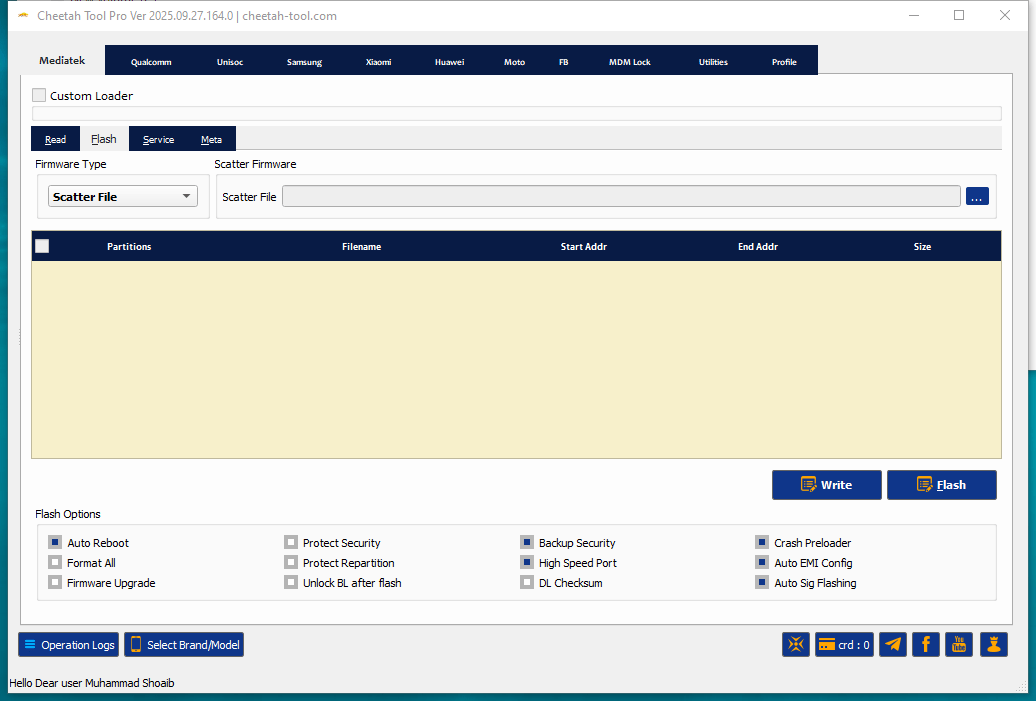
Flash Tab
- Custom Loader (option to use)
- Firmware Type: Scatter File
- Scatter Firmware input (browse for file)
- Partition list display (Partitions | Filename | Start Addr | End Addr | Size)
Cheetah tool pro helps technicians and users fix android phones with one click — from frp bypass to firmware flashing.
Flash Options:
- Auto Reboot
- Format All
- Firmware Upgrade
- Protect Security
- Protect Repartition
- Unlock BL after flash
- Backup Security
- High Speed Port
- DL Checksum
- Crash Preloader
- Auto EMI Config
- Auto Sig Flashing
Buttons:
- Write
- Flash
Download cheetah tool pro free to fix android phones bypass frp flash firmware and perform imei repair with ease.
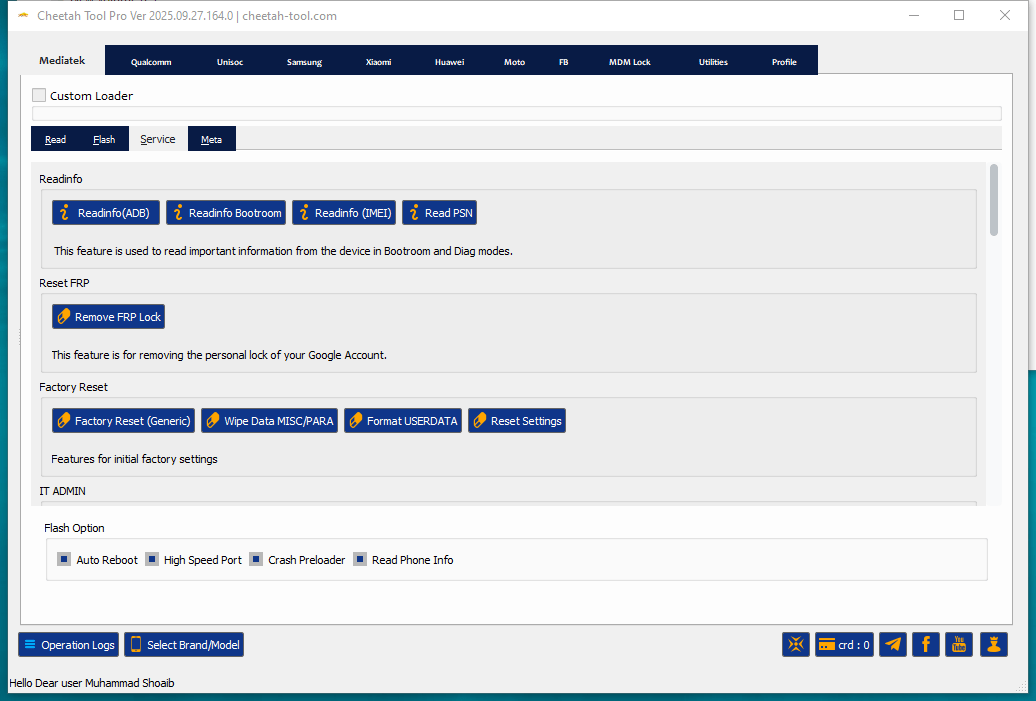
Service Tab
Read Info
- Readinfo (ADB)
- Readinfo Bootroom
- Readinfo (IMEI)
- Read PSN
Reset FRP
- Remove FRP Lock
Factory Reset
- Factory Reset (Generic)
- Wipe Data MISC/PARA
- Format USERDATA
- Reset Settings
Options:
- Auto Reboot
- High Speed Port
- Crash Preloader
- Read Phone Info
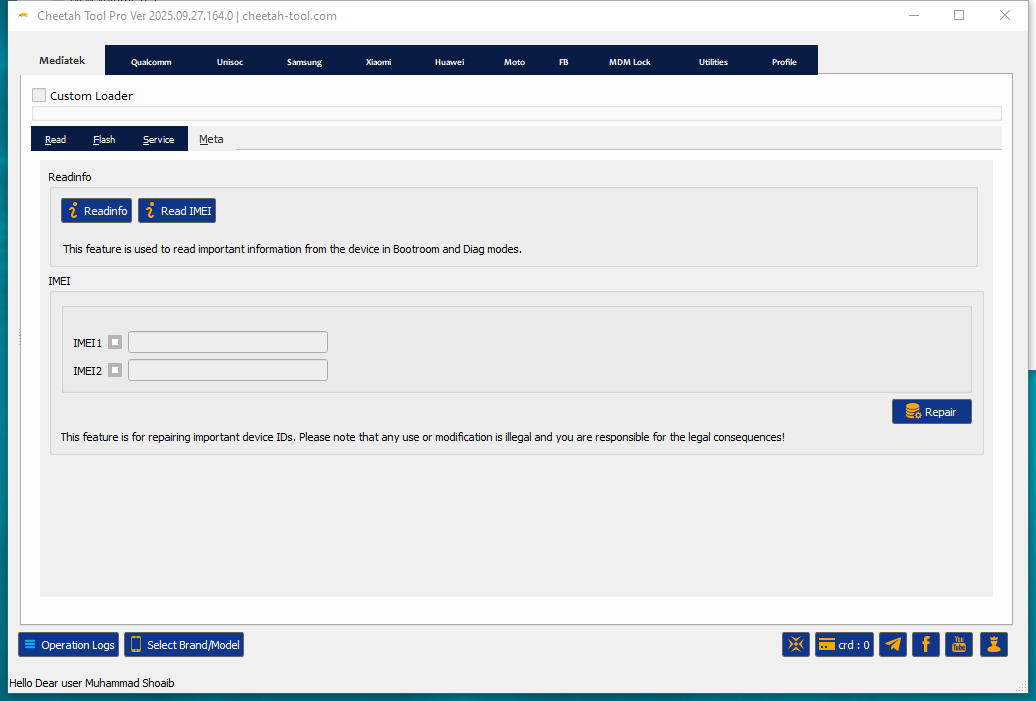
Meta Tab
Read Info
- Readinfo
- Read IMEI
IMEI Section
- IMEI1 input
- IMEI2 input
- Repair button
Note: This Feature Is For Repairing Important Device Ids. Any Use Or Modification Is Illegal And You Are Responsible For Legal Consequences.
Cheetah tool helps users fix android devices perform frp bypass and manage firmware in one click.
Qualcomm
Read Tab
- Custom Loader (option to use)
- Reaback Save Path (set location for backup)
- Partition list display (Partitions | Filename | Start Addr | End Addr | Size)
- Controls:
- Default / Check All / Uncheck All / Invert / Security
Options:
- Auto Reboot
- Auto Sparse
- Read Phone Info
Buttons:
- Delete
- Write
- Read Rawprogram
- Read EMMC
- Identify

Download the latest version of cheetah tool pro free to flash firmware reset frp and repair android devices.
Flash Tab
- Custom Loader (option to use)
- Firmware Type: Rawprogram.xml
Inputs:
- Rawprogram (file selection)
- Patch.xml (file selection)
Partition list display (Partitions | Filename | Start Addr | End Addr | Size)
Flash Options:
- Auto Reboot
- Verify Sha256
- Read Security
- Protect IMEI
Button:
- Flash

Download the latest version of cheetah tool pro free to flash firmware reset frp and repair android devices.
Service Tab
Read Info
- Readinfo (ADB)
- Readinfo (EDL)
- Check Health EMMC
Reset FRP
- Reset FRP Lock
Factory Reset
- Factory Reset January 2024
- Factory Reset (MAKE USERDATA)
- Factory Reset (MISC)
IT Admin
- Remove IT ADMIN
- Dropdown: Aurorastore All OS Ver
Options:
- Auto Reboot
- Read Phone Info

Cheetah tool makes android repairs easier with frp reset imei repair and firmware management.
Unisoc
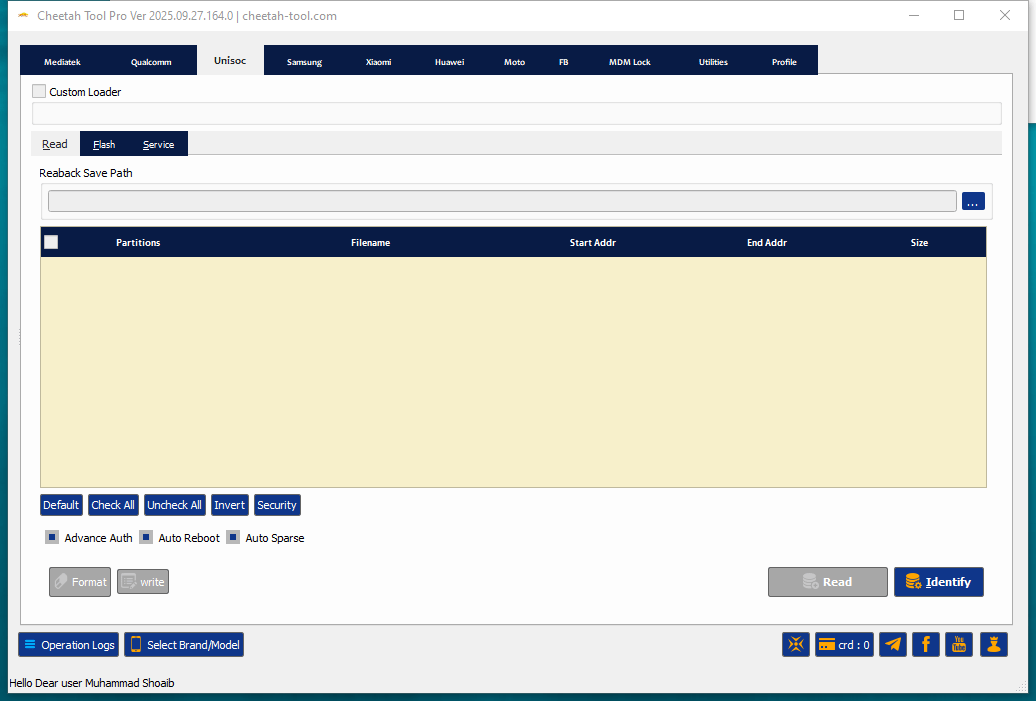
Read Tab
- Custom Loader (option to use)
- Reaback Save Path (set location for backup)
- Partition list display (Partitions | Filename | Start Addr | End Addr | Size)
Controls:
- Default / Check All / Uncheck All / Invert / Security
Options:
- Advance Auth
- Auto Reboot
- Auto Sparse
Buttons:
- Format
- Write
- Read
- Identify
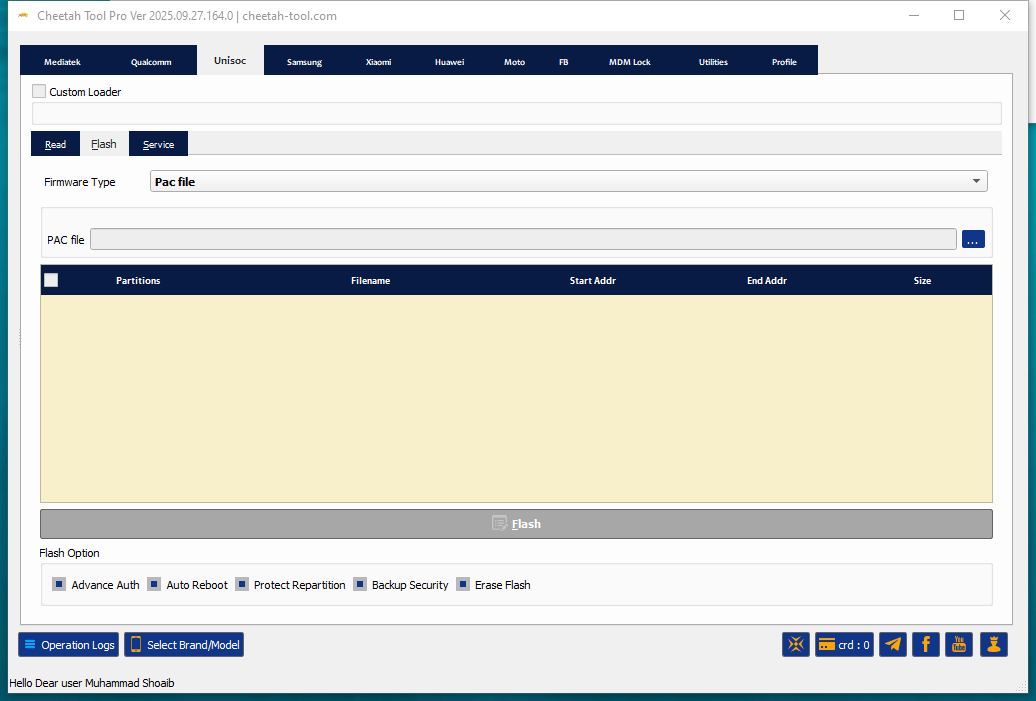
Flash Tab
- Custom Loader (option to use)
- Firmware Type: PAC file
- PAC File input (browse for file)
- Partition list display (Partitions | Filename | Start Addr | End Addr | Size)
Flash Options:
- Advance Auth
- Auto Reboot
- Protect Repartition
- Backup Security
- Erase Flash
Button:
- Flash
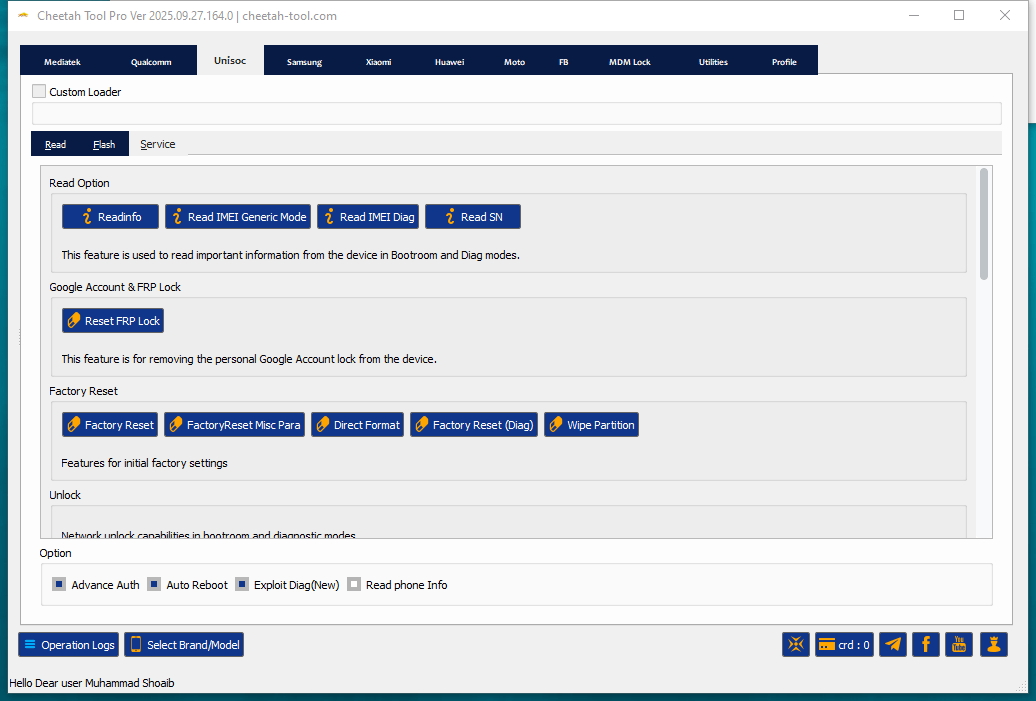
Service Tab
Read Options
- Readinfo
- Read IMEI Generic Mode
- Read IMEI Diag
- Read SN
Google Account & FRP Lock
- Reset FRP Lock
Factory Reset
- Factory Reset
- Factory Reset Misc Para
- Direct Format
- Factory Reset (Diag)
- Wipe Partition
Unlock
- Network unlock features (in bootroom & diag modes)
- Options:
- Advance Auth
- Auto Reboot
- Exploit Diag (New)
- Read Phone Info
Download the latest version of cheetah tool pro to flash firmware reset frp and repair android devices.
Samsung
General Service Tab
Read Info
- Readinfo (ADB)
- Readinfo (MTP)
- Readinfo (DL)
Reset FRP
- Reset FRP Mediatek (Download Mode)
Factory Reset
- Factory Reset (Download Mode)
Network Locks
- Unlock Network JDM CERT
- Unlock Network Sprint (New)
MDM Locks
- Remove Knox Guard (ADB)

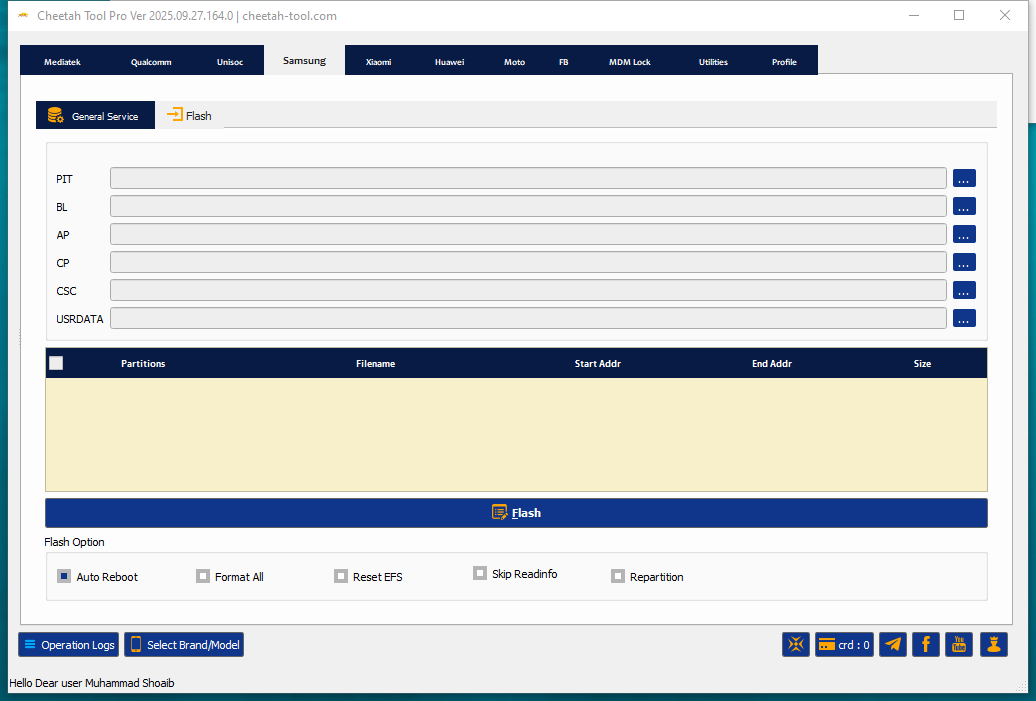
Flash Tab
File Inputs
- PIT
- BL
- AP
- CP
- CSC
- USERDATA
Partition list display (Partitions | Filename | Start Addr | End Addr | Size)
Flash Options
- Auto Reboot
- Format All
- Reset EFS
- Skip Readinfo
- Repartition
Button
- Flash
Download the latest version of cheetah tool to flash firmware bypass frp and repair android devices safely.
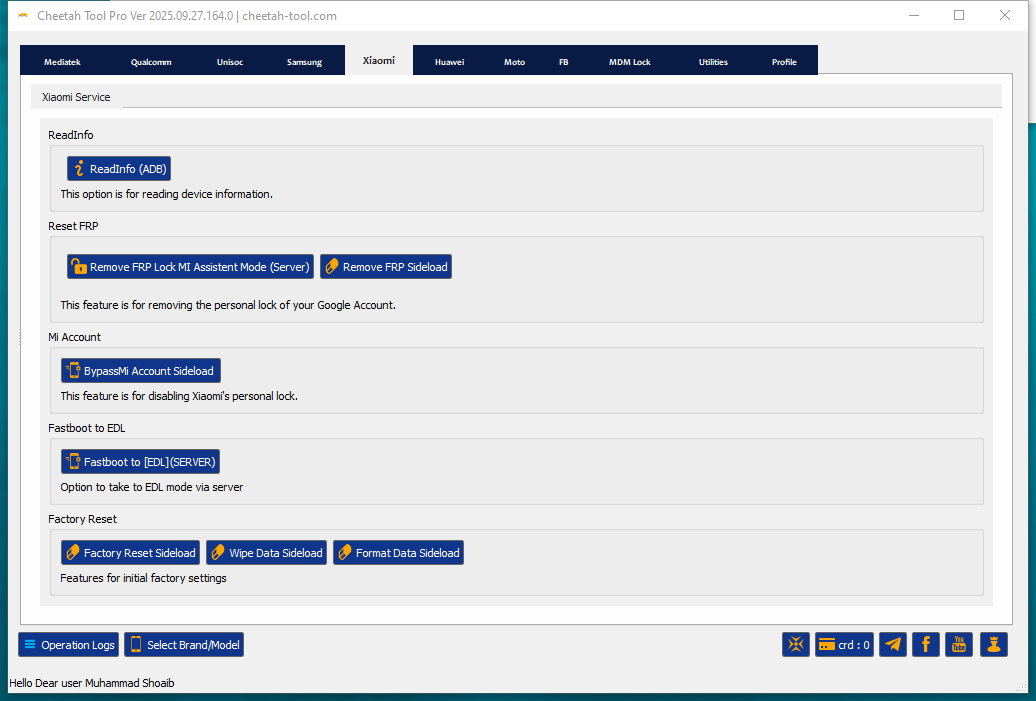
Xiaomi
Read Info
- Readinfo (ADB)
Reset FRP
- Remove FRP Lock MI Assistant Mode (Server)
- Remove FRP Sideload
Mi Account
- Bypass Mi Account Sideload
Fastboot to EDL
- Fastboot to [EDL] (Server)
Factory Reset
- Factory Reset Sideload
- Wipe Data Sideload
- Format Data Sideload
Cheetah tool pro to reset frp bypass mi account and perform factory resets on xiaomi devices.
Huawei
- Flash Upgrade Mode
- Read
- Write
Service
- Read Info
- FRP Locks
- Reset FRP Lock
- Reset Huawei ID
- Factory Reset
- Read Pattern (Unencrypted Data)
- Restore Backup
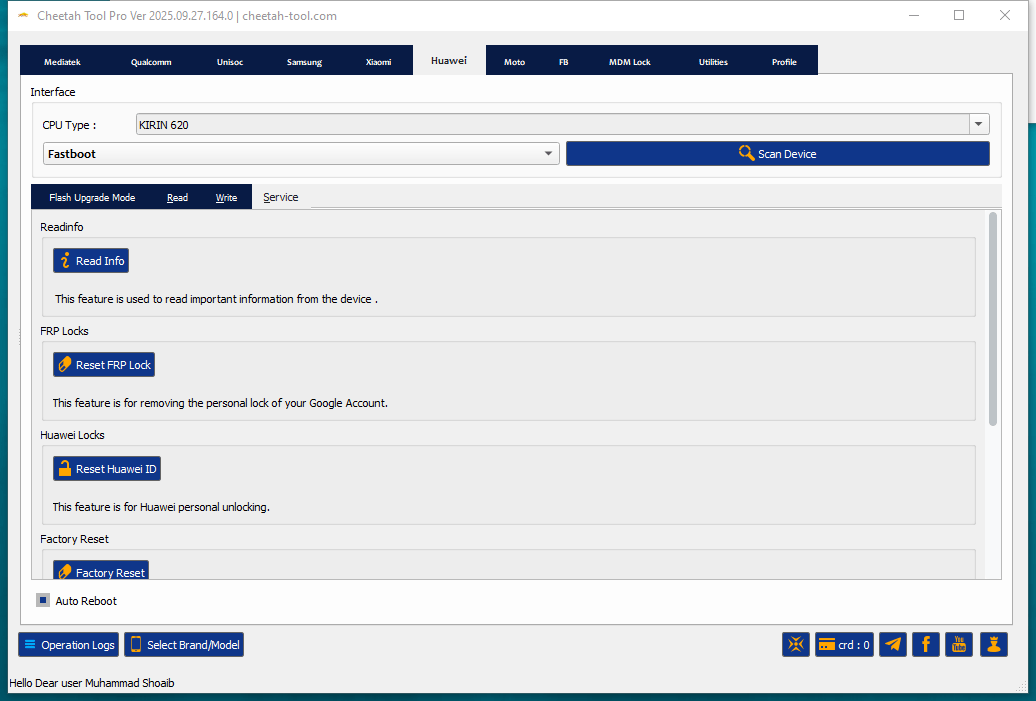
Unlock frp reset huawei id and remove mdm locks on huawei devices using cheetah tool pro.
MDM Lock
Unlock MDM
Direct Unlock Mdm Lock (Dropdown) — Vendor/patch Specific Direct-unlock Methods. Examples Shown In The Menu:
- Direct Unlock MDM Lock Xiaomi All Security Patch
- Direct Unlock MDM Lock Oppo | Realme | OnePlus All Security Patch
- Direct Unlock MDM Lock Tecno | Infinix | ITel All Security Patch [White Screen]
- Direct Unlock MDM Lock Tecno | Infinix | ITel All Security Patch [Black Screen]
- Direct Unlock Network Google Pixel
- Direct Unlock PayJoy (App Lock)
- Direct Unlock PinClaro (App Lock)
- Direct Unlock Cricket (App Lock)
- Direct Unlock MDM Motorola (White Screen)
It Admin
Remove It Admin — Primary Button To Remove Corporate/mdm Admin.
- Aurorastore All OS Ver
- Original Playstore
- Original Playstore [Create User]
- Original Playstore [Create Profile]
- Universal
It Admins Are Often Part Of Mdm Systems That Organizations Use To Manage Their Devices.
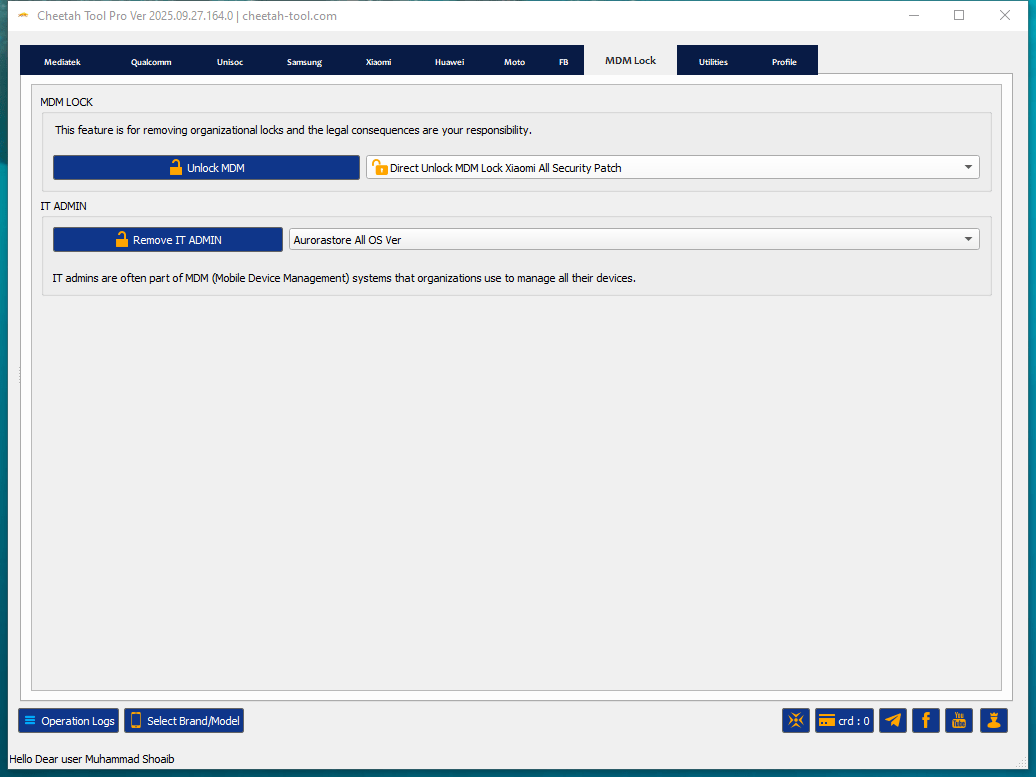
An mdm lock is used by organizations to secure and manage corporate devices requiring admin approval for removal.
Cheetah Tool Pro – New Update Released (V 2026.01.27)
Qualcomm Snapdragon Chipset Support – Oppo / Realme / Oneplus
Vip Auth 9008 Mode Now Supports Devices Powered By The Following Qualcomm Snapdragon Socs:
- Snapdragon 480 5g (sm4350)
- Snapdragon 460 (sm4250)
- Snapdragon 662 (sm6115)
- Snapdragon 665 (sm6125)
- Snapdragon 680 (sm6225)
- Snapdragon 695 5g (sm6375)
- Snapdragon 7+ Gen 2 (sm7475)
- Snapdragon 7+ Gen 3 (sm7675)
- Snapdragon 888 (sm8350)
- Snapdragon 8 Gen 1 (sm8450)
- Snapdragon 8+ Gen 1 (sm8475)
- Snapdragon 8 Gen 2 (sm8550)
- Snapdragon 8 Gen 3 (sm8650)
- Snapdragon 8s Gen 3 (sm8735)
- Snapdragon 8 Elite (sm8750)
These Chipsets Are Now Supported For Qualcomm Vip Authorization And 9008 Mode Operations On Oppo Realme And Oneplus Devices.
Qualcomm Vip Auth (9008 Mode) – New Supported Models
Oppo
- Oppo A1 5g (phs110)
- Oppo A1 Pro (phq110)
- Oppo A5i Pro (cph2821)
- Oppo A6 Gt (pll110)
- Oppo A98 (cph2529)
- Oppo F21 Pro 5g (cph2341 Cph2455)
- Oppo F23 (cph2527)
- Oppo Find N5 (cph2671 Pkh110 Pkh120)
- Oppo Find X2 Lite (cph2005)
- Oppo Find X2 Neo (cph2009)
- Oppo Find X7 Ultra (phy110 Phy120)
- Oppo Find X8 Ultra (pkj110 Pku110)
- Oppo K10x (pggm10)
- Oppo K11x (phf110)
- Oppo K12 (pir110)
- Oppo K12 Plus (pks110)
- Oppo K12x China (pjt110)
- Oppo Pad Air (opd2102 X21n2)
- Oppo Reno 7 Lite 5g (cph2343)
- Oppo Reno 7z 5g (cph2343)
- Oppo Reno 8 Lite 5g (cph2343)
- Oppo Reno 8t 5g (cph2505)
Realme
- Realme 9 Pro 5g (rmx3471 Rmx3472)
- Realme 10 Pro 5g (rmx3663 Rmx3660 Rmx36xx Series)
- Realme Gt Neo 5 Se (rmx3700)
- Realme Gt Neo 6 Se (rmx3850)
- Realme Gt5 240w (rmx3823)
- Realme Gt5 Pro (rmx3888)
- Realme Gt8 (rmx6699)
- Realme Pad X (rmp2107 Rmp2108)
- Realme Q5 5g (rmx3478)
- Realme V25 (rmx3475)
Oneplus
- Oneplus 9 Pro (le2120 Le2121 Le2123 Le2125)
- Oneplus 9rt 5g (mt2110 Mt2111)
- Oneplus 12 (pjd110 Cph2573 Cph2581 Cph258x Series)
- Oneplus 13 (cph2655 Cph2653 Pjz110 Cph2649)
- Oneplus 13r (cph2645 Cph2691 Cph2647)
- Oneplus 13s (cph2723)
- Oneplus 13t (pkx110)
- Oneplus Ace 3 Pro (pkr110)
- Oneplus Ace 3v (pjf110)
- Oneplus Ace 5 (pkg110)
- Oneplus Ace 5 Pro (pkr110)
- Oneplus Ace 6 (plq110)
- Oneplus Nord 4 (cph2663 Cph2661)
- Oneplus Nord Ce 2 Lite (cph2381 Cph2409)
- Oneplus Nord Ce 3 Lite (cph2465)
- Oneplus Nord Ce 4 (cph2613)
- Oneplus Nord Ce 4 Lite (cph2619 Cph262x Series)
- Oneplus Nord N20 (gn220 Cph2459)
- Oneplus Pad 2 (opd2403)
- Oneplus Pad 3 (opd2415)
- Oneplus Pad Pro (opd2404)
Samsung – Frp / Factory Reset Support
- SM-A025U1 BIT 6
- SM-F7000 BIT B
- SM-F9160 BIT 8
- SM-G781N BIT D
- SM-G781V BIT L
- SM-G781W BIT L
- SM-G990U2 BIT I
- SM-M236B BIT C
- SM-T636B BIT 9
- SM-T638U BIT 9
- SM-T735 BIT 9
- SM-W9023 BIT 8
- SM-X210 BIT 9
- SM-X216C BIT 9
- SM-X216N BIT 9
Carrier Relock Support
- Added Relock Carrier Support For Android 16 Devices
- Note: Android 16 Security Patch 2026 Is Not Yet Supported
Samsung Tools
- Added Check Info By Imei For Samsung Devices
Oppo / Realme / Oneplus
- Added Direct Network Unlock For All Security Levels On Mediatek Chipsets
- Added Online Region Unlock Code Reading For Oppo Devices
Nothing Phone Support
- Supported Cpu: Mt6886 / Mt6877 / Mt6878
- Nothing Phone 2a
- Nothing Phone 3a Lite (galaxian)
Note: Bootloader Unlock And Imei Repair Are Not Supported For These Models
New Brand Support
AGM G2
Improvements & Fixes
- Fixed Reported Bugs
- Optimized Model Selection Interface
- Improved Overall Stability
Why Technicians Prefer Cheetah Tool Pro
Professionals In Mobile Repair Shops Appreciate Tools That Save Time Reduce Risk And Cover Multiple Brands In One Package. Cheetah Tool Pro Does Exactly That. Its User-friendly Interface Makes It Easy To Find Functions Quickly And Advanced Options Like Imei Repair And Network Unlock Add More Flexibility.
Also Updates Are Frequent So Technicians Can Support The Latest Devices Without Waiting Months For Compatibility. This Reliability Is One Reason It’s Considered A Comprehensive Solution For Mobile Repair.
Is Cheetah Tool Pro Safe And Legal To Use?
While The Software Is Powerful It’s Important To Remember That Not All Functions Are Legal In Every Country. For Example Imei Repair And Some Network Unlocks May Violate Local Regulations. The Tool Itself Includes A Clear Warning That You’re Responsible For Legal Consequences If You Misuse It.
For Most Everyday Tasks Like Flashing Frp Reset And Factory Resets It’s Safe And Perfectly Legal To Use. Always Double-check The Rules In Your Country And Use The Tool Ethically To Avoid Issues.
How to Install
- Download And Extract The Cheetah ToolTo Your Computer.
- Now Extract The Tool Using Winrar Or 7zip,
- Run the The Cheetah Tool.exe as Administrator.
- Go To The Desktop Of Your Pc And Open The Tool.
- Now The Tool Will Open Successfully.
Disclaimer
This Software Is Only For Testing And Learning. It Is Made To Check And Fix Some Software Problems.
- Please Do Not Install It On Your Main Computer.
- We Cannot Promise That It Is Fully Safe Or Free From Errors.
- If Your Computer Gets Hacked Damaged Or Loses Data We Are Not Responsible.
You Are Using This Software At Your Own Risk. Stay Safe.
Frequently Asked Questions (FAQs)
What Is Cheetah Tool Pro?
Cheetah Tool Pro Is A Powerful Gsm Software Designed For Professional Technicians To Perform Flashing Frp Bypass And Factory Resets On Various Android Devices Including Samsung Qualcomm And Mediatek Models.
Is Cheetah Tool Free To Download?
Yes You Can Get The Cheetah Tool Latest Version Free Download From Our Website. However Some Advanced Features May Require An Official Activation Or Account Login.
Does Cheetah Tool Pro Support Qualcomm Frp Bypass?
Absolutely! Cheetah Tool Pro Is Highly Recommended For Qualcomm Snapdragon Devices. It Can Easily Reset Frp And Unlock Patterns In Edl Mode With Just One Click.
Is Cheetah Tool Safe For My Pc?
Yes The Cheetah Tool Setup Provided Here Is 100% Tested And Safe. Always Ensure You Disable Your Antivirus Before Installation To Avoid Any File Blocking During The Flashing Process.
How To Update Cheetah Tool Pro To The Latest Version?
To Update Simply Download The Latest Cheetah Tool Pro Setup From Our Site Uninstall The Old Version And Install The New One To Enjoy The Latest Security Patches And Model Support.
Conclusion:
Cheetah Tool Pro Stands Out As One Of The Most Reliable And Efficient Solutions For Modern Android Servicing. Whether You Need To Bypass Frp Flash Firmware Or Reset User Locks This Tool Provides A Stable Environment For All Operations. The Latest Update Has Made The Cheetah Tool Even More Powerful By Adding Support For The Newest Qualcomm And Mtk Chipsets.
How To Download
To Download The Cheetah Tool Pro Follow These Steps:
- Go To The A2zflashfile.com Website Of The Cheetah Tool.
- Find The Download Page And Don’t Click Button And Click Only The (Download Here).
- Below Buttons Are Advertisements. Please Use The Download Links Above.
- Wait For The Download To Complete.
- Locate The Downloaded File On Your Device Once The Download
Cheetah Tool V2026.02.16.175.2
👉 [Click Here to Rent This Tool on WhatsApp]
Download Link:: Usersdrive – Mediafire – 4shared – My.pcloud – DropBox – Mega – Vexfile – Google Drive