

Your all-in-one solution for xiaomi device unlocking frp bypass firmware flashing and mi cloud removal using the ghost auth tool.
If You’ve Ever Stared At A Locked Xiaomi Device Wondering How To Get Past Mi Cloud Erase Frp Or Safely Flash Firmware Without Bricking Your Phone You’re Definitely Not Alone. Whether You’re A Repair Technician Dealing With A Customer’s Locked Device Or Just Someone Trying To Regain Access To Your Own Phone The Process Can Feel Overwhelming Especially When One Wrong Step Could Make Things Worse. The Tools Are Out There But Figuring Out Which One Actually Works And How To Use It Properly Is A Whole Other Challenge.
That’s Exactly What This Blog Post Is Here For. We’re Breaking Down The Ghost Auth Tool A Powerful Utility Packed With Features Like Mi Cloud Clean Unlock Bootloader Erase Frp Backup Efs Fastboot To Edl And Much More So You Know Exactly What Each Function Does And When To Use It. By The End You’ll Have A Clear Practical Understanding Of How To Navigate The Tool Confidently Whether You’re Doing A Factory Reset Reading Device Info Or Handling Mi Account-related Issues. Keep Reading You’re In The Right Place.
What Is The Ghost Auth Tool And How Does It Work
The Ghost Auth Tool Is A Windows-based Xiaomi Servicing Utility Built Specifically For Mobile Repair Professionals. It Gives Technicians Direct Access To Deep Device-level Operations That Standard Software Simply Can’t Handle. Think Of It As A Master Key For Xiaomi Redmi And Poco Devices One That Opens Doors Most Other Tools Can’t Even Reach.
It Works By Connecting Your Xiaomi Device To A Pc Via Usb And Communicating Through Adb Fastboot Or Edl Mode Depending On The Operation. The Tool Is Organized Into Four Main Tabs Flash Service Fastboot And Mi Assistant Each Designed For A Specific Category Of Tasks. Once Connected You Simply Select The Function You Need And Let The Tool Do The Heavy Lifting.
Ghost Auth Tool Key Features You Need To Know
The Ghost Auth Tool Isn’t Just One Function Wrapped In A Flashy Interface. It’s A Full Suite Of Professional-grade Operations. Here’s A Breakdown Of Everything Packed Inside:
Flash Tab Features
The Flash Tab Handles All Firmware-related Tasks. It Includes:
- Firmware Folder — Select And Load Firmware Directly
- Read Gpt — Reads The Partition Table Of The Device
- Backup — Creates A Full Backup Before Flashing
- Erase — Wipes Selected Partitions Safely
- Auto Reboot — Automatically Reboots After Flashing
- Flash Now! — Executes The Firmware Flash Instantly

Ghost auth tool the flash tab activity log credit system price list and supported servicing options including mi cloud clean frp erase and efs for xiaomi redmi and poco devices.
Service Tab Features
This Is Where The Real Magic Happens For Account And Lock Removal:
- Mi Cloud Clean (Persist / Server) — Removes Mi Cloud At Persist Or Server Level
- Erase Frp — Clears Factory Reset Protection In Seconds
- Mi Cloud Disable — Disables The Mi Cloud Lock On The Device
- Mi Unlock + Reset + Frp — Complete Unlock Operation In One Step
- Factory Reset — Restores The Device To Factory Settings
- Factory Reset + Frp — Full Wipe With Simultaneous Frp Removal
- Enable Mi Account — Re-enables A Disabled Mi Account On Device

Ghost auth tool service tab displaying all account and lock removal options including mi cloud clean (persist / server) mi cloud disable mi unlock + reset + frp factory reset factory reset + frp and enable mi account for xiaomi redmi and poco devices.
Fastboot Tab Features
- Read Info — Reads Full Device Information In Fastboot Mode
- Fastboot To Edl [auth] — Boots Device Into Edl Mode With Auth
- Unlock Bootloader [auth] Indian Device Only — Unlocks Bootloader On Indian Variant Xiaomi Devices
- Fb Erase Frp (Bi Unlocked) — Erases Frp On Bootloader-unlocked Devices
- Reboot Bootloader — Reboots Device Back Into Fastboot Mode
- Reboot Sideload — Reboots Into Sideload Mode For Adb Flashing
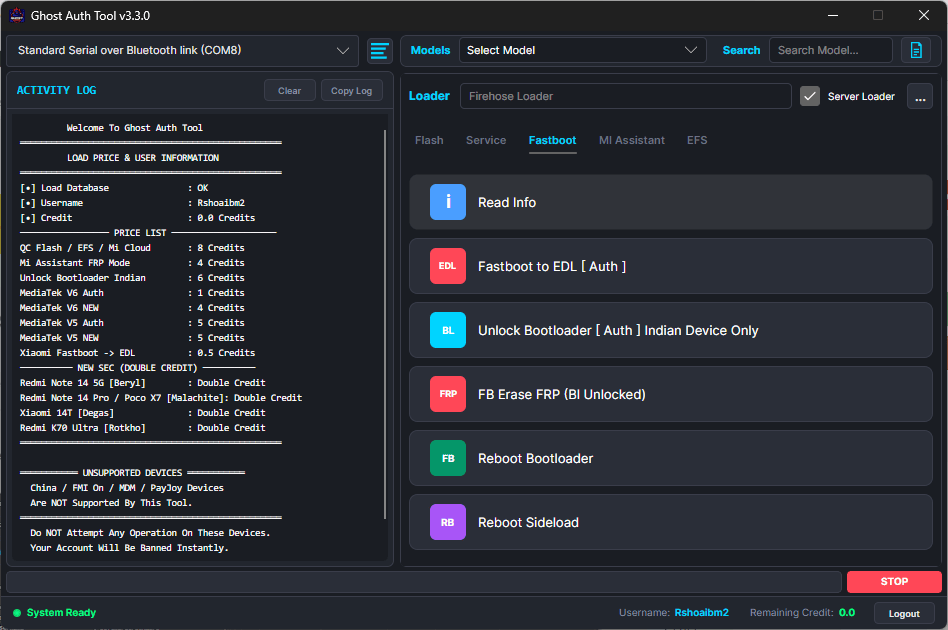
Ghost auth tool fastboot tab displaying all fastboot mode operations including read info fastboot to edl auth unlock bootloader auth for indian devices fb erase frp on bi unlocked devices reboot bootloader and reboot sideload for complete xiaomi fastboot servicing.
Mi Assistant Tab Features
- Read Info — Pulls Detailed Device Information Via Mi Assistant
- Erase Frp [Auth] — Removes Frp With Authentication Support
- Wipe Storage — Completely Wipes Internal Storage Safely
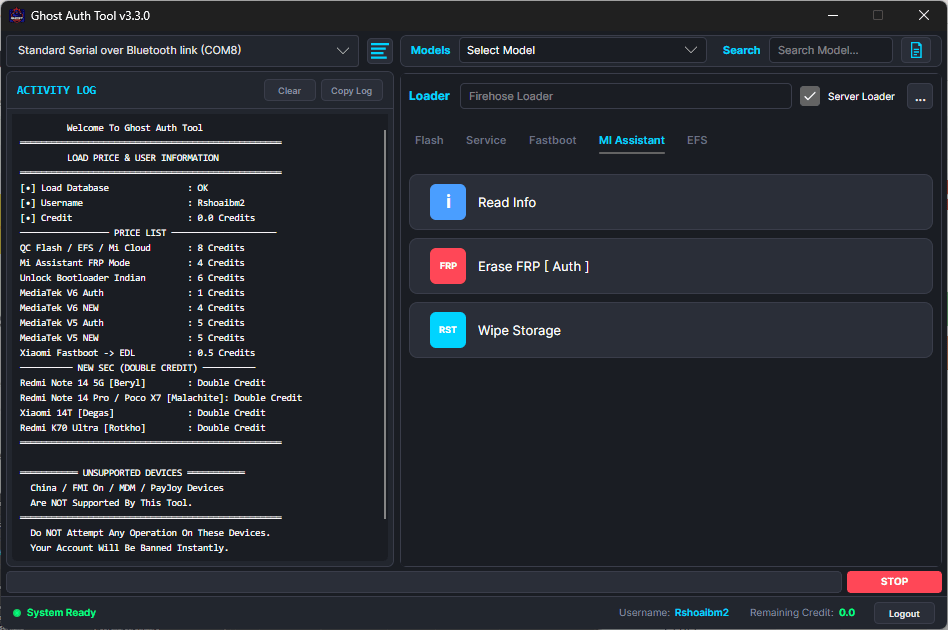
Ghost auth tool mi assistant tab displaying three core functions — read info erase frp auth and wipe storage — designed for deep software-level servicing of xiaomi redmi and poco devices through the mi assistant module.
Efs Tab Features
- Backup Efs — Saves The Efs Partition Before Any Risky Operation
- Restore Efs — Restores A Previously Saved Efs Backup
- Erase Efs — Wipes The Efs Partition When Required
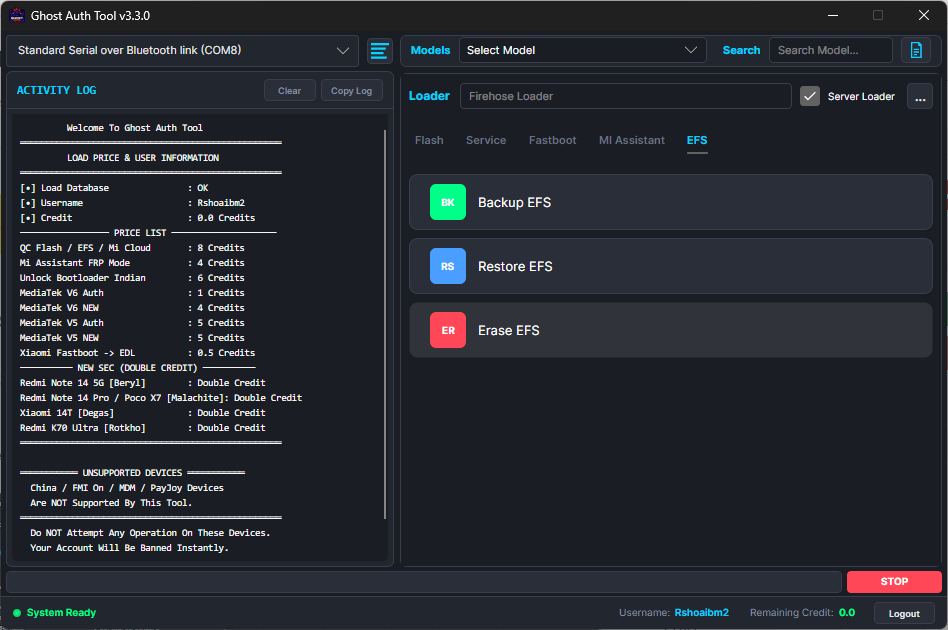
Ghost auth tool efs tab displaying three critical partition operations — backup efs restore efs and erase efs — essential for protecting imei data and baseband integrity on xiaomi redmi and poco devices during deep servicing operations.
How To Download Ghost Auth Tool Latest Version Free
Always Download The Ghost Auth Tool From A Trusted And Verified Source. The Internet Is Full Of Modified Or Outdated Versions That Can Damage Your Device Or Compromise Your Pc. Stick To Well-known Mobile Tech Forums Official Telegram Groups Or Reputable Tech Blogs That Link Directly To The Original Release File.
The Tool Usually Comes As A Zip File. Extract It To A Folder On Your Desktop And Make Sure All Files Are Intact Before Launching. It’s Also A Good Idea To Temporarily Disable Your Antivirus During Extraction — Not Because The Tool Is Harmful But Because Security Software Often Flags Servicing Tools Due To The Deep System Access They Require. Re-enable Your Antivirus Immediately After Setup.
| Detail | Info |
|---|---|
| Tool Name | Ghost Auth Tool |
| Supported Brands | Xiaomi / Redmi / POCO |
| Platform | Windows (PC Only) |
| File Format | ZIP (Executable inside) |
| Auth Required | Yes — for select functions |
| Mi Cloud Clean | ✅ Supported |
| FRP Erase | ✅ Supported |
| EFS Backup & Restore | ✅ Supported |
| Fastboot to EDL | ✅ Supported [Auth] |
| Unlock Bootloader | ✅ Indian Devices Only |
How To Use Ghost Auth Tool Step By Step
Using The Tool Correctly Is Just As Important As Downloading It. Follow These Steps Carefully To Avoid Mistakes.
How To Flash Firmware Using Ghost Auth Tool
- Open The Tool And Go To The Flash Tab
- Click Firmware Folder And Select Your Extracted Firmware
- Connect Your Xiaomi Device Via Usb In Edl Or Fastboot Mode
- Enable Auto Reboot If You Want The Device To Restart Automatically
- Click Flash Now! And Wait For The Process To Complete
Always Use The Correct Firmware For Your Exact Device Model. Flashing The Wrong Firmware Can Brick Your Device Permanently.
How To Clean Mi Cloud With Ghost Auth Tool
- Open The Tool And Navigate To The Service Tab
- Connect The Device Via Usb — Make Sure It’s Detected
- Select Mi Cloud Clean (persist / Server) Based On Your Device’s Lock Type
- Click The Operation Button And Wait For Confirmation
- Reboot The Device Once The Process Finishes
Persist-level Cleaning Works For Most Older Miui Versions. Server-level Is Needed For Newer Devices With Online Account Verification.
How To Erase Frp Using Ghost Auth Tool
- Go To The Service Tab Or Mi Assistant Tab Depending On Your Device State
- Select Erase Frp Or Erase Frp [auth]
- Connect Your Device In The Correct Mode (adb Or Fastboot)
- Click The Function And Let It Run Completely
- Reboot And Set Up The Device Without Any Frp Prompt
Backup And Restore Efs With Ghost Auth Tool
- Open The Efs Tab In The Tool
- Connect Your Device Via Usb In Adb Mode
- Click Backup Efs And Save The File To A Safe Location On Your Pc
- If Needed Later Click Restore Efs And Select The Saved Backup File
- Never Perform Risky Operations Without Backing Up Efs First
Fastboot To Edl Mode — Step By Step Guide
- Boot Your Device Into Fastboot Mode (power + Volume Down)
- Connect To Pc And Open The Ghost Auth Tool
- Go To The Fastboot Tab And Click Fastboot To Edl [auth]
- The Device Will Switch To Edl Mode Automatically
- You Can Now Perform Edl-level Operations
Unlock Bootloader On Indian Xiaomi Devices
- Enable Developer Options And Oem Unlocking On The Device
- Boot Into Fastboot Mode And Connect To Pc
- Open The Fastboot Tab And Select Unlock Bootloader [auth] Indian Device Only
- Confirm The Operation On Both Pc And Device
- The Device Will Reboot And Bootloader Will Be Unlocked
Note: This Function Works On Indian Variant Devices Only. Using It On Global Variants May Fail Or Cause Errors.
How To Use Mi Assistant Tab In Ghost Auth Tool
- Open The Tool And Click The Mi Assistant Tab
- Connect Your Device In Normal Adb Mode
- Use Read Info To Pull Device Details First
- Then Select Erase Frp [auth] Or Wipe Storage As Needed
- Confirm And Let The Operation Finish Before Disconnecting
Wipe Storage Safely Using Ghost Auth Tool
- Go To The Mi Assistant Tab
- Make Sure Your Device Is Connected And Detected
- Click Wipe Storage — This Will Erase All Internal Data
- Wait For The Process To Complete Fully
- Reboot The Device And Set It Up Fresh
Always Warn The Customer Before Wiping Storage. This Operation Is Irreversible.
Ghost Auth Tool Supported Devices List
The Ghost Auth Tool Supports A Wide Range Of Xiaomi Ecosystem Devices. Here’s A General Overview:
| Brand | Supported |
|---|---|
| Xiaomi | Yes |
| Redmi | Yes |
| POCO | Yes |
| Mi Series | Yes |
| Note Series | Yes |
| Indian Variants | Yes (Bootloader unlock) |
| Global Variants | Partial (Some functions) |
Device Support Can Vary By Model And Miui Version. Always Check The Tool’s Official Release Notes For A Confirmed Compatibility List.
Common Errors In Ghost Auth Tool And How To Fix Them
Every Tool Has Its Quirks. Here Are The Most Common Issues Technicians Face And How To Solve Them Quickly:
| Error | Cause | Fix |
|---|---|---|
| Device Not Detected | Wrong Usb Driver | Install Xiaomi Usb Drivers And Retry |
| Auth Failed | Invalid Or Expired Auth | Renew Auth Credentials |
| Flash Failed | Wrong Firmware Selected | Match Firmware To Exact Device Model |
| Frp Not Erased | Wrong mode used | Switch Between Adb And Fastboot Mode |
| Edl Not Detected | Cable or port issue | Try Different Usb Cable Or Port |
| Tool Crashes On Launch | Missing Runtime Files | Install Visual C++ Redistributable |
Is Ghost Auth Tool Safe To Use
Yes — When Downloaded From A Verified Source And Used Correctly The Ghost Auth Tool Is Safe For Professional Use. It Doesn’t Contain Malware Or Spyware In Its Original Form. However Modified Versions Floating Around On Random Websites Can Be Dangerous. Always Verify The File Hash If Provided By The Original Developer Before Running Anything.
It’s Also Worth Noting That Some Functions Like Erase Efs Or Wipe Storage Are Permanent And Irreversible. Use Them Only When You’re Absolutely Sure. A Good Technician Always Backs Up Data Before Running Any Destructive Operation. The Tool Rewards Careful Informed Use. Rushing Through It Without Understanding Each Function Is The Only Real Risk Involved.
System Requirements For Ghost Auth Tool
Before Installing Make Sure Your Pc Meets These Basic Requirements:
| Requirement | Details |
|---|---|
| Operating System | Windows 7 / 8 / 10 / 11 (32 or 64-bit) |
| RAM | Minimum 2GB (4GB Recommended) |
| Storage | At least 500MB free space |
| USB Port | USB 2.0 or higher |
| Drivers | Xiaomi USB Drivers (Latest version) |
| Runtime | Visual C++ Redistributable 2015–2022 |
| Internet | Required for auth-based functions |
Frequently Asked Questions (FAQs)
Is Ghost Auth Tool Free To Download?
Yes A Free Version Is Available. However Some Advanced Auth-based Functions May Require A Paid Subscription Or Activation.
Does It Work On All Xiaomi Devices?
It Supports Most Xiaomi Redmi And Poco Devices But Some Functions Are Model Or Variant Specific. Always Check Compatibility Before Use.
Do I Need To Root My Device First?
No. Most Functions Work Without Root. Edl And Some Fastboot Operations Require The Device To Be In The Correct Mode Though.
What If The Tool Doesn’t Detect My Device?
Install The Latest Xiaomi Usb Drivers Try A Different Usb Cable And Make Sure Usb Debugging Is Enabled On The Device.
Can I Use This On A Mac Or Linux Pc?
No. The Ghost Auth Tool Is Windows Only. It Doesn’t Support Mac Or Linux Operating Systems.
Is Mi Cloud Clean Permanent?
Yes. Once Mi Cloud Is Cleaned Successfully The Lock Is Removed Permanently From That Device.
What Is The Difference Between Persist And Server Mi Cloud Clean?
Persist Cleaning Removes The Lock Stored Locally On The Device. Server Cleaning Removes It From Xiaomi’s Online Servers Needed For Newer Miui Versions.
Final Verdict
The Ghost Auth Tool Is Genuinely One Of The Most Complete Xiaomi Servicing Utilities Available Right Now. It Doesn’t Try To Do One Thing Well It Tries To Do Everything Well And Mostly Succeeds. From Flashing Firmware And Cleaning Mi Cloud To Erasing Frp Backing Up Efs And Switching Between Fastboot And Edl Mode It Covers The Full Range Of What A Professional Technician Needs On A Daily Basis.
If You Work With Xiaomi Redmi Or Poco Devices Regularly This Tool Deserves A Permanent Spot In Your Toolkit. It Saves Time Reduces Errors And Handles Operations That Most Other Tools Simply Can’t. Just Make Sure You Download It From A Verified Source Install The Correct Drivers And Always Back Up Important Data Before Running Any Destructive Function. Used Carefully And Correctly The Ghost Auth Tool Is A Powerful Trustworthy Solution That Delivers Real Results Every Single Time.
Ghost Auth Tool V3.3.0
Ghost Auth Tool Credits Available! Click Here To Order On Whatsapp (Paid)
Download Link:: Usersdrive – Mediafire – 4shared – My.pcloud – Playbook – Google Drive – DropBox – Mega – Vexfile


