Android multi tool all-in-one unlocking and flashing solution for android devices.
Sometimes When A Phone Gets Locked You Just Sit There Wondering What To Do Next. Frp Issues Mi Account Stuck Or A Phone That Refuses To Flash — Every Technician Knows How Frustrating That Feels. That’s The Moment You Wish For One Tool That Can Fix Everything At Once. And Honestly The Android Multi Tool (amt Tool) Is Exactly That Kind Of Lifesaver.
In This Blog I’ll Explain Everything In Clear Simple English So You Know Exactly How This Tool Works And Why It’s So Helpful. You’ll See How Features Like Infinix / Tecno / Itel Mediatek Auth Xiaomi Edl / Brom Auth And Oppo / Realme Secracy Decrypt Make Your Work Easier. If You Were Searching For Android Multi Tools Download Or Amt Tool Download You’ve Definitely Landed In The Right Place.
Contents
The Android Multi Tool (Amt) Everything You Need To Know
Let’s Talk About The Android Multi Tool Or Amt For Short. If You Fix Phones For A Living—or Even If You Just Like Messing Around With Your Own Devices—this Software Is Basically A Lifesaver. It Handles The Heavy Lifting When You Need To Unlock A Screen Wipe Frp Locks Flash Firmware Or Bypass Pesky Account Restrictions. People In The Repair Industry Rely On It Heavily Because It Gets Updated Constantly And Actually Works On A Huge Range Of Phones.
What Does The Amt Tool Actually Do?
Instead Of Jumping Through Crazy Loopholes To Remove A Mi Account Or Deal With A Locked Bootloader This Program Puts Everything Into One Simple Dashboard. It Is An All-in-one Fix.
Depending On Your Budget And Needs You Just Pick An Activation Plan: 3 Months A Full Year Or A Lifetime License. And It Really Doesn’t Matter If The Phone Sitting On Your Desk Is A Xiaomi Oppo Vivo Realme Nokia Or An Infinix. It Supports Almost Everything. That Flexibility Is Exactly Why Technicians Keep Amt Tool Running On Their Shop Computers All Day Long.
Also Read
Top Features Of The Android Multi Tool (Amt)
Let’s Break Down Exactly What This Software Brings To The Repair Table. Instead Of Dealing With Five Different Programs Amt Tool Packs The Most Essential Repair Features Into One Dashboard:
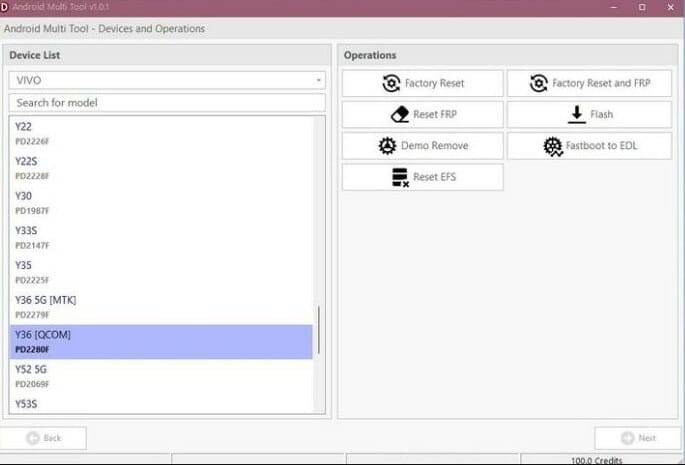
Deep Factory Resets & Frp Bypass: Sometimes A Phone Gets Completely Locked Out Or You Just Need To Wipe It Clean For A Customer. This Tool Makes Factory Resetting A Breeze. More Importantly If The Device Gets Stuck On The Factory Reset Protection (frp) Screen Asking For An Old Google Account Amt Easily Bypasses That Security Layer So You Can Actually Set Up The Phone Again.
Firmware Flashing: Got A Phone Stuck On The Boot Logo Or Running An Incredibly Buggy Os? You Can Flash The Newest Manufacturer Firmware Directly Through The Software. It’s A Straightforward Way To Upgrade The System Or Revive A Corrupted Device.
Removing Demo Mode: We’ve All Seen Those Restricted “demo” Phones Locked To Store Display Settings. If A Device Accidentally Triggers That Mode This Tool Wipes Away Those Annoying Restrictions In Just A Few Clicks Giving You Full Normal Access To The Phone.
Fastboot To Edl (Emergency Download Mode): When An Android Is Hard-bricked Completely Unresponsive Or Stuck In A Bootloop Edl Mode Is Usually Your Last Hope For Recovery. Instead Of Taking The Back Cover Off To Short Test Points Amt Tools Pushes The Device Straight From Fastboot Into Edl Mode So You Can Fix It Immediately.
Resetting The Efs: Your Phone’s Encrypting File System (efs) Holds Highly Sensitive Network Data Including Your Imei Numbers. If This Partition Gets Corrupted Your Phone Will Lose Its Network Signal Entirely. The Tool Gives You A Safe Option To Reset The Efs Restoring The Phone’s Cellular Stability And Network Security.
Android Multi-Tool Credits Recognition of Contributors
Android Multi Tool Was Only Possible With The Dedicated Efforts Of Contributors And Developers. The Tool Acknowledges These Credits:
- Vivo Auth Vivo PIN/Pattern/FRP/Demo/EFS/EDL/Flash
- Free Auth Techno/Infinix/iTel/Realme/SPD
- They Have Brought This Tool To Market And Made It Accessible To Android Users.
It Works With Vivo | Xiaomi | Tecno | Infinix | Itel | Realme | Karbonn | Samsung | Oppo Etc Phones.
Supported Devices And Authorization Server Status
The Amt Tool Supports A Wide Range Of Devices And Ensures Proper Authorization Via Its Servers. Below Are Some Key Authorizations:
- Infinix / Tecno / Itel Mediatek Auth
- Infinix / Tecno / Itel Spreadtrum Auth
- Oppo / Oneplus / Realme Secracy Decrypt
- Oppo / Oneplus / Realme Demo Remove
- Oppo / Oneplus Mediatek Auth
- Realme Mediatek Auth
- Nokia Fastboot Hmd Auth
- Vivo Qualcomm / Mediatek Auth
- Xiaomi Edl / Brom Auth
- Xiaomi Fastboot To Edl Auth
- Xiaomi Mi Assistant Frp Auth
- Transsion Anti Crack Fix Auth
This Ensures Secure Verified Operations Across Popular Smartphone Brands. The Tool Is Regularly Updated To Include New Devices And Chipset Support.
Download android multi tool
Device Compatibility Highlights
- Infinix Tecno Itel: Full Mediatek & Spreadtrum Support
- Xiaomi: Edl Brom And Fastboot To Edl Modes
- Oppo Realme Oneplus: Frp Demo Remove Secracy Decrypt
- Vivo & Nokia: Qualcomm And Mediatek Supported
By Covering A Wide Spectrum Of Devices And Chipsets The Amt Tool Is Truly An All-in-one Mobile Repairing Solution.
How To Use
- You Will Need To First Download The Zip From The Below Link.
- Then, Unzip All The Files In The C Drive.
- Then, Install The Setup With The Basic Instructions.
- Run The Tool As Admin “Android Multi Tool.exe“
- If You Already Have Drivers Installed, Skip This Step.
- Enjoy ! !!
Conclusion
If You Are Running A Mobile Repair Business Or Just Fixing Phones Frequently The Android Multi Tool Is An Absolute Game-changer. Dealing With Locked Bootloaders Frp Screens And Brand-specific Security Authorizations Usually Takes Hours Of Frustrating Research. This Tool Puts All Those Solutions Into One Single Easy-to-use Dashboard. It Saves You Time Drastically Reduces The Risk Of Bricking A Device And Keeps Your Workflow Moving Smoothly. If You Haven’t Added It To Your Repair Arsenal Yet You Are Definitely Missing Out.
How To Download
To Download Follow These Steps:
- Go To The A2zflashfile.com Website Of Amt Tool.
- Find The Download Page And Don’t Click Button And Click Only The (Download Link).
- Wait For The Download To Complete.
- Locate The Downloaded File On Your Device Once The Download
Android Multi Tool v1.3.5.8
👉 [Click Here to Rent This Tool on WhatsApp]
Download Link:: Usersdrive – Mediafire – 4shared – My.pcloud – Playbook – Google Drive – DropBox – Mega – Vexfile – Drive.proton